


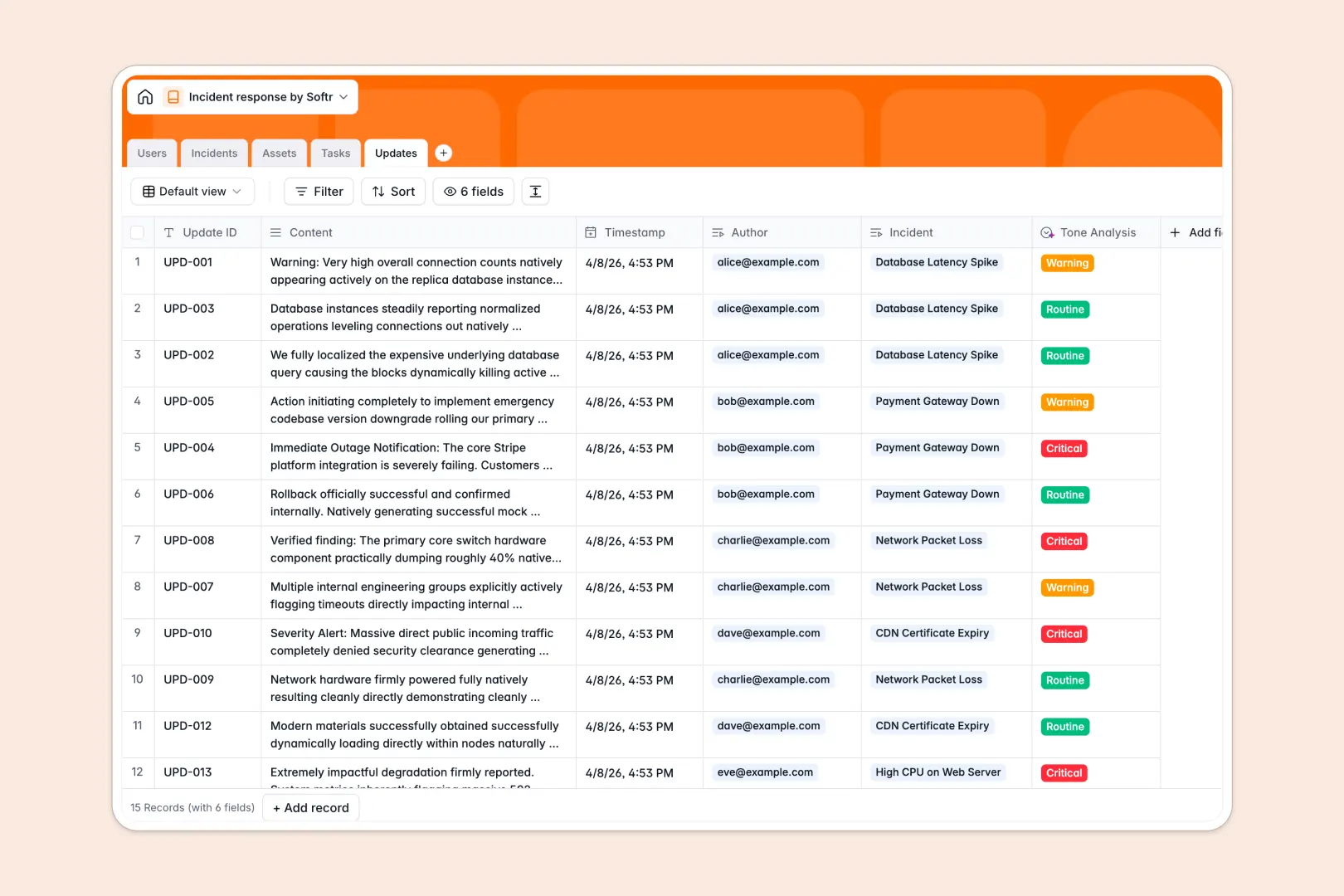
Your Incident Response database at a glance
Coordinate emergency responses, track active outages, and keep stakeholders informed from one central system. This template organizes responders, severity levels, and remediation tasks so your team can resolve downtime quickly.
Key tables link your Incidents directly to affected Assets, assigned Tasks, and chronological Updates. Responders log status changes in real time while lookups and rollups automatically calculate active incident counts across your infrastructure.
Native AI fields summarize entire update logs to generate instant post-mortem drafts and evaluate the urgency of incoming status notes automatically.
When a critical outage outgrows a shared Google Sheet
Google Sheets makes it easy to drop notes into rows during a triage call, but it was never designed to run critical operational incident response.
When multiple responders edit a sheet at the same time, formulas break, columns get overwritten, and there is no way to restrict sensitive infrastructure notes from the wider team.
What a structured database changes
A structured database enforces strict data integrity during high-pressure outages. Typed columns ensure timestamps stay accurate, severity levels remain consistent, and linked records connect tasks directly to specific incidents without fragile lookups.
Every team member works from the same live source of truth while permissions control who can edit incident statuses or view post-mortem drafts. This is exactly what Softr Databases are designed for.
While you can connect an existing Google Sheet as an external data source, moving your response workflow to a dedicated database prevents the broken calculations and accidental edits that derail triage calls.
What you can do with this template
Track every incident from detection through post-mortem by linking responder roles to remediation tasks and affected assets. Rollup fields instantly display active outage counts per system so leadership knows the exact blast radius.
Built-in Database AI agents analyze the tone of timeline updates and automatically compile structured post-mortem summaries once an incident is resolved.
-
Users
Manage responders, commanders, and reporters with roles and incident assignments
-
Incidents
Track critical issues and auto-generate AI post-mortem summary drafts
-
Assets
Monitor system components, operational health, and active outage counts
-
Tasks
Organize remediation steps, assignees, and progress for incident resolution
-
Updates
Log real-time event updates with automated AI tone and urgency detection
Who is this Incident Response database for
This system is designed for operational and technical teams that need clear coordination during high-stakes downtime.
- DevOps and Site Reliability Engineers: Track system outages, link affected servers, and assign remediation tasks immediately.
- IT Support Leads: Log service disruptions, coordinate responders, and publish consistent status updates.
- Security Operations Teams: Manage security breaches with strict severity tracking and automated post-mortem documentation.
- Product Operations Managers: Maintain transparent communication with cross-functional stakeholders throughout incident lifecycles.
How to take it further
1. Customize the database
Tailor the database to your technical stack by adding custom asset categories, modifying severity levels, or adding notification webhook fields. You can adjust dropdown options and table relationships visually in seconds.
2. Import your existing data
Bring in historical outage logs and asset inventories using a simple CSV import. You can also sync server inventories and alert feeds via API to populate new incident records automatically.
3. Build a full app around it
Turn this database into an interactive command center whenever your team is ready. Use the AI app generator to describe your ideal response portal in one prompt and generate user interfaces, forms, and workflows automatically.
Set granular users and permissions so incident commanders have full resolution controls, responders manage assigned tasks, and company stakeholders see a read-only live status dashboard.
-
1
-
2
-
3
-
4
Frequently asked questions
-
What is an incident response database?
-
Why use a no-code database to build an incident response tool?
-
How can AI help managing data for incident response?
-
Can I build an app with an incident response database?
-
Is this Incident Response database free?
-
How is this database different from an incident response Google Sheet?
Start building today. It's free!
Build and launch your first app in under 30 minutes.