


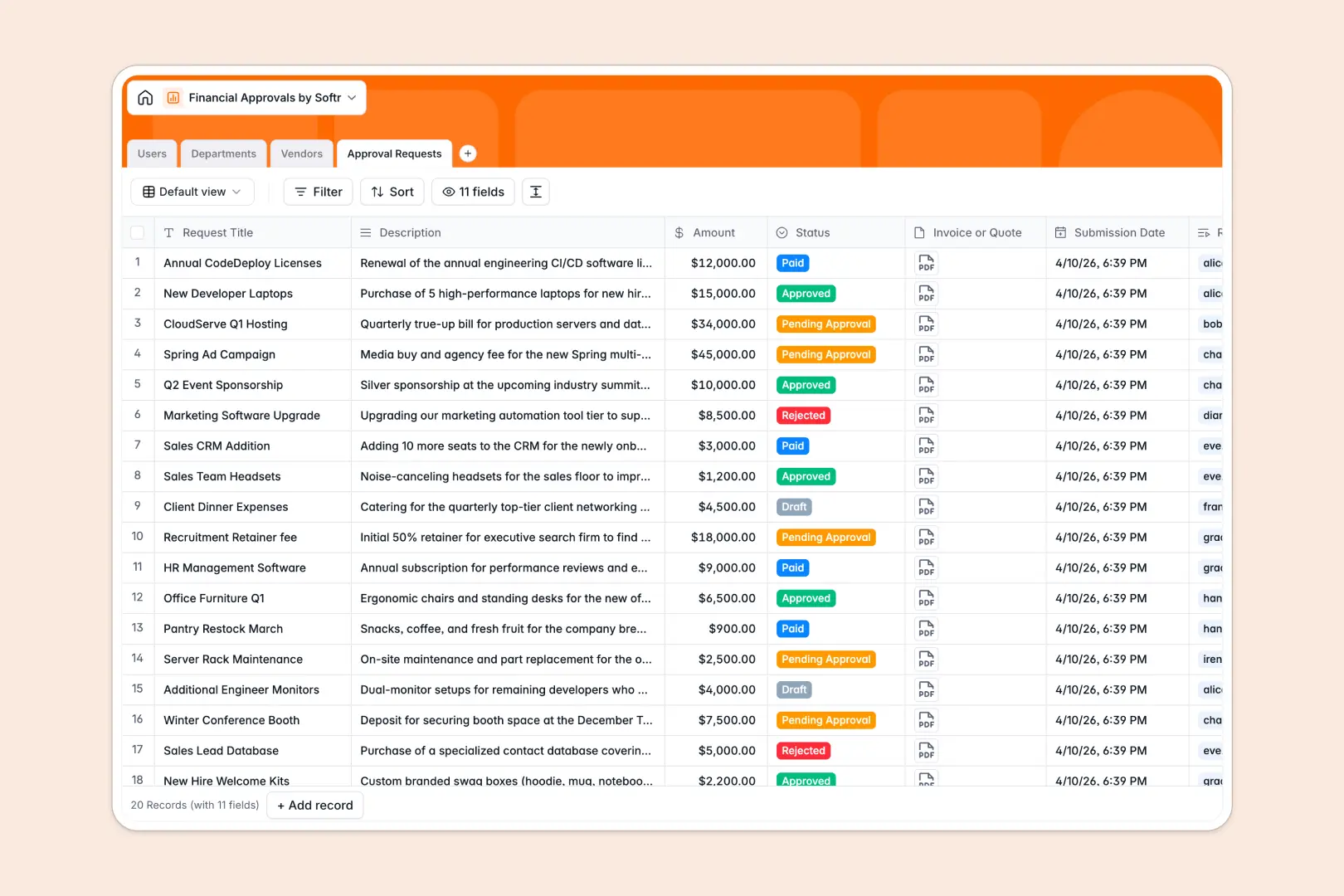
Your Financial Approvals database at a glance
This template gives your team a dedicated system to log purchase requests, route them to designated approvers, and monitor departmental budget limits in real time. It eliminates back-and-forth emails and keeps financial records audit-ready.
The database connects Users, Departments, Vendors, and Approval Requests. Each request links directly to the submitting requester, the assigned approver, and the relevant vendor quote, while department tables automatically calculate total approved spend against strict caps.
Built-in AI fields draft concise executive summaries for faster sign-offs and automatically research vendor websites to summarize their services without manual data entry.
When every manager can see every department's budget and quote
Google Sheets makes sharing simple, but financial authorizations require strict boundaries. In a shared sheet, any editor can accidentally overwrite formula sums, see sensitive invoices across all departments, or enter malformed numbers into date cells.
What a structured database changes
A database enforces data integrity out of the box. Currency fields stay numeric, file attachments like invoices stay attached to the right line items, and relational rollups calculate department totals without fragile VLOOKUP formulas that break after a sort.
Most importantly, you can separate access so team members only review what belongs to their purview. This is exactly what Softr Databases are designed for, giving you clean data structures that scale securely. You can also connect an existing Google Sheet as a data source whenever needed.
What you can do with this template
Every purchase request moves seamlessly through custom statuses from draft to approved and paid. Department heads can instantly compare current spending against fixed limits before granting authorization.
With native Database AI agents, the database auto-summarizes request justifications into two bullet points for busy executives and enriches vendor records with live web research on creation.
-
Users
Manage requesters and approvers with roles and department assignments
-
Departments
Track organizational teams, budget limits, and total approved spend
-
Vendors
Maintain supplier profiles enriched with AI web-generated descriptions
-
Approval Requests
Process financial spend approvals with AI-powered executive summaries
Who is this Financial Approvals database for
- Finance teams: Centralize purchase authorizations, verify quotes, and monitor departmental budget caps automatically.
- Department managers: Review team requests with quick AI summaries and approve spend without chasing email threads.
- Operations leads: Track active vendor contracts, review category spending, and ensure compliance across purchases.
- Team members: Submit expenditure requests, attach invoices, and check real-time approval status in one place.
How to take it further
Customize this database by adapting the approval statuses, adding custom expense categories, or adjusting department budget thresholds directly within the visual interface.
Import your historical financial records or vendor rosters instantly using CSV import, or set up API syncs to connect with your accounting software.
When your team is ready, generate an app with AI on top of this database. You can establish granular users and permissions so requesters submit forms, managers approve their department's tickets, and finance executives retain full oversight without sharing raw spreadsheet access.
-
1
-
2
-
3
-
4
Frequently asked questions
-
What is a financial approvals database?
-
Why use a no-code database to build a financial approvals tool?
-
How can AI help managing data for financial approvals?
-
Can I build an app with financial approvals database?
-
Is this Financial Approvals template free?
-
How is a financial approvals database different from Google Sheets?
Start building today. It's free!
Build and launch your first app in under 30 minutes.