


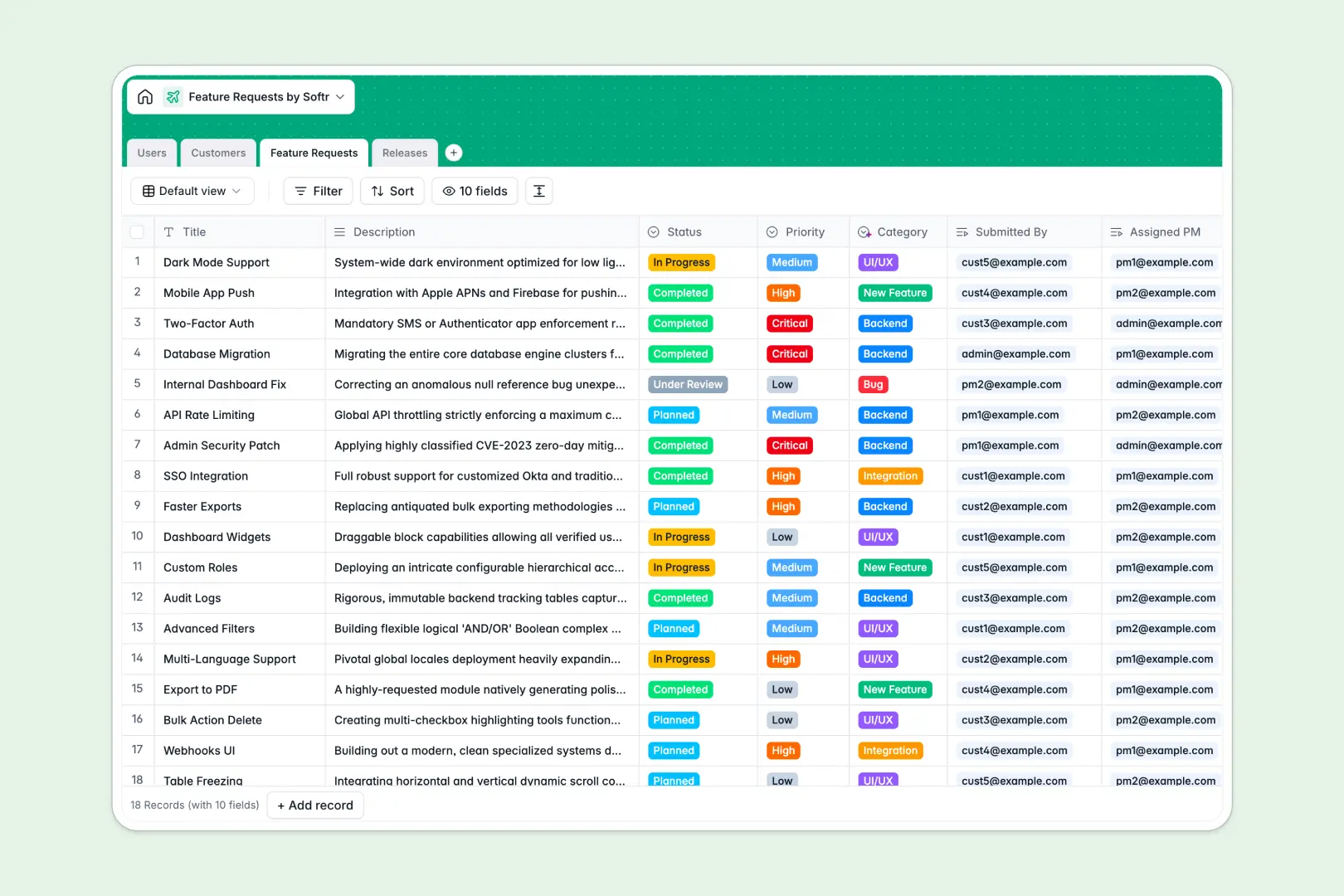
Your Feature Requests database at a glance
This template centralizes incoming product feedback, bug reports, and user ideas so your team can prioritize roadmap decisions with total clarity.
It connects Feature Requests directly to Customers, internal Users, and planned Releases, ensuring you always know who asked for what and when it ships.
Built-in AI automatically tags request categories, drafts customer-facing release notes, and researches company profiles directly from website URLs.
When product roadmaps break across shared spreadsheet tabs
Google Sheets makes sharing easy, but using it as a product backend leads to messy feedback tracking where anyone can accidentally edit roadmap data or overwrite formulas.
What a structured database changes
In a real database, every column enforces data integrity: dates remain valid timestamps, select tags stay consistent, and text fields never break underlying calculations.
Instead of fragile lookup formulas that fail when someone inserts a row, linked records connect each request to its requesting accounts and assigned product managers automatically.
This is exactly what Softr Databases are designed for, giving you a structured foundation that easily scales. (Softr can also connect to an existing Google Sheet if you need to pull data from one).
What you can do with this template
Group customer requests into unified release batches and instantly tally total feedback volume per organization without manual counting.
Leverage Database AI agents to automatically categorize incoming request descriptions and summarize complex feature sets into clear release notes.
Start using the system immediately to give your product managers, developers, and customer-facing teams one dependable source of truth.
-
Users
Manage team members and customer contacts with roles and ownerships
-
Customers
Track client companies using AI-generated descriptions from websites
-
Feature Requests
Log product ideas and bugs with AI-powered automatic categorization
-
Releases
Plan product launches and generate release notes automatically with AI
Who is this Feature Requests database for
Designed for teams that need to turn raw customer feedback into actionable roadmap milestones.
- Product Managers: Prioritize development backlogs and link high-impact ideas directly to targeted version releases.
- Customer Success Teams: Log client enhancement requests and quickly monitor delivery status for key accounts.
- Engineering Leads: Track bug reports and technical backend requirements grouped cleanly by release cycles.
- SaaS Founders: Maintain a single source of truth for user feedback without juggling fragmented feedback forms.
How to take it further
Tailor the database schema to your exact release lifecycle. Add custom tags for development effort, rename status fields like In Progress or Planned, and create custom priority metrics in a few clicks.
Import your historical feedback and customer rosters in seconds using CSV bulk uploads or sync continuous submissions via API.
When your team is ready, generate an app with AI on top of this database. You can launch an internal roadmap dashboard for engineers or an external submission portal where clients submit ideas securely.
Using granular users and permissions, ensure clients only see their own submissions while product managers manage the full backlog.
-
1
-
2
-
3
-
4
Frequently asked questions
-
What is a feature requests database?
-
Why use a no-code database to build a feature requests tool?
-
How can AI help managing data for feature requests?
-
Can I build an app with feature requests database?
-
Is this Feature Requests template free?
-
How is a feature requests database different from Google Sheets?
Start building today. It's free!
Build and launch your first app in under 30 minutes.