


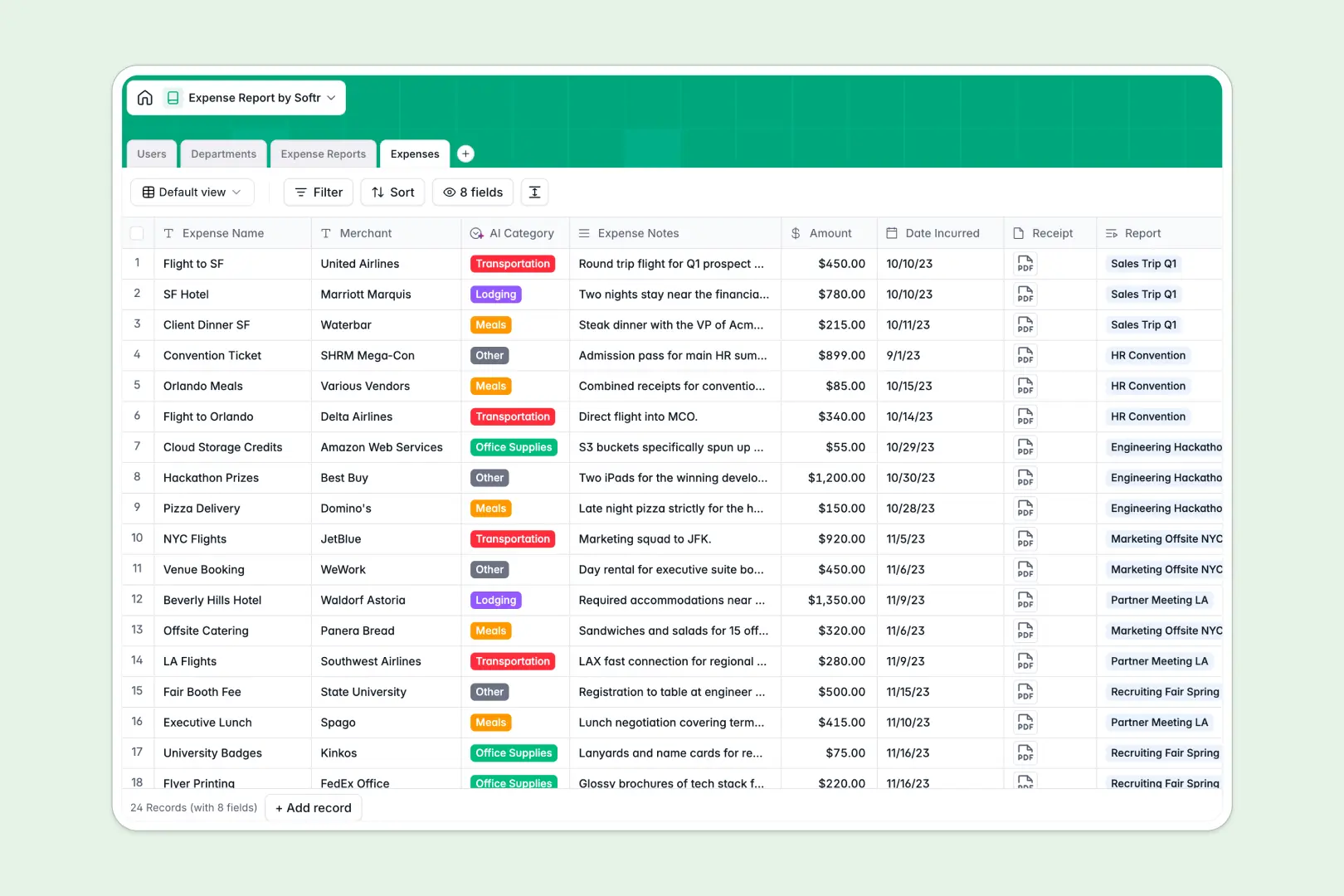
Your Expense Report database at a glance
This template gives your team a clear, organized way to submit, review, and approve employee business spending without manual data entry.
It connects four dedicated tables: Users, Departments, Expense Reports, and individual Expenses. Line-item purchases link directly to overall reports, while rollup fields automatically calculate total reimbursement amounts.
Built-in AI automatically classifies line items into categories like Travel or Meals from expense notes, while an AI summary checks submitted reports for compliance.
When expense receipts break your shared Google Sheet
Google Sheets makes sharing simple, but it was never designed to serve as a reliable expense approval backend. Anyone with access can accidentally overwrite formulas, view sensitive compensation or budget data, and attach unstructured receipt links that break when shared.
What a structured database changes
In a structured database, every column enforces its data type. Dates remain dates, currency fields calculate reliably, and image receipts attach securely to individual records.
Instead of fragile cross-sheet lookups, each expense links natively to its parent report, submitter, and department budget. This prevents calculation errors when rows are sorted or added.
This is exactly what Softr Databases are designed for. (While you can also connect a Google Sheet to Softr, using a dedicated database keeps your financial tracking clean and scalable.)
What you can do with this template
Employees can submit line-item expenses with attached receipts, while managers review bundled reports with accurate rollups.
With native Database AI agents, the database auto-categorizes expenses from merchant notes and generates audit summaries for approvers automatically.
Statuses transition smoothly from Draft to Submitted, Returned, or Approved without messy email chains.
-
Users
Manage employee profiles, assigned approval workflows and department links
-
Departments
Organize teams, assign annual spend budgets, and track related personnel
-
Expense Reports
Track batches with status flows and AI-generated compliance audit summaries
-
Expenses
Log purchase amounts, attach receipts, and categorize costs using AI
Who is this Expense Report database for
This database is built for teams looking to simplify spend tracking and approvals:
- Finance Teams: Maintain clean reimbursement logs, track departmental budgets, and eliminate calculation errors.
- Department Managers: Review line items, read automated audit summaries, and approve reports quickly.
- Employees: Submit expense items with clear receipts and monitor reimbursement status in real time.
- Operations Leads: Standardize expense submission workflows across expanding company departments.
How to take it further
Customize the database: Add custom expense categories, modify select fields for tax codes, or add departmental approval limits in seconds directly in the database interface.
Import your existing data: Bring in historical reimbursement logs via CSV or sync live records using the API to centralize past spending.
Build a full app around it: When you are ready, use the AI app generator to turn this database into a full internal expense portal in one prompt. You can configure users and permissions so employees only view their own submissions while finance leads see company-wide reports.
-
1
-
2
-
3
-
4
Frequently asked questions
-
What is an expense report database?
-
Why use a no-code database to build an expense report system?
-
How can AI help managing data for expense reports?
-
Can I build an app with an expense report database?
-
Is this Expense Report database free?
-
How is this database different from an expense report Google Sheet?
Start building today. It's free!
Build and launch your first app in under 30 minutes.