


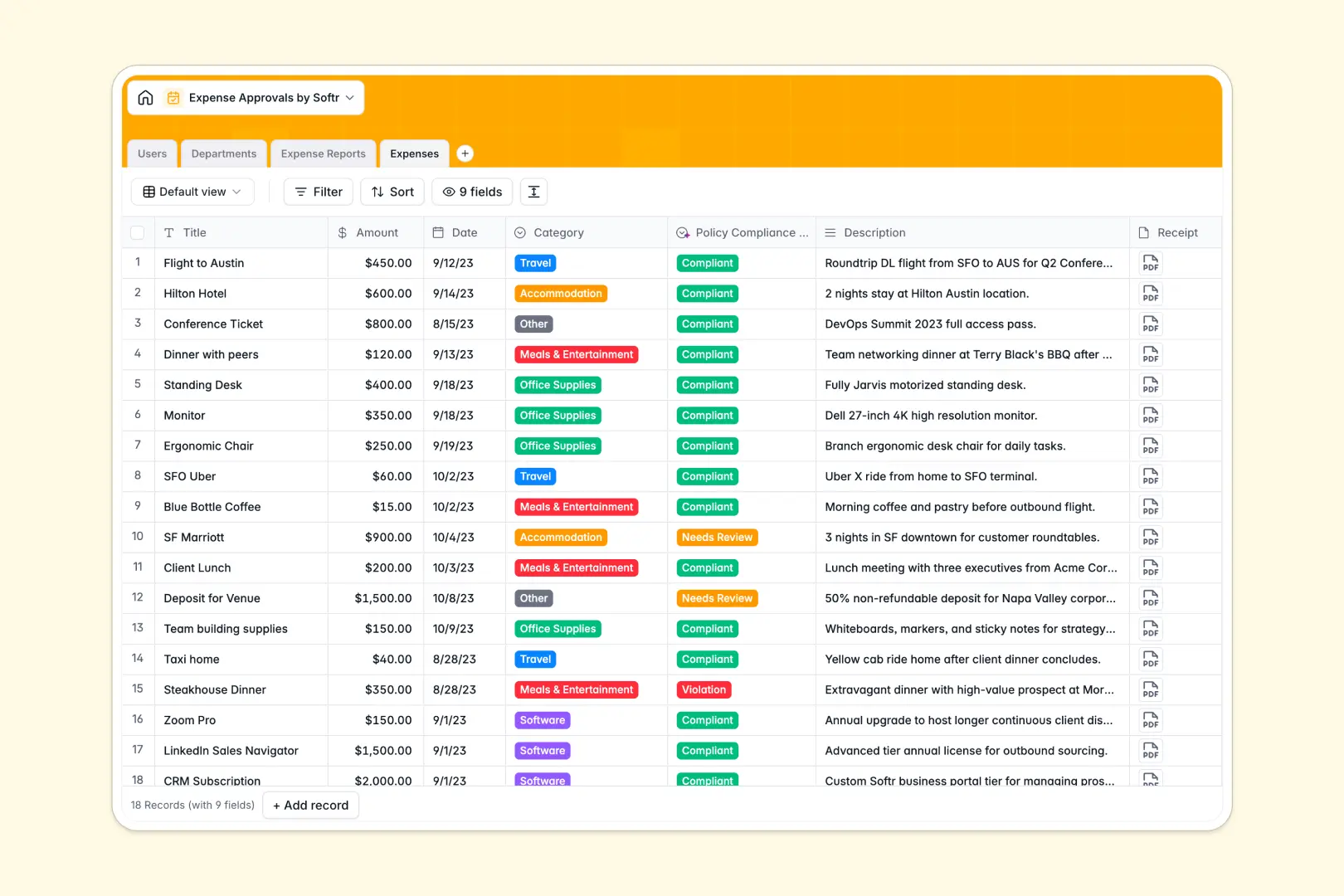
Your Expense Approvals database at a glance
This template provides a clear structure to track employee reimbursements, assign reviewers, and maintain budget oversight across your entire organization. It eliminates lost receipts and ambiguous email threads by centralizing every claim in one structured workflow.
Four dedicated tables handle Users, Departments, Expense Reports, and individual Expenses. Linked relationships automatically connect individual line items to broader expense reports and departmental budgets without fragile lookup formulas.
Built-in AI checks flag policy violations instantly on line items and generate concise executive summaries for busy managers before approval.
When a shared spreadsheet becomes an approval bottleneck
Google Sheets makes collaboration simple, but managing employee reimbursements inside a shared grid quickly exposes structural limits. Anyone with access can view sensitive salary-linked expenses, edit submitted numbers, or accidentally overwrite formulas that calculate department budgets.
What a dedicated database changes
A structured database enforces strict data integrity where dates stay dates, receipt attachments remain secure, and amounts cannot be corrupted by accidental text entries. Tables link natively, so individual expense items roll up into consolidated reports and departmental spending caps automatically.
This is exactly what Softr Databases are designed for: keeping your financial records clean, structured, and ready to scale safely. While Softr can also connect to an existing Google Sheet as an external data source, moving to a native database gives you built-in data types, rollups, and robust structure.
What you can do with this template
Employees can submit itemized claims with attached receipts, while managers get full visibility into remaining department budgets before issuing approvals. Status tracking moves claims cleanly from Draft and Pending Approval to Paid.
Built-in Database AI agents automatically evaluate individual claims against spending policy constraints and produce instant summaries across multi-item reports.
-
Users
Directory of staff members, management hierarchies, and approval rights
-
Departments
Manage organizational units, team allocations, and operational budgets
-
Expense Reports
Track approval workflows and generate executive summaries using AI insights
-
Expenses
Log itemized receipts and evaluate policy compliance with AI predictions
Who is this Expense Approvals database for
This template gives growing teams complete control over company spending and reimbursement cycles.
- Finance Teams: Maintain accurate records of approved spend against department allocations with automated rollups.
- Department Managers: Review itemized reports, read automated summaries, and approve claims without tracking down paper receipts.
- Operations Leads: Standardize reimbursement workflows and eliminate messy multi-tab spreadsheets across departments.
- Employees: Submit expense items quickly, upload receipts, and monitor approval status in real time.
How to take it further
Customize the database to match your internal finance policies. You can add new spending categories, adjust approval statuses, or add custom budget thresholds in just a few clicks within the visual builder.
Import your existing data by uploading CSV files of past expense records or team directories. You can also sync data via API to connect with your existing accounting tools.
Build a full app around it when your team is ready for a dedicated internal portal. Using an AI app generator, you can describe the expense management workflow you want and instantly generate employee submission portals and manager review dashboards on top of this database. Granular users and permissions ensure employees only see their own claims while managers access their direct reports.
-
1
-
2
-
3
-
4
Frequently asked questions
-
What is an expense approvals database?
-
Why use a no-code database to build an expense approvals system?
-
How can AI help managing data for expense approvals?
-
Can I build an app with an expense approvals database?
-
Is this Expense Approvals database free?
-
How is an expense approvals database different from Google Sheets?
Start building today. It's free!
Build and launch your first app in under 30 minutes.