


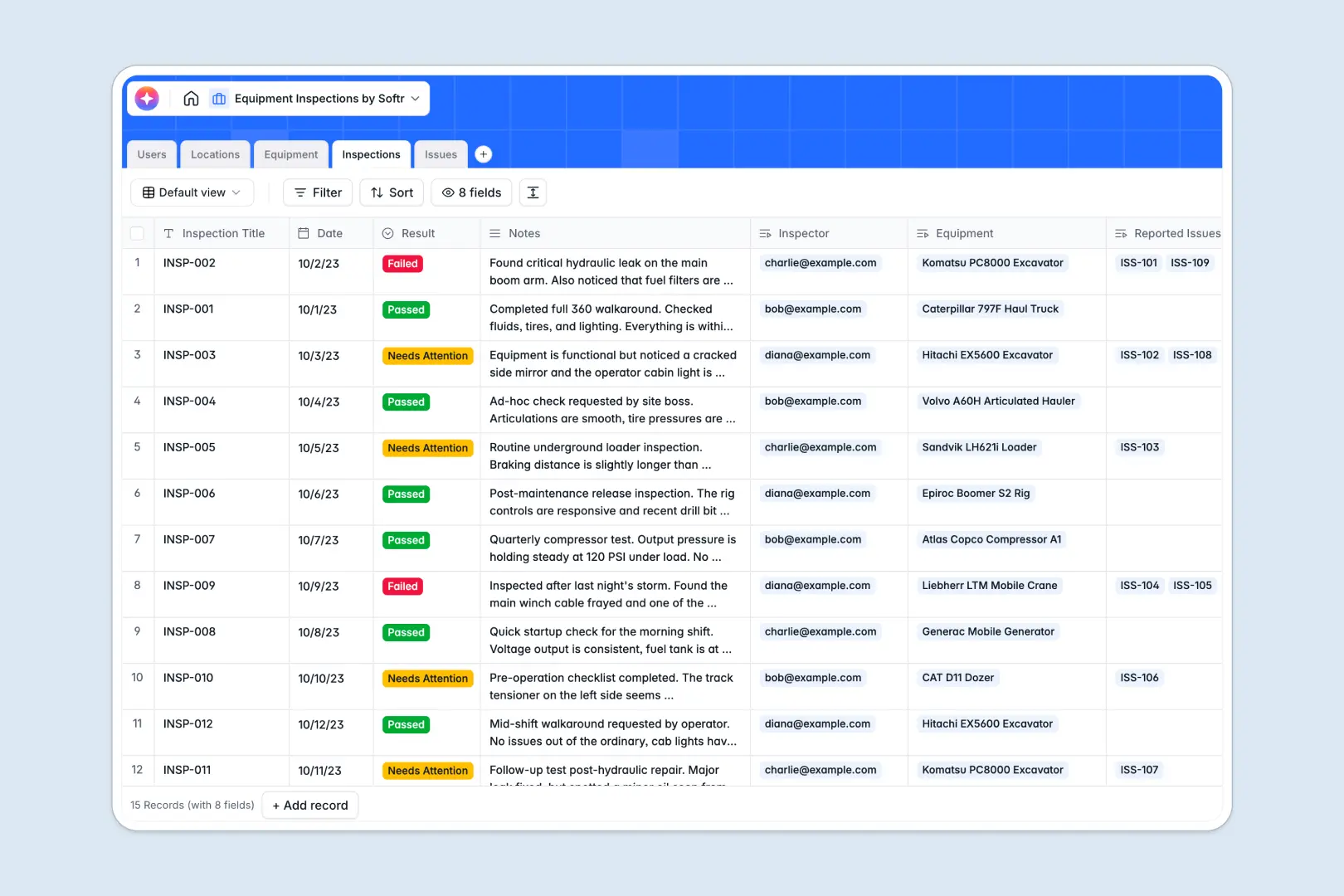
Your Equipment Inspections database at a glance
Track the status, location, and health of every asset across your organization. This template gives you a unified view of your field operations to ensure total compliance.
It organizes your data into clear tables for Equipment, Locations, Inspections, and Issues. When an inspector creates a log, the related equipment record updates instantly without manual data entry.
It also includes integrated AI to automatically summarize inspection notes, research asset specifications, and assign risk severity levels to new issues.
Why equipment inspections get messy in Google Sheets
Managing physical assets across multiple locations quickly outgrows a spreadsheet. Teams end up with lost photo proof, scattered inspection histories, and accidental overwrites.
What a structured database changes
Relational structure replaces fragile formulas. You can link an inspection directly to the equipment and the specific inspector without copying data across rows.
Attachments like photo proof of damages stay flawlessly organized in dedicated fields instead of floating loosely above cells. This is exactly what Softr Databases are designed for.
What you can do with this template
Add new assets, connect them to facilities, and track deep histories of maintenance logs effortlessly. You can see the last inspection date for any machine in seconds.
Built-in AI fields do the heavy lifting for your field teams. They automatically summarize long inspection notes and intelligently flag the severity of reported damages.
-
Users
Manage personnel profiles including contact info, roles, and inspection history
-
Locations
Track facility sites and monitor total equipment distribution across areas
-
Equipment
Monitor asset status and use AI to research technical specifications automatically
-
Inspections
Log safety checks and generate automated AI summaries of the reported findings
-
Issues
Document defects with photo proof and use AI to classify risk severity levels
Who is this Equipment Inspections database for
This template is built for teams operating physical assets across multiple facilities.
- Safety Inspectors: Log compliance checks quickly and accurately with attached photographic evidence.
- Maintenance Crews: Track open issues, severity levels, and specific equipment histories in real time.
- Operations Managers: Monitor asset health across distinct locations and easily measure compliance rates.
- Facilities Administrators: Manage the user directory and control exactly who can approve system repairs.
How to take it further
Start by customizing the database to fit your exact operational needs. Add a new field to capture warranty expiration dates, or modify the status choices to match your workflow language.
Need to import existing asset logs? You can effortlessly upload a CSV file or use an API to sync historical inspection data directly into your tables.
When your team is ready, you can build a custom portal around this foundation. Create a mobile-friendly field app where inspectors only see the equipment assigned to their specific location.
With native users and permissions, you can ensure that inspectors only submit logs while admins retain full editing control. A well-structured database makes launching full-stack tools incredibly simple.
-
1
-
2
-
3
-
4
Frequently asked questions
-
What is an equipment inspections database?
-
Why use a no-code database to build an equipment inspection tool?
-
How can AI help managing data for equipment inspections?
-
Can I build an app with this equipment inspections database?
-
Is this Equipment Inspections template free?
-
How is this template different from Google Sheets or Excel?
Start building today. It's free!
Build and launch your first app in under 30 minutes.