


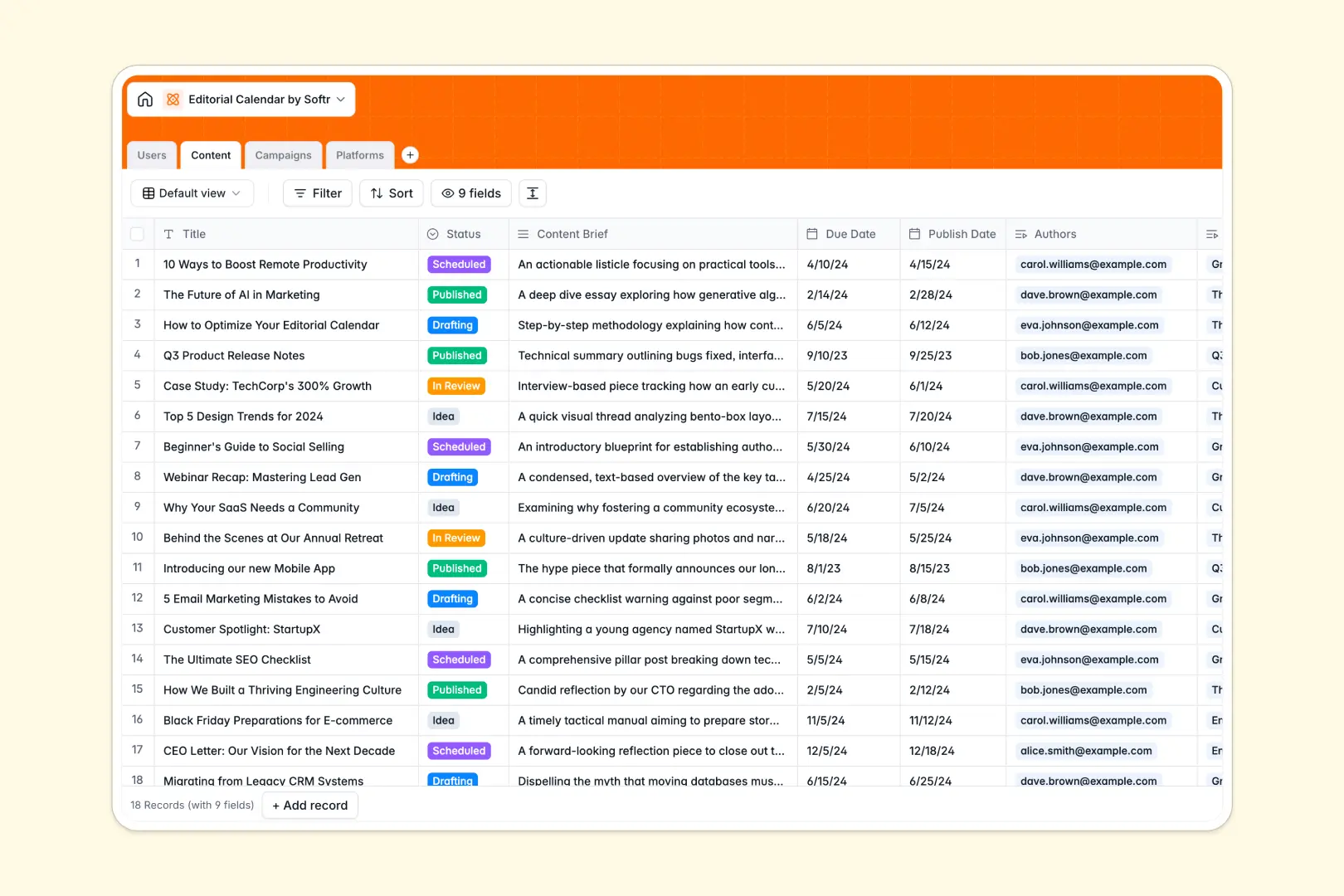
Your Editorial Calendar database at a glance
This template gives your team a structured production hub to manage articles, assign writers, and track marketing campaigns. Keep everyone aligned from initial brief to publication.
It connects four dedicated tables: Content, Users, Campaigns, and Platforms. Linking writers and campaigns directly to content pieces keeps your publishing pipeline organized without broken cell references.
Built-in AI fields automatically draft catchy SEO titles from content briefs and summarize platform details using live web research.
When a shared grid becomes an accidental publishing backend
Google Sheets is built for shared calculation, but using it to manage multi-author publishing workflows leads to mixed date formats, accidental row edits, and exposed draft notes.
What a structured database changes
A database enforces data types so publication dates stay clean, attachments like author avatars remain intact, and statuses never get mistyped.
Instead of juggling messy lookups across tabs, relational records link every article directly to its author and parent campaign. This is exactly what Softr Databases are designed for.
While you can connect an existing Google Sheet to Softr as a secondary data source, a dedicated database keeps your publishing pipeline clean and resilient.
What you can do with this template
Group content by status or campaign to instantly spot bottlenecks before launch dates slip. Every author gets clear visibility into upcoming deadlines and assigned tasks.
Native Database AI agents analyze briefs to suggest SEO titles and look up platform data automatically. Start publishing without manual data cleanup.
-
Users
Manage editorial team members, roles, contact details and assignments
-
Content
Track editorial workflows and generate SEO titles using built-in AI
-
Campaigns
Organize strategic initiatives, timelines, and aggregate content pieces
-
Platforms
Manage distribution channels with web-powered AI profile summaries
Who is this Editorial Calendar database for
This database helps content operations stay on schedule across multiple channels and contributors.
- Content Marketing Managers: Keep multi-channel campaigns organized and ensure every piece meets its publication deadline.
- Managing Editors: Assign writers, track review stages, and review briefs in a structured environment.
- Freelance Writers: View assigned drafts, due dates, and editorial briefs without seeing internal planning details.
- Social Media Teams: Coordinate cross-platform releases and align promotional copy with active campaigns.
How to take it further
Customize your workflow by adding custom fields like content format, target keywords, or internal approval tags in your Softr Database.
Import your existing article lists and contributor rosters instantly using CSV import or connect an API to sync live performance data.
Turn this database into a complete content portal with granular users and permissions so writers only view their own drafts. You can build an app with Softr's AI Co-Builder in seconds by prompting what you need, then refine the interface visually.
-
1
-
2
-
3
-
4
Frequently asked questions
-
What is an editorial calendar database?
-
Why use a no-code database to build an editorial calendar?
-
How can AI help managing data for editorial calendars?
-
Can I build an app with an editorial calendar database?
-
Is this Editorial Calendar template free?
-
How is this template different from using an editorial calendar in Google Sheets?
Start building today. It's free!
Build and launch your first app in under 30 minutes.