


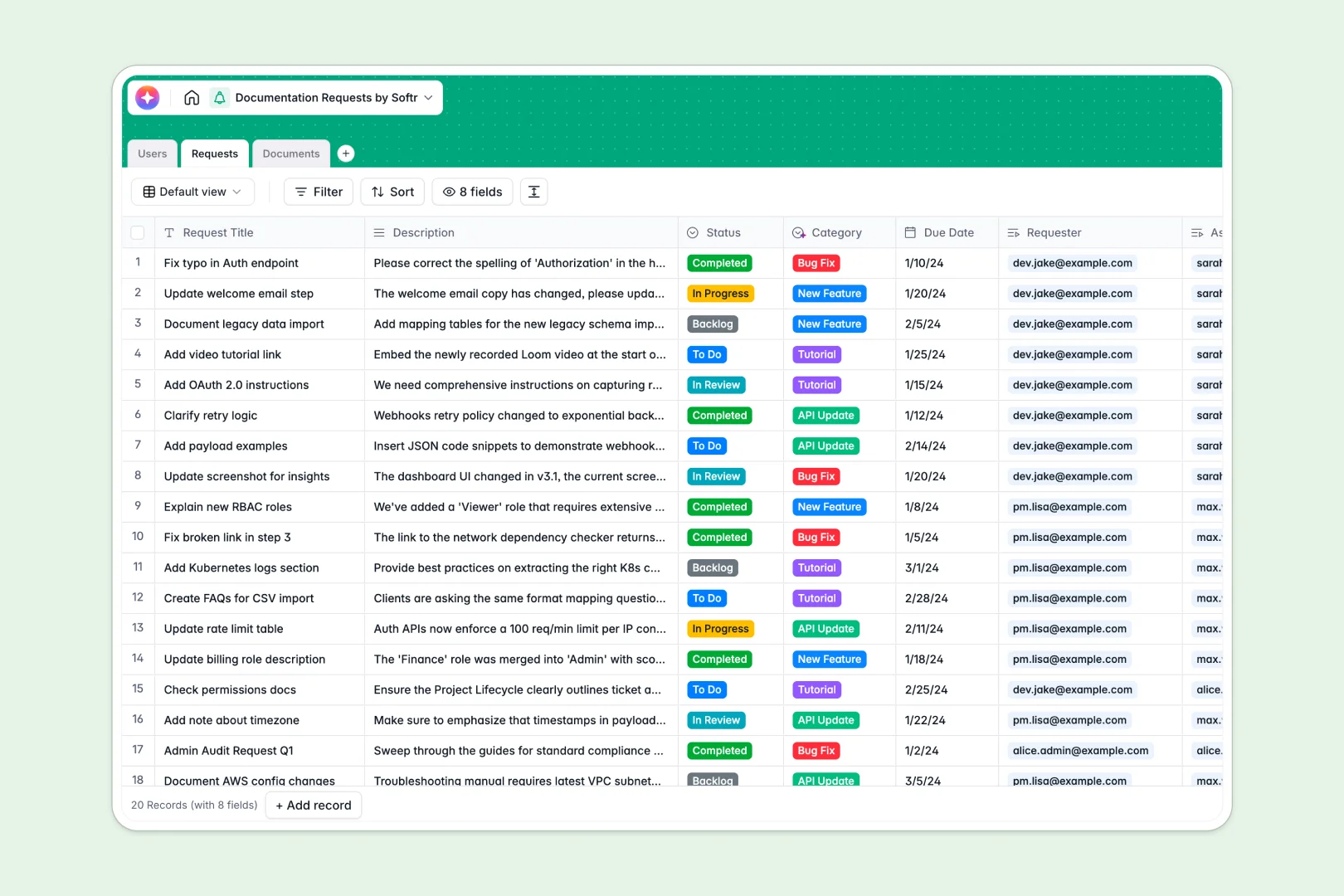
Your Documentation Requests Database at a glance
This template replaces scattered processes with a central source of truth for your technical writing team. It helps you manage incoming requests, track drafting progress, and maintain your documentation library effortlessly.
It organizes your workflow into three connected tables: Users, Requests, and Documents. This means you can natively link a specific bug fix request directly to the technical writer and the live URL it affects.
Best of all, AI works natively in your table to categorize incoming requests automatically. It even generates concise meta summaries for your published docs to save your writers time.
Why documentation requests get messy in Google Sheets
When your team relies on spreadsheets to handle documentation pipelines, things break down fast. Rows get accidentally overwritten, status updates slip through the cracks, and linking a requester to a final document requires fragile VLOOKUPs.
What a structured database changes
A true database enforces structure so your data stays clean as your team scales. Dates stay dates, statuses are locked to specific choices, and related records connect seamlessly without manual copying.
Instead of pasting URLs across rows, simply link an API update request to its specific owner using native relational fields. This is exactly what Softr Databases are designed for.
What you can do with this template
You can instantly route incoming requests to the right tech writers and track every document from backlog to published status.
With Database AI agents, your table works for you by automatically classifying requests and summarizing text natively. This gives your team a ready-to-use system that maintains itself.
-
Users
Manage technical writers and requesters with roles and linked document ownership
-
Requests
Handle tickets and updates with AI-powered categorization based on descriptions
-
Documents
Store documentation files with status tracking and AI-generated content summaries
Who is this Documentation Requests database for
This structured system is built for teams that need to keep a clear pipeline of technical updates and published content.
- Technical Writers: Track assigned tasks and update document statuses from Draft to Published effortlessly.
- Product Managers: Submit new feature documentation requests and monitor progress without constantly pinging writers.
- Support Teams: Flag bug fixes by submitting a clear request tied directly to the live document.
How to take it further
Customize the database
You can easily tailor this template to fit your exact workflow. Adjust the status options, add a priority column, or modify AI prompt instructions to match your specific content guidelines.
Import your existing data
Move away from messy spreadsheets instantly. Upload your current request backlog and user directory via CSV to populate your new database in seconds.
Build a full app around it
When your team is ready, turn this database into a complete portal using a visual interface builder. This creates a dedicated portal where external teams can submit requests securely without touching the raw data.
By setting up specific users and permissions, requesters only see their own tickets, while tech writers access the full pipeline. A well-structured database makes building this secure app incredibly simple.
-
1
-
2
-
3
-
4
Frequently asked questions
-
What is a documentation requests database?
-
Why use a no-code database to build a documentation requests system?
-
How can AI help managing data for documentation requests?
-
Can I build an app with this documentation requests database?
-
Is this Documentation Requests template free?
-
How is a documentation requests database different from Google Sheets?
Start building today. It's free!
Build and launch your first app in under 30 minutes.