


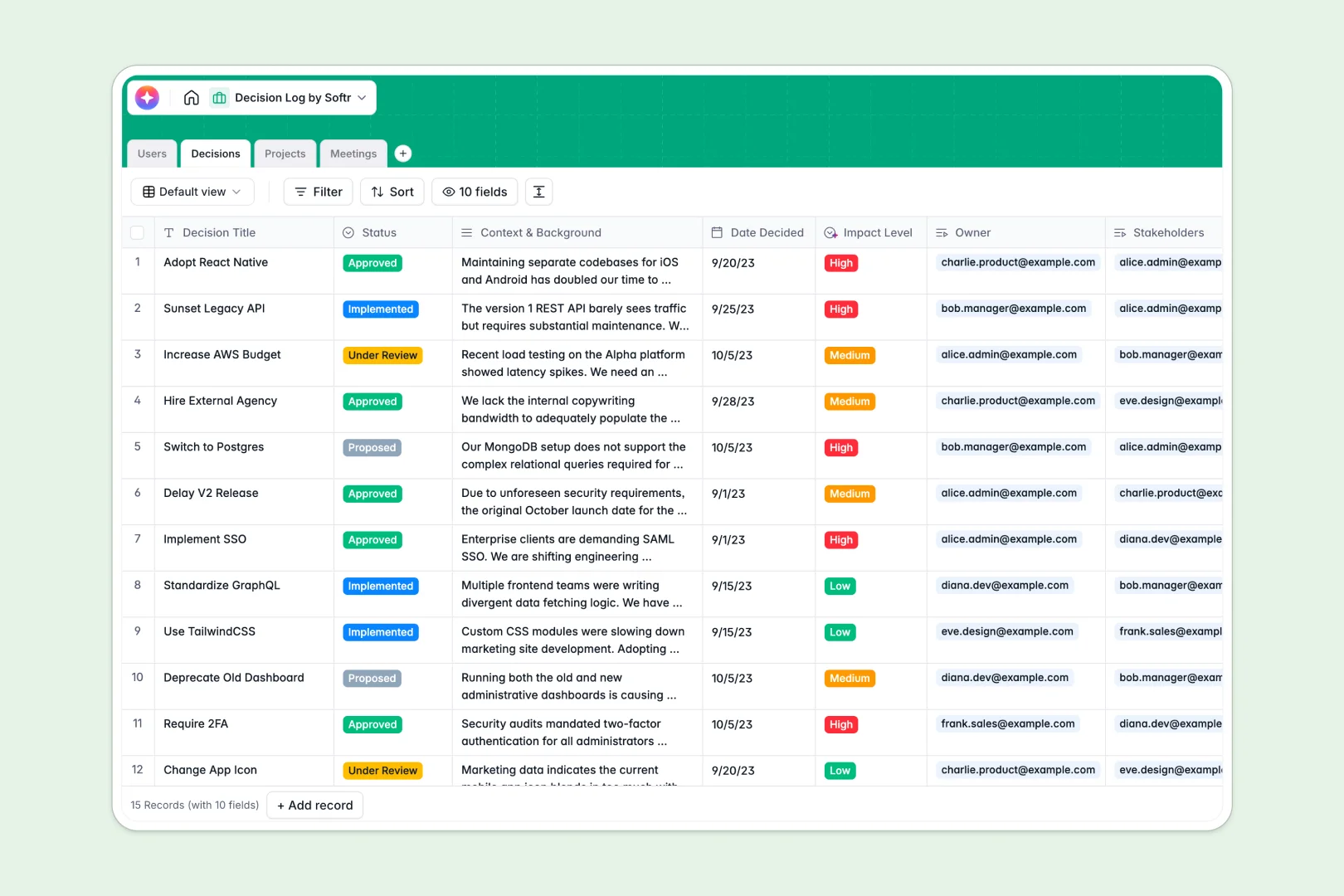
Your Decision Log database at a glance
Track every organizational choice clearly so you never lose the context behind why a move was made. This ready-to-use foundation keeps your entire team aligned without confusion.
Record choices in the Decisions table and seamlessly link them directly to their respective Projects and Meetings. You can instantly see which team members own or need to sign off on specific outcomes.
Built-in AI automatically summarizes deep context into quick bullet points and categorizes the impact level of each move. It can also instantly extract clear action items directly from your raw meeting notes.
Why logging decisions in Google Sheets breaks down
Tracking critical alignment in spreadsheets usually ends in scattered text boxes, lost context, and broken stakeholder notifications.
What a structured database changes
A dedicated system enforces clear structure where dates, statuses, and massive paragraphs of context stay perfectly organized. You can link a major decision directly to a specific project without clumsily copying and pasting cells across tabs.
This native connectivity is exactly what Softr Databases are built to deliver from day one. Your historical records stay clean, scalable, and impossible to accidentally delete as your team grows.
What you can do with this template
Log detailed background information and let built-in AI fields automatically output executive summaries and impact levels based on the context. Connect meetings directly to their resulting commitments, keeping the discussion and the outcome in one unified view.
Your entire team can clearly see who owns what without digging through chat logs. The template provides an instant, production-ready starting point that is immediately useful.
-
Users
Maintain a directory of team members with roles and project assignments
-
Decisions
Log decisions using AI to summarize context and analyze impact levels
-
Projects
Group related decisions by company initiatives and track team progress
-
Meetings
Record session notes and use AI to extract actionable next steps
Who is this Decision Log database for
This system is built for teams that need strict alignment on critical choices and historical context.
- Project Managers: Keep a clear historical record of scope changes and exactly why they happened.
- Leadership Teams: Centralize executive approvals so stakeholders never lose visibility into business shifts.
- Product Teams: Link feature pivots directly back to the specific strategy meetings that initiated them.
How to take it further
You can easily tweak the database to fit your internal workflow perfectly. Add new project status options or adjust the impact level categorizations with just a few clicks.
If you already have historical logs, bring them over quickly via CSV or API. This populates your tables immediately so you can jump right into gaining value without starting from scratch.
When you are ready to expand, you can transform this data into a secure app with custom layouts for your teams. Create dedicated dashboards where stakeholders only see the choices directly relevant to them.
By leveraging native users and permissions, you can ensure that only authorized admins can formally mark an item as approved. A well-structured backend makes building these trusted, interactive portals effortless.
-
1
-
2
-
3
-
4
Frequently asked questions
-
What is a decision log database?
-
Why use a no-code database to build a decision tracking tool?
-
How can AI help managing data for a decision log?
-
Can I build an app with this decision log database?
-
Is this Decision Log template free?
-
How is a decision log database different from Google Sheets?
Start building today. It's free!
Build and launch your first app in under 30 minutes.