


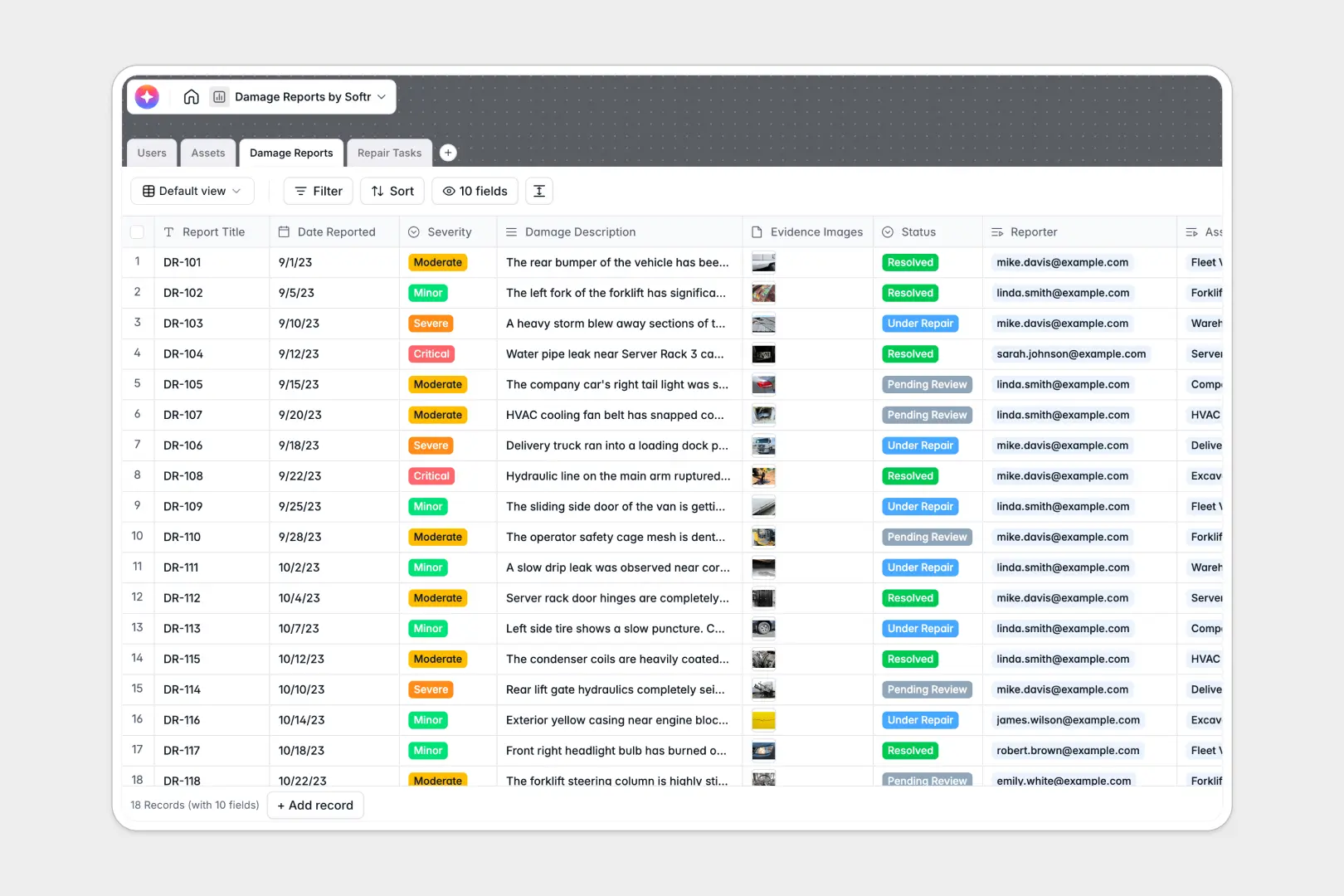
Your Damage Reports database at a glance
This ready-to-use template centralizes your incident tracking so you can resolve issues quickly.
It natively connects Assets, Damage Reports, and Repair Tasks into a single workflow. When a user logs an incident with photo evidence, it automatically links perfectly to the affected vehicle, building, or machine.
Built-in AI agents automatically generate formal executive summaries and step-by-step repair plans based on the reported damage. Your technicians get instant clarity, saving inspectors hours of manual documentation.
Why tracking damage gets messy in Google Sheets
Managing incident logs and maintenance records in a spreadsheet quickly becomes chaotic. Rows get accidentally overwritten, photo evidence floats around in detached folders, and tracking repair costs across different vehicles requires fragile lookup formulas.
What a structured database changes
In a structured database, every piece of information has a strict home. Evidence images are attached directly to the incident record, and repair task costs roll up instantly to the asset without a single formula.
You can effortlessly link an assigned technician directly to an open repair task. This is exactly what Softr Databases are designed for—giving you a clean, scaleable system that keeps your operational data perfectly unified.
What you can do with this template
Start logging damage instantly with clear severity levels and automatically tie every incident to a specific asset. Track exact repair costs directly against the original purchase value of your machinery or equipment.
You can also leverage AI to automatically draft repair methodologies as soon as new damage is logged. Your maintenance team gets a ready-made text action plan before they even step on-site.
-
Users
Manage system accounts for inspectors and technicians including task assignments
-
Assets
Track properties and equipment prone to damage with value and location history
-
Damage Reports
Log incidents and use AI to generate formal executive summaries of assessments
-
Repair Tasks
Execute work orders using AI to suggest step-by-step repair methodologies
Who is this Damage Reports database for
This template provides a reliable, scalable incident tracking system designed specifically for ops and maintenance teams.
- Facilities Managers: Track property damage, attach evidence photos, and assign repair technicians from one view.
- Fleet Supervisors: Monitor vehicle incidents across locations and keep a running history of lifecycle repair costs.
- Operations Leads: Centralize reporting so critical machinery gets fixed faster without scattered email threads.
How to take it further
Customizing this database to fit your exact operational needs is incredibly simple. Add new asset types or modify the repair statuses from categories like "Awaiting Parts" to match your team's workflow.
You can instantly import your existing asset registries and past incident logs via CSV. This bulk upload capability ensures your team can start getting value from a unified system without delays.
When your team is ready, building a full app around this data is a natural next step. Launch a mobile-friendly portal where inspectors can submit reports from their phones while surveying the field.
Thanks to customizable users and permissions, technicians will only see tasks assigned directly to them. Starting with a cleanly structured database makes launching these custom operational tools completely effortless.
-
1
-
2
-
3
-
4
Frequently asked questions
-
What is a damage reports database?
-
Why use a no-code database to track damage instead of custom software?
-
How can AI help managing data for damage reports?
-
Can I build an app with this damage reports database?
-
Is this Damage Reports template free?
-
How does managing damage in a database beat Google Sheets?
Start building today. It's free!
Build and launch your first app in under 30 minutes.