


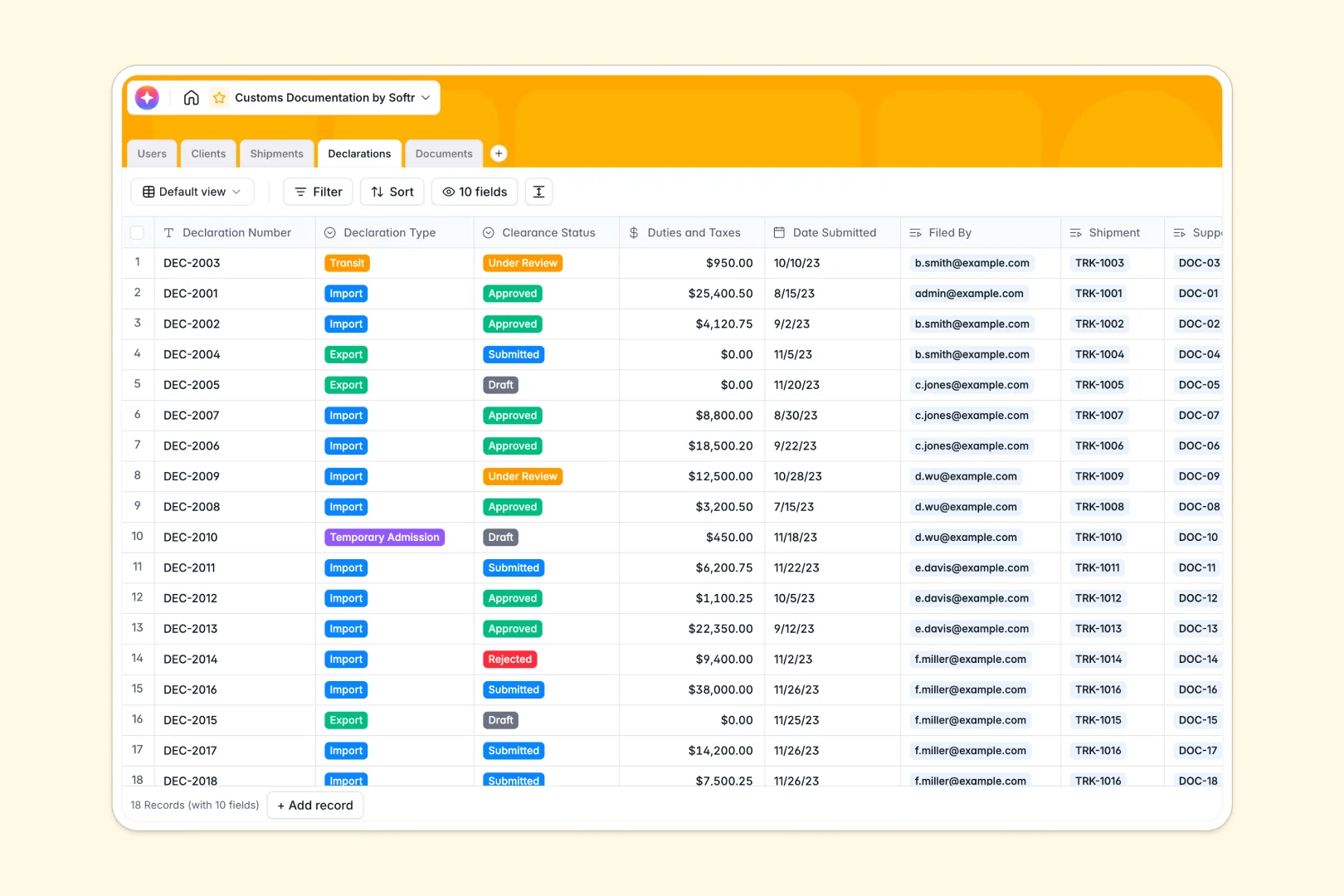
Your Customs Documentation database at a glance
Structure customs documents, shipments, and declarations seamlessly without scattered files.
Clients, shipments, declarations, and documents live in connected tables. This ensures every commercial invoice maps perfectly to its respective tracking number.
AI automatically summarizes shipment routes and researches client profiles from the web. It also evaluates clearance rejection risks in real time to prevent delays.
Why customs documentation gets messy in Google Sheets
Managing fast-moving logistics in Google Sheets quickly becomes chaotic with broken rows, mixed data, and buried tracking numbers.
What a structured database changes
Structured tables enforce strict rules so every column has a defined purpose. Attachments stay secure, dates remain properly formatted, and financial duties never break.
Instead of copying client details across multiple rows, you simply link records together natively. A single client record connects to all their active declarations without relying on fragile formulas.
This is exactly what Softr Databases are designed for. They prevent data fragmentation as your logistics operations scale.
What you can do with this template
Connect commercial invoices and packing lists directly to the specific declarations they support. Track approval statuses and locate missing documents instantly.
You can also rely on AI to automatically evaluate customs rejection risks based on clearance statuses. Everything is pre-built so you can start organizing shipments immediately.
-
Users
Manage customs brokers and staff with role-based access and shipment logs
-
Clients
Maintain client records with industry data and AI-generated company insights
-
Shipments
Log logistics details and track status with AI-generated cargo summaries
-
Declarations
File formal customs entries and evaluate rejection risks via AI analysis
-
Documents
Store shipping files with verification statuses and AI document annotation
Who is this Customs Documentation database for
This system is built for logistics operations and brokerages that need to streamline international trade compliance.
- Customs Brokers: Centralize client declarations and track real-time clearance statuses efficiently.
- Freight Forwarders: Link shipments directly to required origin and transit documentation.
- Import and Export Managers: Maintain a structured, searchable library of commercial invoices securely.
- Client Representatives: Monitor account portfolios and active shipment pipelines with complete clarity.
How to take it further
Customizing this framework is remarkably fast. You can easily add new shipment statuses, insert extra documentation types, or tweak the AI risk evaluation fields to match your local compliance rules.
Getting started is immediate with simple CSV uploads. Import your active shipments and client lists, or utilize the native API to pull in logistics data from your existing tools.
When your team is ready, you can transform this data into a secure client portal. This allows external clients to upload their own packing lists directly into your database. By applying the right users and permissions, you guarantee each client representative only sees the declarations relevant to their assigned assigned shipments.
-
1
-
2
-
3
-
4
Frequently asked questions
-
What is a customs documentation database?
-
Why use a no-code database to build a customs documentation system?
-
How can AI help manage customs documentation?
-
Can I build an app with this customs documentation database?
-
Is this Customs Documentation template free?
-
How is a customs database different from Google Sheets?
Start building today. It's free!
Build and launch your first app in under 30 minutes.