


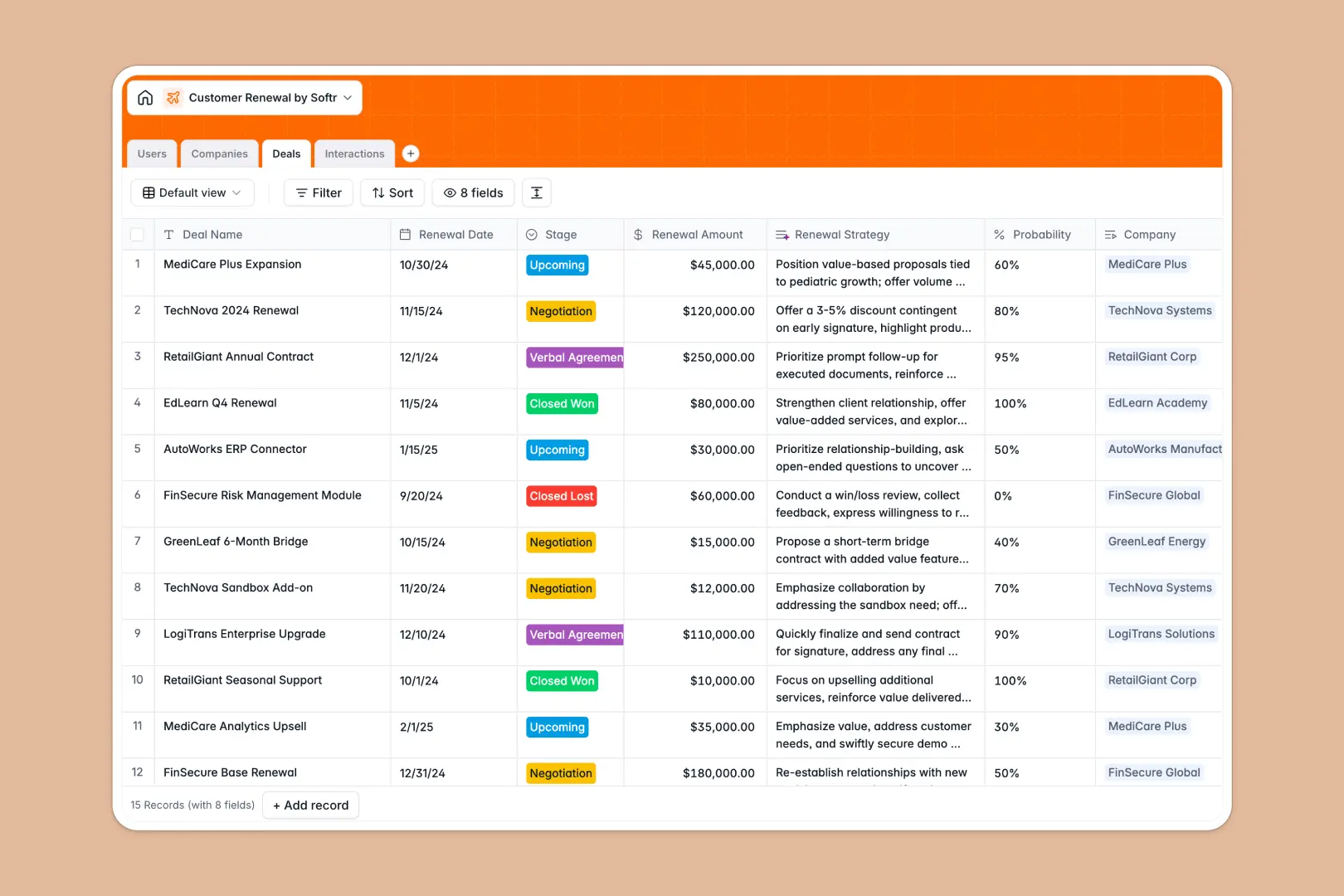
Your Customer Renewal Database at a glance
This Customer Renewal database helps you track upcoming contracts, log interactions, and monitor account health in one centralized view. It gives your account and customer success teams the clarity they need to prevent churn and close upsells.
The database is structured around interconnected tables for your customers, deals, and daily interactions. When you open a company profile, you immediately see their total contract value, past meeting notes, and upcoming renewal stages without searching across disparate files.
Built-in AI automatically researches company details online, analyzes the sentiment of your meeting notes, and extracts action items instantly. This means your customer success managers spend less time doing admin work and more time building relationships.
Why customer renewals get messy in Google Sheets
Managing renewals in a spreadsheet starts out fine, but quickly turns chaotic as your customer base grows.
What a structured database changes
In a spreadsheet, tracking a customer involves scattered rows, fragile formulas, and mixed data like dates and missing text living in the very same column. If an account manager deletes a row by accident, you lose that account's entire deal history completely.
A structured database enforces clean data so dates stay dates, health scores are standardized, and interactions natively link back to the right company. This is exactly what Softr Databases are designed for, keeping your entire pipeline perfectly organized as you scale.
What you can do with this template
You can instantly view all upcoming renewals by stage, track deal probabilities, and log every support ticket or QBR in one interconnected system. Everything updates instantly across your tables without running a single manual sync.
Thanks to native AI agents, this template can automatically suggest negotiation strategies based on deal size and immediately categorize customer sentiment after every recorded meeting. Your team gets a ready-to-use, intelligent retention system the moment you copy the template.
-
Users
Manage internal account managers and staff responsible for customer renewals
-
Companies
Track accounts with AI-powered industry research and company profile enrichment
-
Deals
Handle renewal opportunities using AI to generate targeted negotiation strategies
-
Interactions
Log customer touchpoints with AI sentiment analysis and automated action items
Who is this Customer Renewal database for
This database is built for growing revenue and support teams who need a reliable way to manage client retention.
- Customer Success Managers: Track account health scores and extract action items from meeting notes automatically.
- Account Directors: Monitor total contract value, track renewal probabilities, and forecast upcoming revenue accurately.
- Sales Leaders: Keep a complete history of customer interactions to ensure smooth handoffs to the success team.
How to take it further
You can easily customize this database to fit your exact retention playbook perfectly. Add new deal stages, adjust the health score dropdown criteria, or tweak the AI prompts to extract specific details from your client interactions.
Ready to bring your existing accounts over? Simply import your current customer lists and deal histories via CSV to populate the tables instantly.
When your team expands, you can naturally evolve this foundation into a full-stack internal dashboard. Combining your tables with an interface and setting up proper users and permissions ensures that account managers only see the specific companies they are assigned to, keeping your data secure and focused.
-
1
-
2
-
3
-
4
Frequently asked questions
-
What is a customer renewal database?
-
Why use a no-code database to build a customer renewal tool?
-
How can AI help managing data for customer renewals?
-
Can I build an app with this customer renewal database?
-
Is this Customer Renewal database free?
-
How is a customer renewal database different from Google Sheets?
Start building today. It's free!
Build and launch your first app in under 30 minutes.