


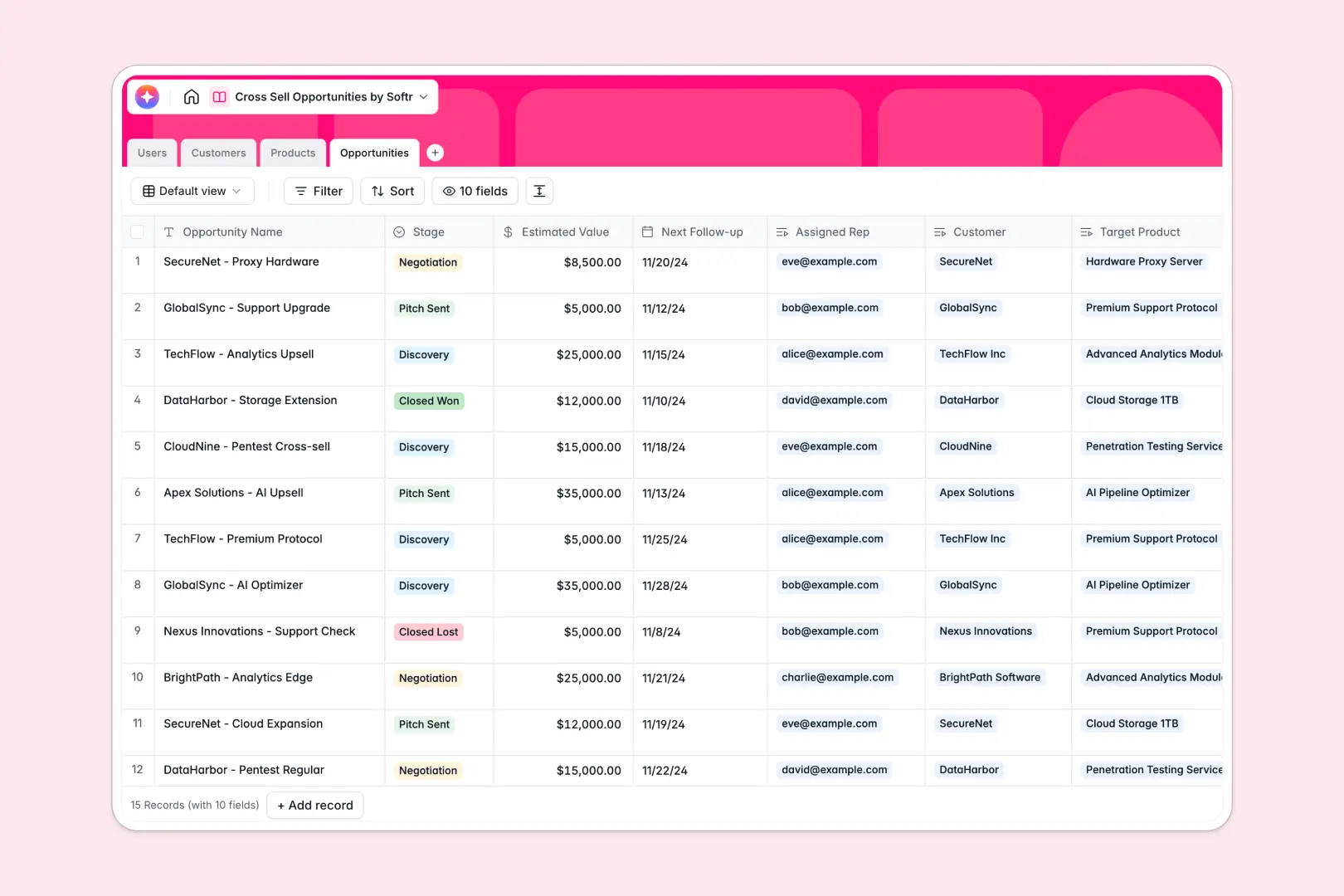
Your Cross Sell Opportunities database at a glance
This template gives your team a clear, structured pipeline to uncover and track cross-selling potentials within your existing customer base. It eliminates the guesswork by keeping every client interaction exactly where you need it.
It consists of connected tables for Users, Customers, Products, and Opportunities. Instead of hunting for information, you can see exactly which products a customer already owns and track active upgrade pitches in one single view.
Built-in AI agents automatically generate custom sales pitches based on a customer's current software stack. They even browse the live web to keep company backgrounds constantly updated.
Why cross sell opportunities get messy in Google Sheets
Managing account upgrades in a spreadsheet quickly turns into a maze of disconnected tabs. As your customer list grows, tracking who pitched what to whom becomes nearly impossible.
What a structured database changes
Spreadsheets rely on fragile VLOOKUPs to match existing clients with potential product upgrades. When a row breaks or gets accidentally deleted by a team member, your entire sales pipeline is compromised.
A structured system enforces strict column types and native relationships. You can reliably link a target product directly to an active opportunity without ever copy-pasting data across rows.
This is exactly what Softr Databases are designed for. Every account, product catalog, and active deal stays perfectly synced as your sales team scales.
What you can do with this template
You can instantly view a customer's current product stack and automatically surface relevant up-sell targets. Every stage of the negotiation is tracked cleanly, ensuring zero dropped leads.
With Database AI agents, you can instantly generate personalized pitch emails comparing the client's current tools with the new product's benefits. The system does the heavy lifting of drafting follow-ups so your reps can focus on selling.
-
Users
Manage internal sales staff and account managers with specific access roles
-
Customers
Store client profiles with automated AI company research and activity tracking
-
Products
Catalog commercial offerings with AI-generated value propositions and pricing
-
Opportunities
Track the sales pipeline using AI to generate personalized outreach pitches
Who is this Cross Sell Opportunities database for
This system is built for revenue teams looking to maximize the lifetime value of their existing accounts.
- Account Managers: See active customer product stacks and easily spot natural upgrade paths.
- Sales Representatives: Track pitch stages, follow-up dates, and estimated deal values in a clean pipeline.
- Sales Leaders: Monitor the team's total active opportunities and measure success rates globally.
How to take it further
Customize the database
You can easily rename opportunity stages or add new product categories to match your specific sales cycle. Since it's a native Softr Database, everything is instantly editable without touching any code.
Import your existing data
Quickly move off Google Sheets by uploading your current customer lists and product catalog via CSV. Your team can pick up right where they left off with zero downtime.
Build a full app around it
When you are ready to scale, you can transform this database into a complete internal tool for your revenue team. Use an interface builder to design a custom portal with lists, forms, and executive dashboards.
By setting up users and permissions, you ensure that Account Managers only see and edit the clients they personally manage. Starting with a well-structured database makes launching these custom business apps completely effortless.
-
1
-
2
-
3
-
4
Frequently asked questions
-
What is a cross sell opportunities database?
-
Why use a no-code database to track cross sell opportunities?
-
How can AI help managing data for cross sell opportunities?
-
Can I build an app with this cross sell opportunities database?
-
Is this Cross Sell Opportunities template free?
-
How is a cross sell opportunities database different from Google Sheets?
Start building today. It's free!
Build and launch your first app in under 30 minutes.