


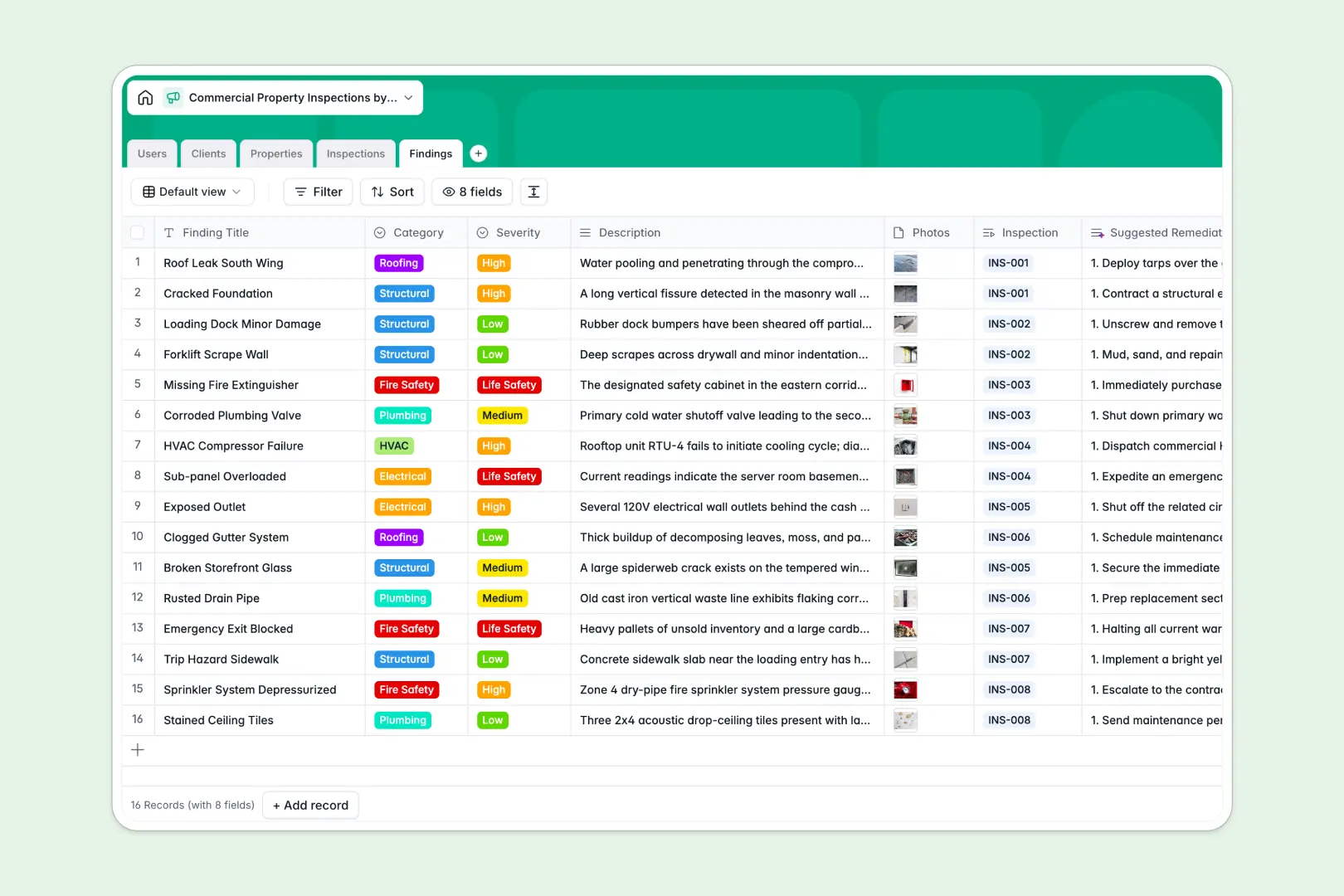
Your Commercial Property Inspections database at a glance
This template gives your team a centralized hub to track site audits, manage inspector assignments, and log structural or mechanical findings without losing details.
Five dedicated tables keep your Clients, Properties, Inspections, Findings, and Users connected, ensuring photos and severity tags roll up to the correct property report automatically.
Built-in AI fields draft executive summaries from logged findings, suggest remediation steps for hazards, and pull public building context from the live web.
When field photos and hazard logs break shared spreadsheets
Google Sheets is convenient for quick lists, but it falls apart when inspectors need to log multiple findings, high-resolution defect photos, and strict severity ratings across properties.
What a structured database changes
In a structured system, columns maintain strict integrity: dates remain valid timestamps, inspectors link directly to user profiles, and photos attach directly to records rather than bloating grid cells.
Relational tables allow one client to hold multiple properties, which in turn hold dozens of individual inspection events and findings without duplicate entry.
This reliability is exactly what Softr Databases provide out of the box, allowing teams to move beyond basic grid sharing.
What you can do with this template
Inspectors can categorize defects into clear categories like HVAC, Roofing, or Fire Safety, while rollups track total issue counts per inspection in real time.
Using native Database AI agents, the database writes cohesive executive summaries and researches historical building context automatically whenever a new inspection is scheduled.
Everything stays organized in one clean environment that is ready for daily field use from day one.
-
Users
Manage inspectors and staff with assigned inspections and roles
-
Clients
Store commercial client contacts, companies, and managed real estate
-
Properties
Track property assets and research building history using web-enabled AI
-
Inspections
Schedule site reviews and generate comprehensive AI executive summaries
-
Findings
Log property hazards and produce expert remediation steps with AI
Who is this Commercial Property Inspections database for
This database is designed for commercial real estate professionals and inspection teams requiring reliable field reporting:
- Commercial Inspection Firms: Standardize defect logging and eliminate manual report compilation across all field staff.
- Property Management Companies: Track ongoing building maintenance needs and vendor remediations across multi-property portfolios.
- Commercial Real Estate Brokers: Organize due diligence assessments and building conditions for prospective buyers quickly.
- Facility Managers: Monitor structural, electrical, and life-safety compliance across retail, warehouse, and office assets.
How to take it further
Customize your database layout in seconds by tailoring defect categories, adding custom compliance checklists, or creating new severity tiers to match your regional safety standards.
Bring in existing records instantly by uploading CSV files of your commercial properties and client contacts, or connect external tools via API to sync inspection schedules.
When your operations expand, use the AI app generator to turn this database into a full mobile field tool with granular users and permissions. Inspectors can submit findings from their phones while clients log in to view read-only inspection reports.
-
1
-
2
-
3
-
4
Frequently asked questions
-
What is a Commercial Property Inspections database?
-
Why use a no-code database to build a commercial property inspections tool?
-
How can AI help managing data for commercial property inspections?
-
Can I build an app with this Commercial Property Inspections database?
-
Is this Commercial Property Inspections template free?
-
How does this template handle property photos compared to Google Sheets?
Start building today. It's free!
Build and launch your first app in under 30 minutes.