


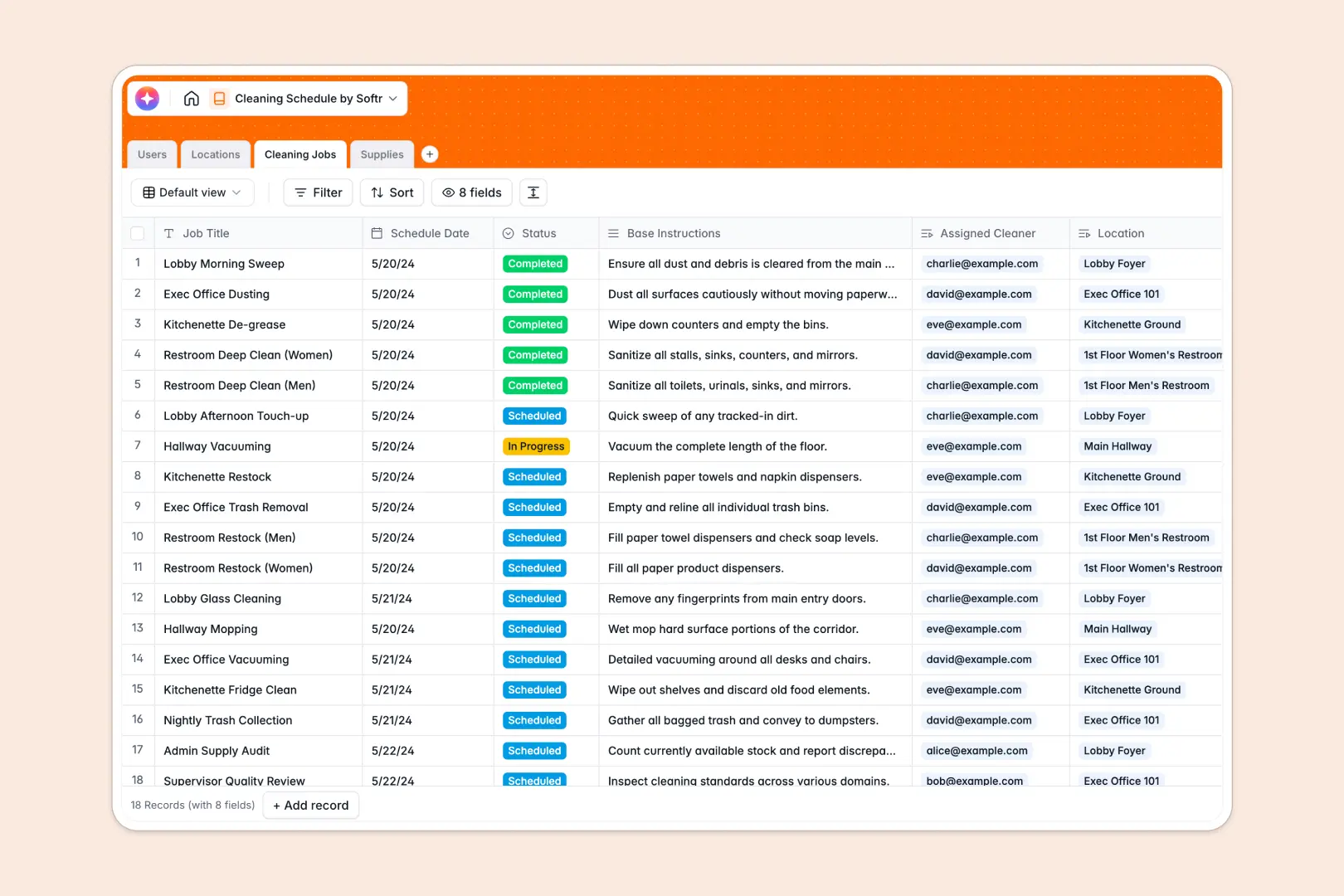
Your Cleaning Schedule Database at a glance
This template centralizes your entire cleaning operation into one reliable system. It gives you complete visibility over who is cleaning what, when the job happens, and which supplies are needed.
The database connects four main tables: Users, Locations, Cleaning Jobs, and Supplies. When you assign a cleaner to a specific location, the schedule automatically links the right personnel to the required tools and rooms.
It also features native AI to save supervisors time on daily administration. The system automatically generates step-by-step cleaning checklists and drafts restock emails when supplies run low.
Why cleaning schedules get messy in Google Sheets
Managing facilities and cleaning shifts in a spreadsheet quickly becomes a chaotic mix of color-coded cells and endless scrolling. When schedules change or supplies run out, keeping everyone aligned without breaking fragile formulas is nearly impossible.
What a structured database changes
In a database, your data stays perfectly organized because every piece of information has a strict type. A schedule date remains a calendar entry, and a staff member's role won't accidentally get overwritten by text.
You can link an assigned cleaner to a specific floor plan or supply list without ever copying and pasting across tabs. This is exactly what Softr Databases are designed for—giving your operations reliable structure as you scale.
What you can do with this template
You can track the exact status of every job, from "Scheduled" to "Completed," while keeping a running inventory of your cleaning chemicals and equipment. Supervisors can instantly see which jobs are happening in which zones.
Thanks to built-in Database AI agents, the system works for you automatically. It can instantly write detailed cleaning checklists based on job titles and draft vendor emails the moment a supply hits "Low Stock."
-
Users
Directory of staff members listing cleaning roles, contact info, and jobs
-
Locations
Manage specific physical zones and rooms requiring regular cleaning cycles
-
Cleaning Jobs
Schedule tasks with instructions and AI-generated checklist breakdowns
-
Supplies
Track stock levels of tools and use AI to draft restock request emails
Who is this Cleaning Schedule Database for
This complete tracking system is built for facility managers, cleaning agencies, and operations teams who need perfect coordination.
- Facility Managers: Monitor completed jobs across multiple zones and track real-time supply levels without manual checks.
- Cleaning Agency Owners: Centralize staff schedules, assignments, and instructions in one easy-to-manage directory.
- Operations Supervisors: Automate task generation and never run out of critical cleaning tools again.
How to take it further
You can easily customize this database to match your exact facility layout. Add new area types, adjust stock status thresholds, or modify the AI prompts directly within your tables.
Bringing your existing schedules over is effortless. You can import your current staff lists, location details, and supply inventory via CSV or connect via API to sync instantly.
When you are ready, you can use the interface builder to turn this database into a robust staff portal. By setting up proper users and permissions, you can ensure that cleaners only see their assigned jobs while admins have full control over the inventory and schedules.
-
1
-
2
-
3
-
4
Frequently asked questions
-
What is a cleaning schedule database?
-
Why use a no-code database to build a cleaning schedule tool?
-
How can AI help managing data for cleaning schedules?
-
Can I build an app with this cleaning schedule database?
-
Is this Cleaning Schedule template free?
-
How is a cleaning schedule database different from Google Sheets?
Start building today. It's free!
Build and launch your first app in under 30 minutes.