


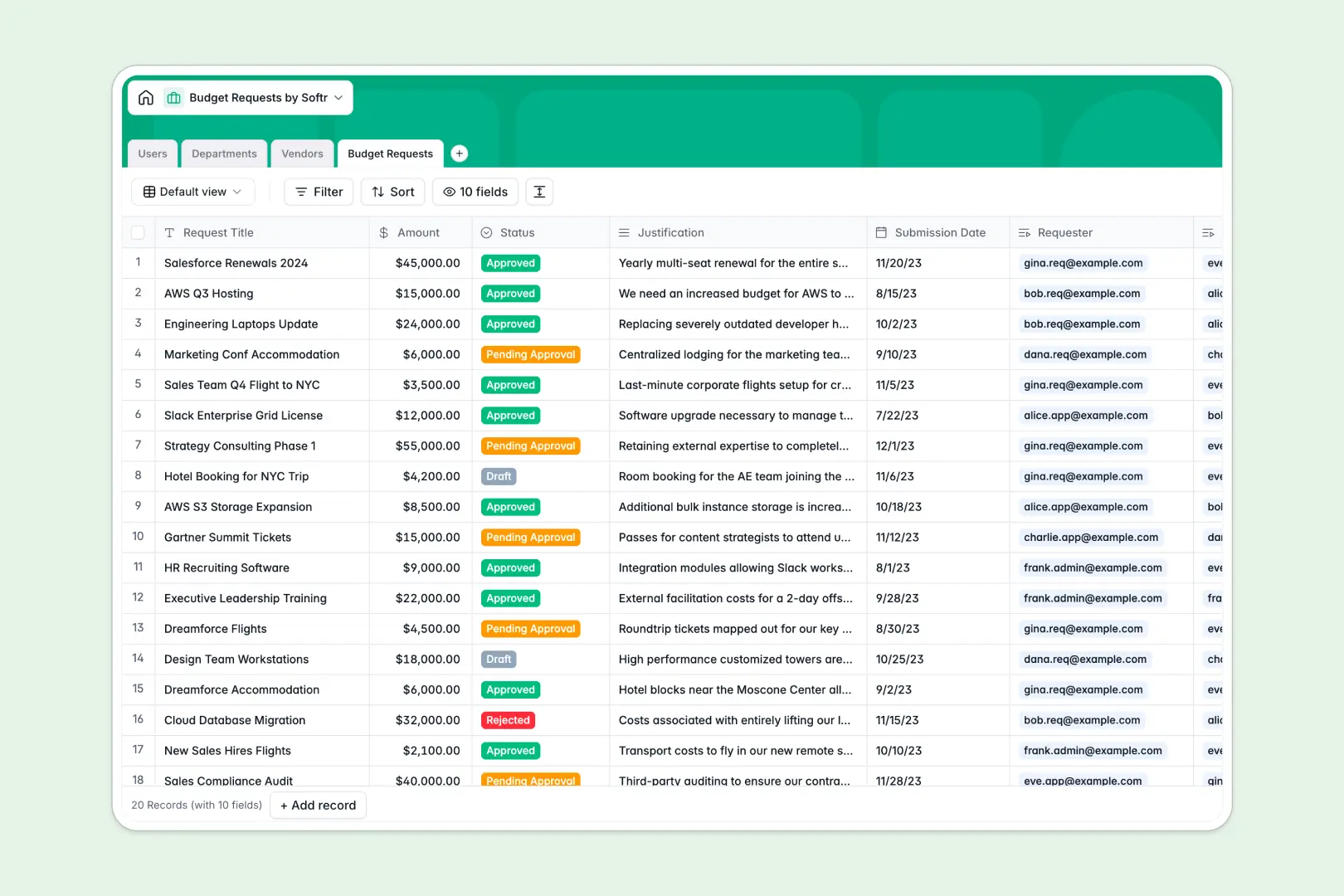
Your Budget Requests database at a glance
This template gives your team a centralized system to submit, review, and approve spending requests. It keeps department spending visible and eliminates back-and-forth communication across email threads.
It connects Budget Requests directly to Users, Departments, and Vendors. Every request links cleanly to the requester, assigned approver, and supplier without copying data across tabs.
Built-in AI fields speed up review cycles by automatically summarizing lengthy justifications and researching vendor website details in the background.
When shared sheets turn budget reviews into a free-for-all
Google Sheets makes sharing easy, but financial requests quickly get messy when every team member can edit any cell, view confidential department totals, or accidentally break rollup formulas.
What a structured database changes
In a true database, every field enforces rigid data types so amounts stay currency, submission dates remain valid, and request statuses cannot be mistyped.
Linked records connect requests directly to departments and vendors, calculating total spend through reliable rollups rather than fragile cross-sheet lookups.
This is exactly what Softr Databases are designed for, giving you a structured foundation that maintains data integrity as your team grows. You can also connect an existing Google Sheet as an external data source if your team already has live data there.
What you can do with this template
You can track each request through custom approval stages from draft to approved, keeping department managers and finance aligned in real time.
Native Database AI agents automatically parse vendor websites to enrich company descriptions and generate concise bullet-point summaries of request justifications to accelerate executive approvals.
Everything is pre-configured and ready to use immediately, letting you manage your organization's spend without building complex spreadsheets from scratch.
-
Users
Manage user accounts, department associations, roles, and budget permissions
-
Departments
Organize teams, monitor members, and aggregate total requested department budgets
-
Vendors
Track suppliers and auto-generate company overviews with AI web searches
-
Budget Requests
Track funding requests with status workflows and AI justification summaries
Who is this Budget Requests database for
This template is tailored for teams that need clear visibility and structured approval trails for organizational spending.
- Finance Teams: Track company-wide spend by department and vendor with automated rollup totals.
- Department Leads: Submit, review, and monitor team budget allocations without messy sheet permissions.
- Operations Managers: Maintain an up-to-date registry of verified vendors and procurement records.
- Team Leads: Get purchase requests reviewed and approved faster with automated summaries.
How to take it further
1. Customize the database
Adapt the database fields to match your exact procurement policies. You can add new spending categories to the Vendors table, adjust the approval status stages, or create custom currency fields for tax calculations.
2. Import your existing data
Bring in your historical spending records, department lists, and vendor registries in minutes using CSV file imports. You can also use the native API to sync new requests directly from internal tools.
3. Build a full app around it
When you are ready to give your team a dedicated interface, you can generate an app with AI simply by describing the approval portal you need. Softr automatically builds the interface, workflows, and users and permissions directly on top of this database. Employees only see their own submissions while finance directors get full approval dashboards, all within a single connected system.
-
1
-
2
-
3
-
4
Frequently asked questions
-
What is a Budget Requests database?
-
Why use a no-code database to build a budget request system?
-
How can AI help managing data for budget requests?
-
Can I build an app with this Budget Requests database?
-
Is this Budget Requests database template free?
-
How is this database different from budget requests in Google Sheets?
Start building today. It's free!
Build and launch your first app in under 30 minutes.