


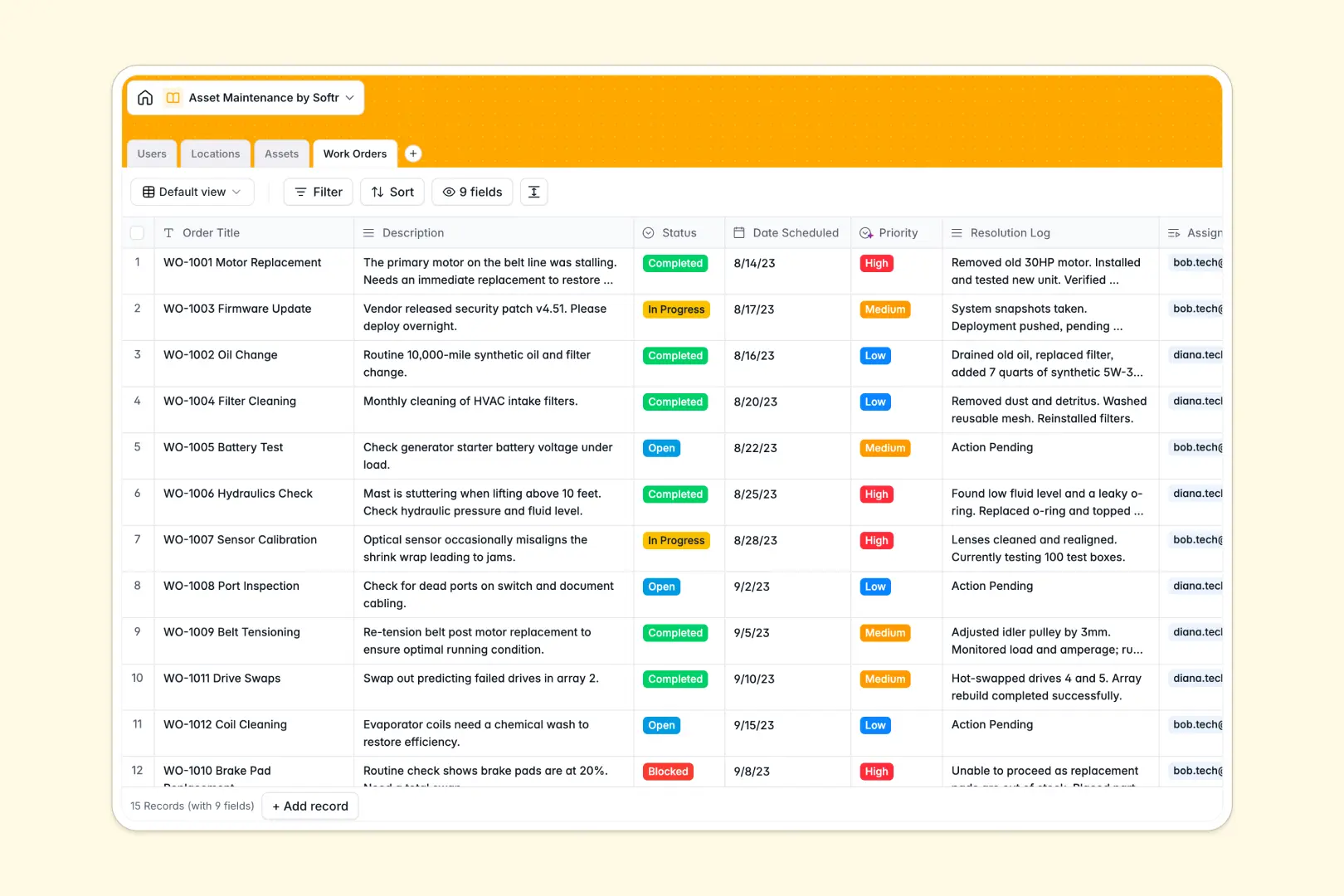
Your Asset Maintenance database at a glance
This template organizes your equipment registry, maintenance schedules, and facility locations in one place. It ensures technicians and facility managers always have complete visibility over equipment status, repairs, and service histories.
Everything connects through relational tables for Assets, Work Orders, Locations, and Users. Assigning a repair task automatically links the technician, the physical site, and the specific machinery without messy cross-sheet formulas.
Built-in AI fields classify work order priorities from descriptions, research property details, and summarize resolution logs into clean bullet points upon completion.
When a shared maintenance sheet becomes an accidental software backend
Google Sheets is great for quick lists, but using it as a maintenance management system quickly causes issues. When multiple technicians update work orders, sort ranges, and paste notes on mobile, cell formulas break and data validation fails.
What a structured database changes
In a structured database, every column enforces its data type so dates remain valid dates and equipment status cannot be overwritten by random text. Relationships connect records directly, meaning a work order links to a specific HVAC unit without fragile `VLOOKUP` or `IMPORTRANGE` functions.
Row-level security ensures technicians only update their assigned jobs while managers oversee all facility operations. This is exactly what Softr Databases are designed for, providing structured records that remain dependable under heavy daily use.
While Softr can connect an existing Google Sheet as an external data source, moving to a native database gives you the structure maintenance workflows demand.
What you can do with this template
Log asset repairs, track machinery lifecycles across multiple branches, and keep detailed service histories attached directly to each piece of equipment.
With native Database AI agents, the database categorizes incoming issue urgency automatically and generates crisp completion summaries once repairs are finished.
Start using the template immediately, adapt the asset categories to your equipment, and keep maintenance operations running smoothly.
-
Users
Manage staff members, roles, contact details, and assigned work orders
-
Locations
Track facilities and sites with AI-gathered web area details and assets
-
Assets
Monitor machinery and equipment with AI-generated standard asset profiles
-
Work Orders
Handle repair jobs using AI for priority classification and resolution logs
Who is this Asset Maintenance database for
Designed for teams managing physical equipment, facilities, and regular service schedules across operations:
- Facility Managers: Oversee equipment health across multiple buildings and track contractor repair work.
- Maintenance Technicians: Access assigned repair orders, check equipment histories, and log job resolutions.
- Operations Leads: Monitor asset downtime, lifecycle status, and recurring machinery issues in real time.
- Fleet & IT Supervisors: Track company vehicles and hardware deployments alongside routine servicing dates.
How to take it further
Customize the database to match your exact operational requirements. You can add specific equipment categories like fleet vehicles or production lines, modify status options, or attach PDF manuals and inspection checklists directly to asset records.
Import your existing data in seconds using CSV upload to migrate equipment inventories, location lists, and past service logs. You can also use the API to sync live asset telemetry or external vendor records automatically.
Build a full app around it when your team is ready for dedicated portals. Use the AI app generator to turn this database into a mobile-friendly technician portal with custom users and permissions. Technicians can update work orders on their phones while facility managers monitor overall uptime from a central dashboard.
-
1
-
2
-
3
-
4
Frequently asked questions
-
What is an Asset Maintenance database?
-
Why use a no-code database to build an asset maintenance system?
-
How can AI help managing data for asset maintenance?
-
Can I build an app with an asset maintenance database?
-
Is this Asset Maintenance database free?
-
How is this Asset Maintenance database different from Google Sheets?
Start building today. It's free!
Build and launch your first app in under 30 minutes.