


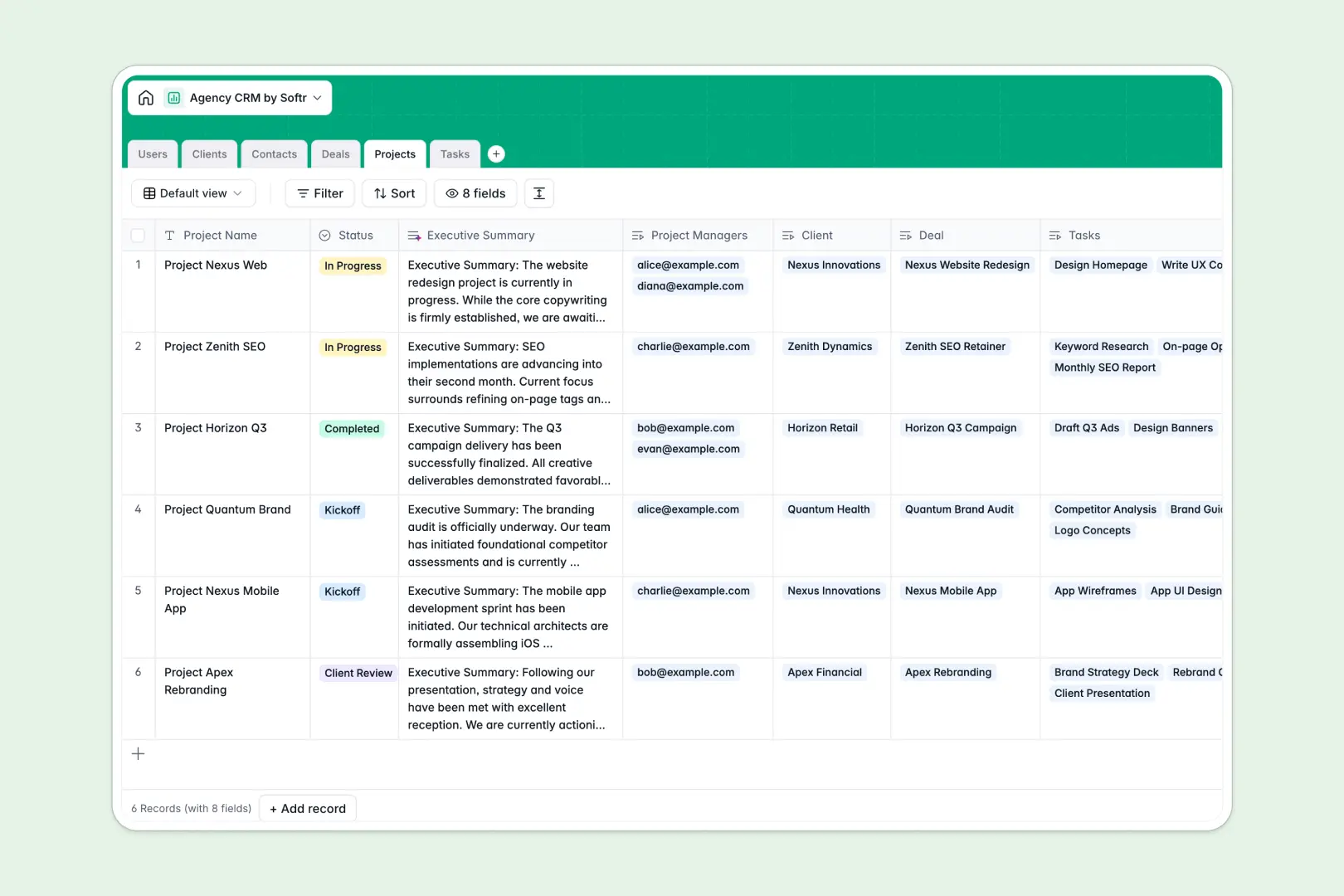
Your Agency CRM database at a glance
This template centralizes client relationships, sales deals, ongoing projects, and daily tasks in one collaborative system.
Key tables link your team members to client accounts, active deals, and project tasks, ensuring full visibility across every stage of delivery without manual copy-pasting.
Built-in AI fields automatically research client websites to draft company descriptions, generate executive project summaries, and categorize incoming tasks.
When a client pipeline outgrows a shared Google Sheet
Google Sheets makes collaboration simple, but managing an agency pipeline across disconnected tabs quickly exposes its limits. When everyone has access to every row, client data is vulnerable, formulas break during custom sorts, and free-text cells make tracking deal amounts and project timelines unreliable.
What a structured database changes
In a structured database, every column enforces strict data types so deadlines stay dates, proposal values stay currency, and account managers stay linked to their accounts.
Instead of maintaining separate tabs that easily break, tables connect natively so a project automatically links to its client and corresponding deal.
This is exactly what Softr Databases are designed for: keeping your agency records clean, relational, and ready to scale. While you can connect an existing Google Sheet to Softr as an external data source, a dedicated database gives you the reliable foundation needed for production-ready workflows.
What you can do with this template
Track prospective leads through deal stages to closed-won revenue, instantly connecting won accounts to live project deliverables.
Built-in Database AI agents handle routine admin tasks by scraping company descriptions from client URLs, generating client-ready executive summaries from raw project notes, and categorizing tasks into development, design, or copywriting automatically.
Your entire team gains clear visibility into deadlines, client contacts, and assigned deliverables from day one.
-
Users
Manage agency staff profiles, roles, client accounts, and assigned work
-
Clients
Track client organizations with status and AI-generated web descriptions
-
Contacts
Maintain client stakeholder directory with job titles and contact info
-
Deals
Track sales pipeline stages, deal values, closing dates, and reps
-
Projects
Deliver client projects with notes and AI-generated executive summaries
-
Tasks
Organize project tasks with due dates, assignees, and AI categorization
Who is this Agency CRM database for
This template is designed for service businesses looking to organize client management and delivery in one place.
- Marketing & Creative Agencies: Connect prospective brand deals directly to active creative campaigns and deliverables.
- Account Managers: Track client stakeholders, communications, and live project statuses without switching tools.
- Agency Founders: Monitor total pipeline revenue, deal stages, and team resource allocation in one view.
- Project Managers: Assign granular project tasks to team members and automate executive updates for client meetings.
How to take it further
Customize this template directly in Softr to fit your agency workflow. You can easily modify pipeline stages, add custom billing fields, or update task categories to match your service offerings.
Import your existing agency data in seconds using CSV upload, or set up an API sync to pull in leads and client contacts from your external web forms.
When you are ready, use Softr to build an app on top of this database. Describe what you need in plain language, and the AI Co-Builder creates custom client portals, internal team dashboards, and visual Kanban pipelines.
Configure granular users and permissions so clients only see their own deliverables while your account executives and creators access their assigned deals and tasks.
-
1
-
2
-
3
-
4
Frequently asked questions
-
What is an Agency CRM database?
-
Why use a no-code database to build an agency CRM?
-
How can AI help managing data for an Agency CRM?
-
Can I build an app with an Agency CRM database?
-
Is this Agency CRM database free?
-
How is this CRM database different from an agency CRM Google Sheet?
Start building today. It's free!
Build and launch your first app in under 30 minutes.