


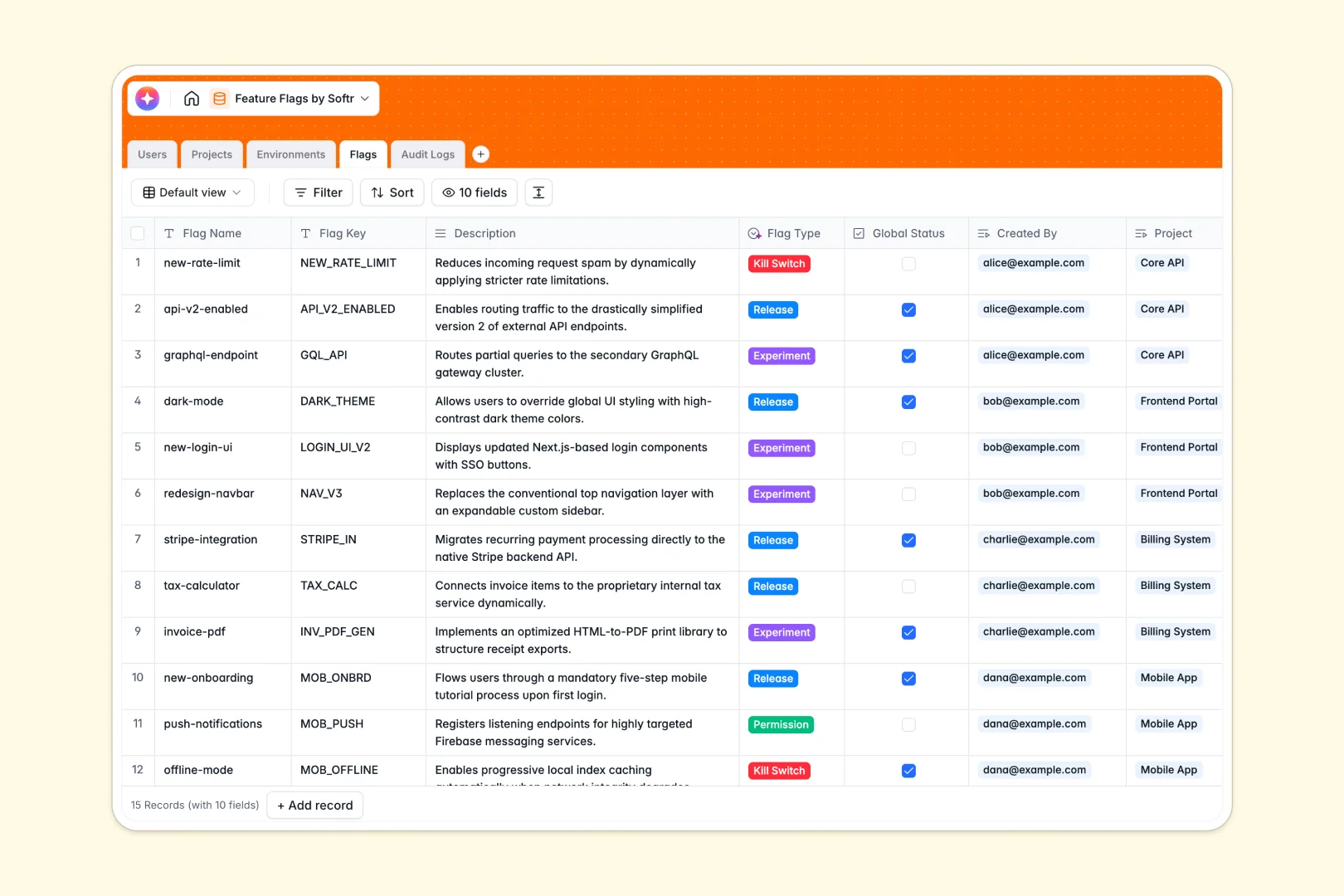
Your Feature Flags database at a glance
This ready-to-use template helps product and engineering teams track every feature toggle across multiple deployment environments. It provides a single source of truth for all releases, kill switches, and active experiments.
The database connects Projects directly to specific Environments and Flags, ensuring every toggle maps perfectly to your applications. A built-in Audit Log automatically captures when a flag is enabled or disabled, keeping a strict history of who made the change.
Native AI fields also instantly summarize project statuses and automatically classify your flags into categories like Release, Experiment, or Kill Switch based on their descriptions.
Why managing feature flags in spreadsheets breaks down
Tracking feature toggles in a spreadsheet quickly becomes a massive software risk, leading to broken formulas, hidden rows, and zero historical accountability when a production switch gets flipped.
What a structured database changes
In a relational database, data maintains strict integrity. Linking a toggle to a specific staging or production environment doesn't require fragile VLOOKUPs, and an automated audit log guarantees you always know who changed what and when.
This clear structure is exactly what Softr Databases are designed for. Every release, project, and team member stays cleanly organized, ensuring safe deployments at scale.
What you can do with this template
You can instantly organize all your active toggles by project and environment, allowing your team to easily distinguish between staging environments and live production systems.
Thanks to built-in native AI automation, the template categorizes new flags and automatically writes brief project digests, saving your product team hours of manual tagging.
-
Users
Manage team members, roles, and access for feature flag administration
-
Projects
Organize software applications and use AI to generate status digests
-
Environments
Define deployment stages like production or staging with dedicated keys
-
Flags
Manage toggles with AI-powered classification and automated summaries
-
Audit Logs
Track historical changes and toggle activities for full accountability
Who is this Feature Flags database for
This system is built for technical teams needing absolute control and visibility over their software rollout processes.
- Engineering Managers: Keep track of kill switches and maintain a perfectly clear log of deployment history.
- Product Managers: Monitor active experiments and quickly understand flag statuses across various software projects.
- QA Engineers: Isolate staging environments from production to safely test new backend toggles.
- DevOps Teams: Maintain strict visibility into which APIs and features are live in every deployment environment.
How to take it further
You can easily customize this native structure to fit your exact workflow. Add new flag types to the select field, or create a new column to track specific deployment metrics alongside your existing data.
Getting started is effortless since you can import your existing feature lists in seconds via CSV. You can also connect via API to sync real-time toggle states directly from your codebase.
When your team grows, you can evolve this foundation by building a full application directly on top of it. This lets you create a custom product management portal rather than just sharing raw database views.
By leveraging granular users and permissions, you can ensure that only senior administrators have the rights to flip a production kill switch. Starting with a clean, structured database makes building these advanced access controls incredibly simple.
-
1
-
2
-
3
-
4
Frequently asked questions
-
What is a feature flags database?
-
Why use a no-code database to build a feature flags tool?
-
How can AI help managing data for feature flags?
-
Can I build an app with feature flags database?
-
Is this feature flags database free?
-
How do I import existing flags into this template?
Start building today. It's free!
Build and launch your first app in under 30 minutes.