


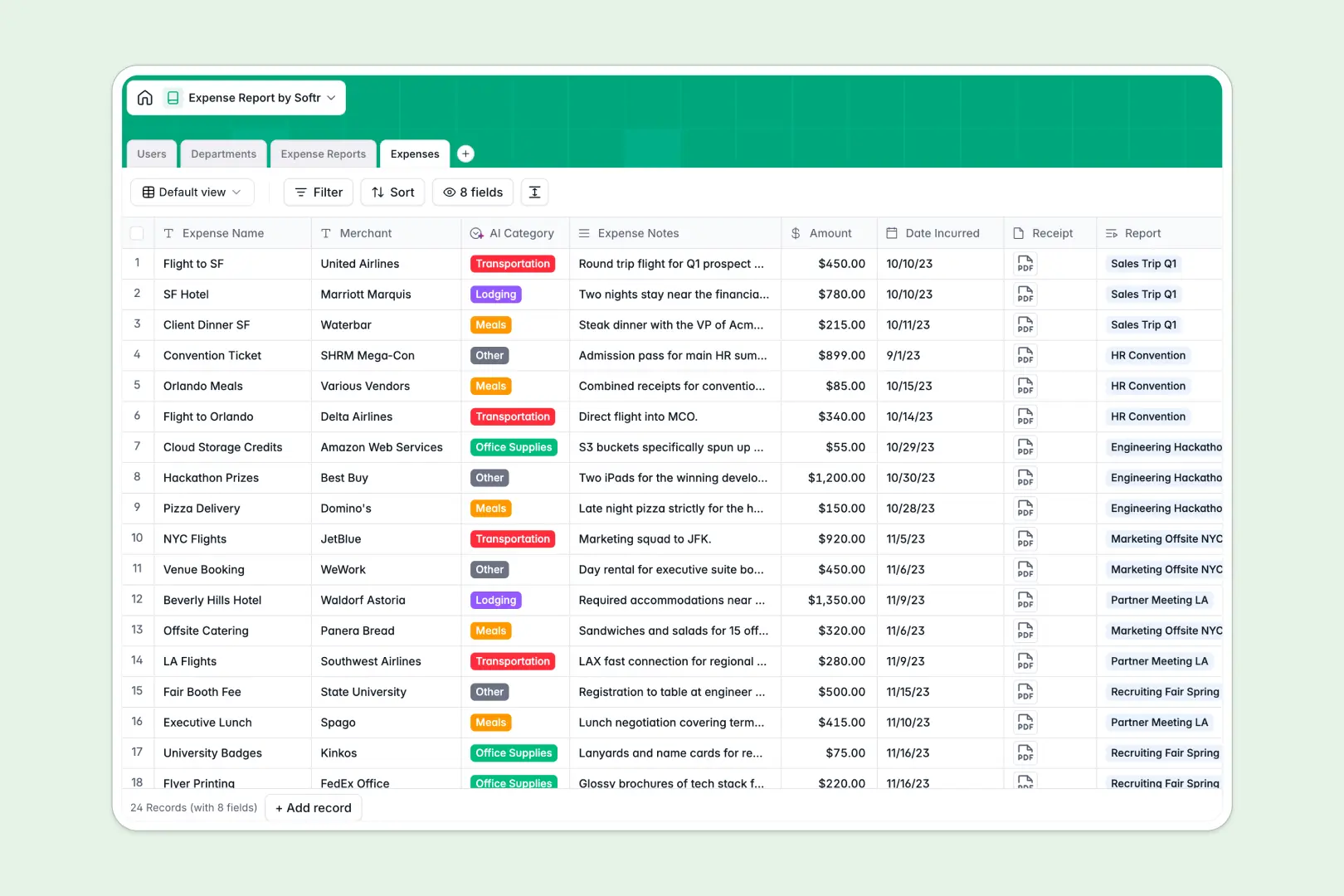
Your Expense Report database at a glance
This template centralizes your entire reimbursement process so you can track out-of-pocket costs, auto-categorize line items, and unblock approvals instantly. It natively links individual employee expenses directly into grouped reports for fast, single-click manager sign-offs.
Every record connects seamlessly structured tables. Individual Expenses with attached receipts roll up into batched Expense Reports, which are automatically tied to specific Users and their respective Departments.
Built-in AI features automatically categorize individual purchases and write a comprehensive compliance summary for every submitted report. This means less manual data entry for employees and faster auditing for finance teams.
Why managing employee expenses in spreadsheets breaks down
Processing reimbursements through shared spreadsheets quickly leads to lost receipts, broken formulas, and endless email chains. It creates unnecessary friction and delays for both employees and finance teams.
What a structured database changes
A tight database structure ensures financial records stay clean and reliable. Currencies remain stored as strict numbers, dates enforce correct formatting, and attached receipt images clearly link directly to the right line item without messy workarounds.
Instead of copy-pasting data across tabs, tables connect natively so individual expenses smoothly roll up into a single department report. This is exactly what Softr Databases are designed for.
What you can do with this template
Start tracking purchases and managing approvals immediately without heavy setup. Submitters can easily attach receipts, while managers review rolled-up totals and approve entire batch reports in one unified view.
Take advantage of built-in Database AI agents to entirely eliminate manual data entry. The template automatically classifies expenses into categories like 'Travel' and summarizes compliance risks before a manager even opens the file.
-
Users
Manage employee profiles, departmental roles, and hierarchical approval workflows
-
Departments
Organize business units and monitor annual budget allocations across the company
-
Expense Reports
Group expense batches and generate AI audit summaries for compliance oversight
-
Expenses
Track individual purchases with receipts and automated AI category classification
Who is this Expense Report database for
This setup helps teams process reimbursements accurately, transparently, and quickly without relying on messy spreadsheets.
- Finance Teams: Centralize every receipt and track total spending against department budgets.
- Department Managers: Review rolled-up expense reports and approve them with full AI context.
- Employees: Submit individual purchases securely without wrestling with complex accounting tools.
How to take it further
Customize your fields. Easily tweak the AI prompt to check against your specific company policy, or add new expense categories to the drop-down menu in seconds. Because it is a native database, these structural changes are effortless.
Import your existing data. Upload your current CSV logs to instantly structure past expenses into clear records. You can also use the API to sync new purchases directly from corporate cards.
Build a full app around it. When ready, you can turn this database into a secure employee portal by building an interface on top of it. This lets team members log in to submit their own reports while managers get a dedicated dashboard for approvals. Complete users and permissions ensure employees only ever see their own records. Starting with a well-structured database makes this app development process incredibly fast.
-
1
-
2
-
3
-
4
Frequently asked questions
-
What is an expense report database?
-
Why use a no-code database to build an expense report tool?
-
How can AI help managing data for expense reports?
-
Can I build an app with an expense report database?
-
Is this expense report database free?
-
How is an expense report database different from Excel?
Start building today. It's free!
Build and launch your first app in under 30 minutes.