


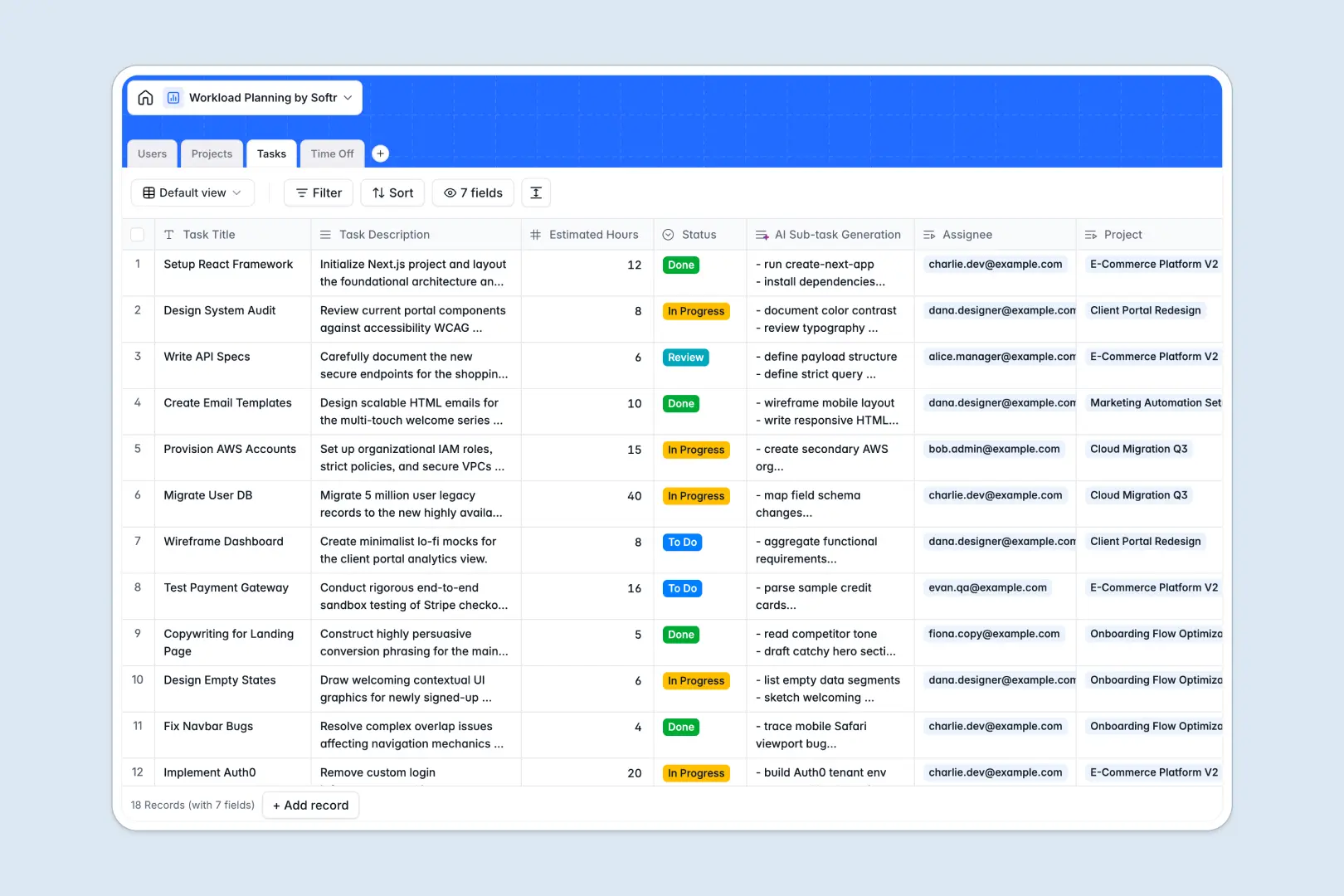
Your Workload Planning database at a glance
This Workload Planning database gives you a real-time view of who is doing what, ensuring projects stay on track without burning out your team.
It connects Users, Projects, Tasks, and Time Off into one unified system. When you assign a task to a team member, their total capacity automatically updates, factoring in their scheduled time off.
Instead of manually breaking down tasks or analyzing risks, built-in AI handles the heavy lifting by auto-generating sub-task checklists and surfacing project risks instantly.
Why workload planning gets messy in Excel
Trying to balance team capacity in a spreadsheet quickly turns into chaos when project scopes change or team members take unexpected leave.
What a structured database changes
In a spreadsheet, tracking tasks, projects, and vacations usually requires fragmented tabs and easily broken VLOOKUPs. A single typo can throw off your entire capacity calculation.
A structured system connects data natively. When an employee logs sick leave, their task availability updates automatically across all projects without manual copy-pasting.
This is exactly what Softr Databases are designed for. Every column has a strict data type, and bulletproof relationships between tables ensure your capacity planning remains perfectly accurate as your team scales.
What you can do with this template
Bring all your team members, active projects, tasks, and time-off requests into a single, reliable source of truth. You can beautifully roll up total assigned hours to spot bottlenecks before they happen.
Thanks to Database AI agents, this template actively accelerates your project planning. It automatically drafts 5-step checklists for new tasks and writes instant risk summaries based on your project briefs and status.
-
Users
Manage team members, roles, and capacity with linked task and time off logs
-
Projects
Track initiatives with an AI-powered risk assessment based on status and briefs
-
Tasks
Manage work items with AI-generated sub-task checklists to streamline workflows
-
Time Off
Log leave requests and unavailability to accurately calculate team availability
Who is this Workload Planning database for
This template is designed for teams that need to balance project demands with realistic human capacity.
- Project Managers: Distribute estimated task hours accurately so deadlines are met without team burnout.
- Operations Leaders: Gain a real-time, global view of active projects, resource bottlenecks, and team availability.
- HR Teams: Easily log time-off requests to automatically adjust workload calculations across the entire company.
How to take it further
1. Customize the database
Tailor the system seamlessly to your exact workflow. You can easily rename task statuses (like changing "Review" to "QA") or add new time-off categories directly in the template.
2. Import your existing data
Don't start from scratch. Upload your current Excel files via CSV to instantly populate your users, active projects, and task backlogs without data entry.
3. Build a full app around it
When you're ready to share this with your broader team, you can build an app right on top of this data. You can create a self-serve portal where team members log in to update their own tasks or request time off.
By leveraging users and permissions, you can ensure members only see their assigned work, while managers see the entire department's workload. Working from a structured database makes building these secure, scalable apps completely effortless.
-
1
-
2
-
3
-
4
Frequently asked questions
-
What is a workload planning database?
-
Why use a no-code database to build a workload planning tool?
-
How can AI help managing data for workload planning?
-
Can I build an app with this workload planning database?
-
Is this Workload Planning database free?
-
How is a workload planning database different from Excel?
Start building today. It's free!
Build and launch your first app in under 30 minutes.