


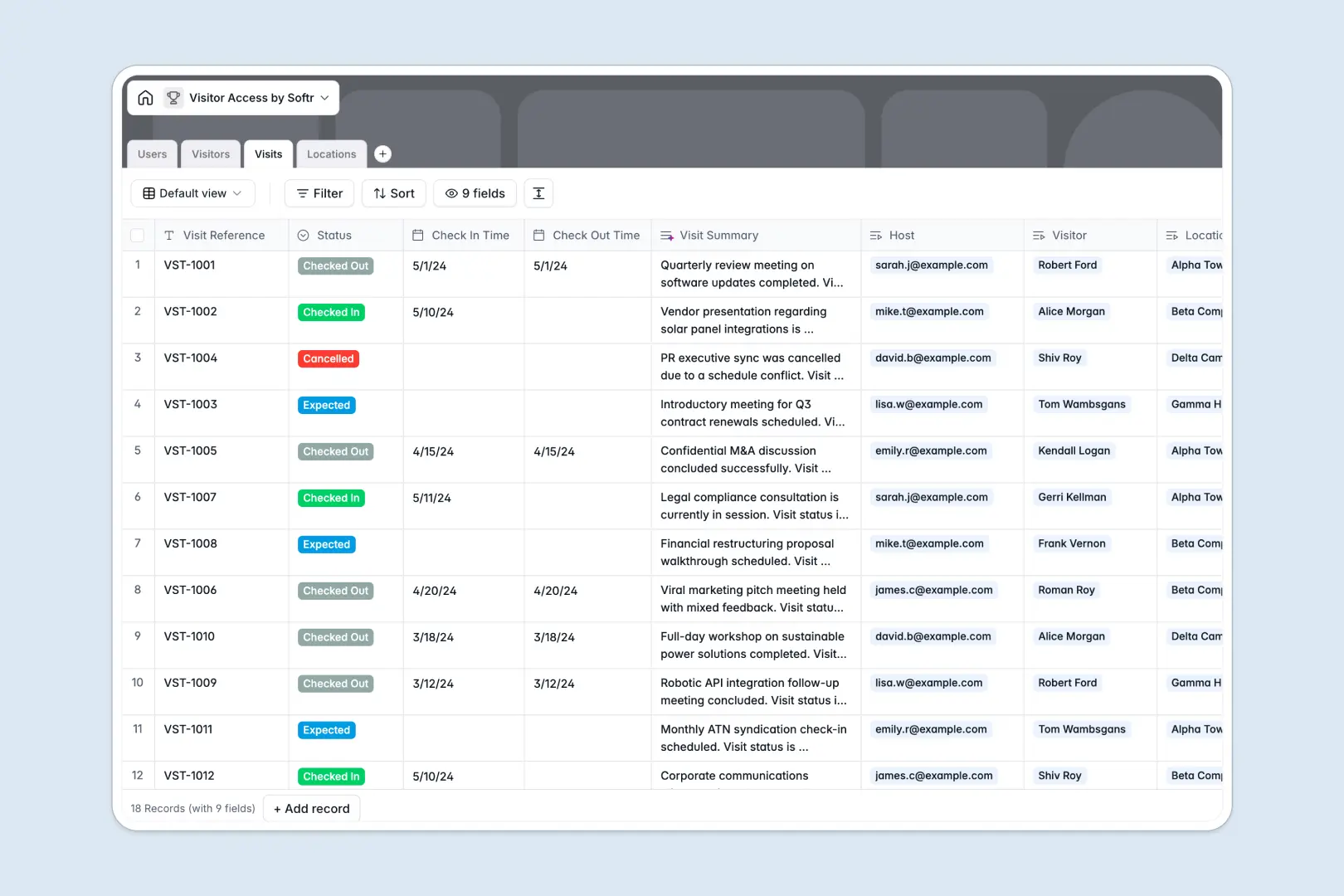
Your Visitor Access database at a glance
This template gives your team a centralized system to coordinate upcoming guest arrivals, monitor building access, and keep physical security logs completely accurate.
It connects four dedicated tables: Visitors, Visits, Users (hosts and staff), and Locations. When a guest arrives, receptionists can immediately log check-in timestamps and link the entry to the assigned host without retyping guest details.
Built-in AI fields automatically research guest company background from the web and summarize visit notes into concise status briefs.
When visitor logs get copied across email attachments and local drives
Managing building security with shared desktop workbooks inevitably leads to version forks. When security at the front desk and hosts in separate departments save their own copies of a guest log, check-in timestamps drift and confidential visitor details end up stored insecurely on individual computers.
What a structured database changes
A central database maintains a single live record for every guest, location, and host. Dedicated field types protect your data so date-time stamps stay exact, phone numbers stay formatted, and photo IDs stay securely attached to the right profile.
Instead of manually pasting host names, tables connect natively. Linking a visit record to a host automatically updates that employee's schedule while preserving accurate visitor histories across every building.
This is exactly what Softr Databases are designed for, giving you a shared system of record without disconnected files circulating across departments. If you have an online workbook, Softr can also connect to it directly.
What you can do with this template
Coordinate multi-location front desks with real-time status updates ranging from Expected to Checked Out. Front desk teams can review guest histories and verify photo ID attachments in seconds.
Built-in Database AI agents streamline daily operations by summarizing visit notes into clear security briefs and pulling live company information directly into guest profiles.
-
Users
Manage internal staff members, system roles, and hosted visit assignments
-
Visitors
Track guest profiles, security IDs, and AI-generated company overviews
-
Visits
Log visitor check-ins, checkpoints, and AI-generated status summaries
-
Locations
Maintain building sites, reception details, and physical access points
Who is this Visitor Access database for
This system is built for operations and security teams needing structured visitor tracking:
- Front Desk Teams: Log arrivals, verify visitor credentials, and notify hosts instantly.
- Facility Managers: Track occupancy, monitor multi-building traffic, and maintain compliance records.
- Corporate Security: Securely store photo IDs, access logs, and visitor histories.
- Office Administrators: Coordinate scheduled meetings, client visits, and temporary contractor access.
How to take it further
1. Customize the database
Adapt the database fields to your exact building protocols. Add custom status choices such as Security Escort Required, configure badge number fields, or add specific location access tiers.
2. Import your existing data
Easily bring your existing contact lists into the template using CSV file uploads or direct API sync. You can immediately map employee directories and frequent guest records into their respective tables.
3. Build a full app around it
When you are ready to give your team a dedicated interface, you can build an app on top of this database. Describe what you need in one prompt, and Softr's AI Co-Builder generates a tailored receptionist check-in portal and employee dashboard connected directly to your tables.
Set up custom users and permissions so front desk staff can manage visit statuses while employees only view their own upcoming guests. Because your data structure is already clean and relational, publishing a secure, production-ready workplace tool takes minutes.
-
1
-
2
-
3
-
4
Frequently asked questions
-
What is a visitor access database?
-
Why use a no-code database to build a visitor access system?
-
How can AI help managing data for visitor access?
-
Can I build an app with visitor access database?
-
Is this Visitor Access template free?
-
How does this database template differ from a standard visitor tracking file?
Start building today. It's free!
Build and launch your first app in under 30 minutes.