


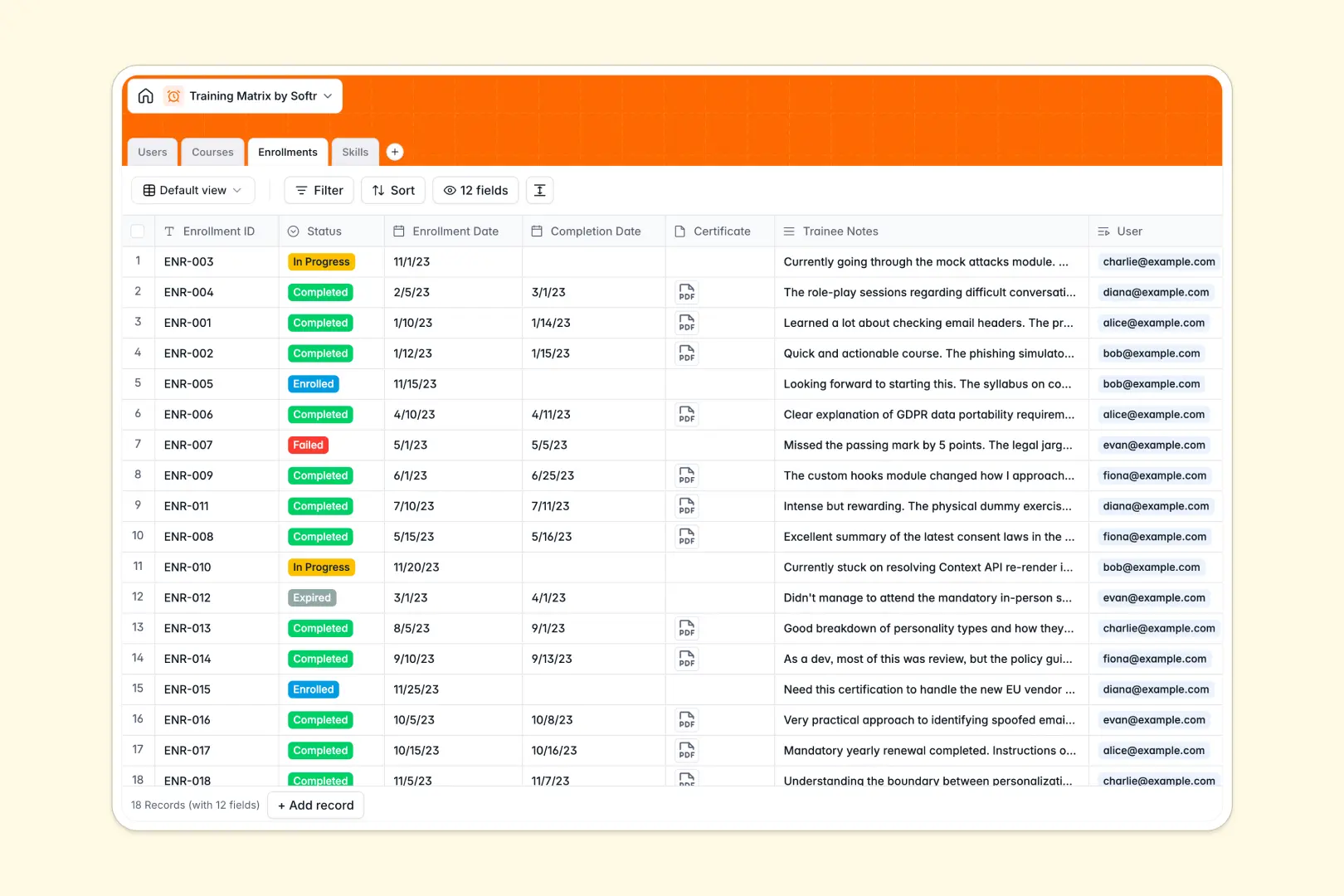
Your Training Matrix database at a glance
This template tracks employees, available courses, and the specific skills acquired across your organization. It gives you a clear, centralized view of who is trained on what without manual tracking errors.
The database connects four main tables: Users, Courses, Enrollments, and Skills. When a user completes a course, their enrollment status updates, instantly granting them the associated skills on their profile.
Built-in AI automatically generates detailed course syllabuses by searching the public web. It also summarizes trainee notes and auto-drafts competency definitions so your matrix stays detailed with zero extra effort.
Why training tracking gets messy in Excel
Managing skill matrices in Excel often leads to endless, scroll-heavy rows and broken version control. As your team grows, keeping track of who completed which training becomes a chaotic manual chore.
What a structured database changes
A structured database enforces proper field types, meaning dates, attachments like certificates, and dropdown statuses stay perfectly uniform. You no longer have to worry about mixed data or accidentally deleted cells.
Instead of relying on fragile VLOOKUPs, tables natively link together to connect employees directly to their enrolled courses and acquired skills. This is exactly what Softr Databases are designed for.
What you can do with this template
Instantly log enrollments and upload completion certificates directly to a user's record. Rollups will automatically calculate the total courses and skills attained by each department or employee.
You can also leverage native AI to automatically summarize feedback notes into actionable bullet points the moment a trainee submits them. This keeps records tidy and actionable for management.
-
Users
Manage employee profiles, departmental roles, and overall training progress
-
Courses
Catalog training modules with AI-generated syllabi based on course topics
-
Enrollments
Track course status and use AI to summarize trainee notes and feedback
-
Skills
Map core competencies using AI to define skill levels and category tags
Who is this Training Matrix database for
This template provides a ready-to-use foundation for teams that need strict compliance and continuous learning tracking.
- HR Managers: Monitor compliance training and department-wide skill gaps effortlessly.
- Team Leads: Track the onboarding progress and course completions of direct reports.
- Operations Directors: Ensure health and safety certifications stay up to date across the workforce.
How to take it further
Customizing this database is incredibly intuitive. You can easily add new skill categories, update department dropdowns, or change enrollment statuses to match your exact internal processes.
Getting started is seamless when you import your existing employee rosters or course catalogs. Just upload a CSV to instantly populate your users and past enrollments for immediate value.
When your team is ready, you can build a full app on top of this data to serve as an interactive internal employee portal. By configuring users and permissions, you ensure employees only see their own training history while managers view their entire department.
Starting with a cleanly structured backend makes this app development fast and reliable. Full-stack apps combine your database, interfaces, and workflows seamlessly connected in one completely integrated platform.
-
1
-
2
-
3
-
4
Frequently asked questions
-
What is a training matrix database?
-
Why use a no-code database to build a training matrix?
-
How can AI help managing data for training matrices?
-
Can I build an app with this training matrix database?
-
Is this Training Matrix database free?
-
How is a training matrix database different from Excel?
Start building today. It's free!
Build and launch your first app in under 30 minutes.