


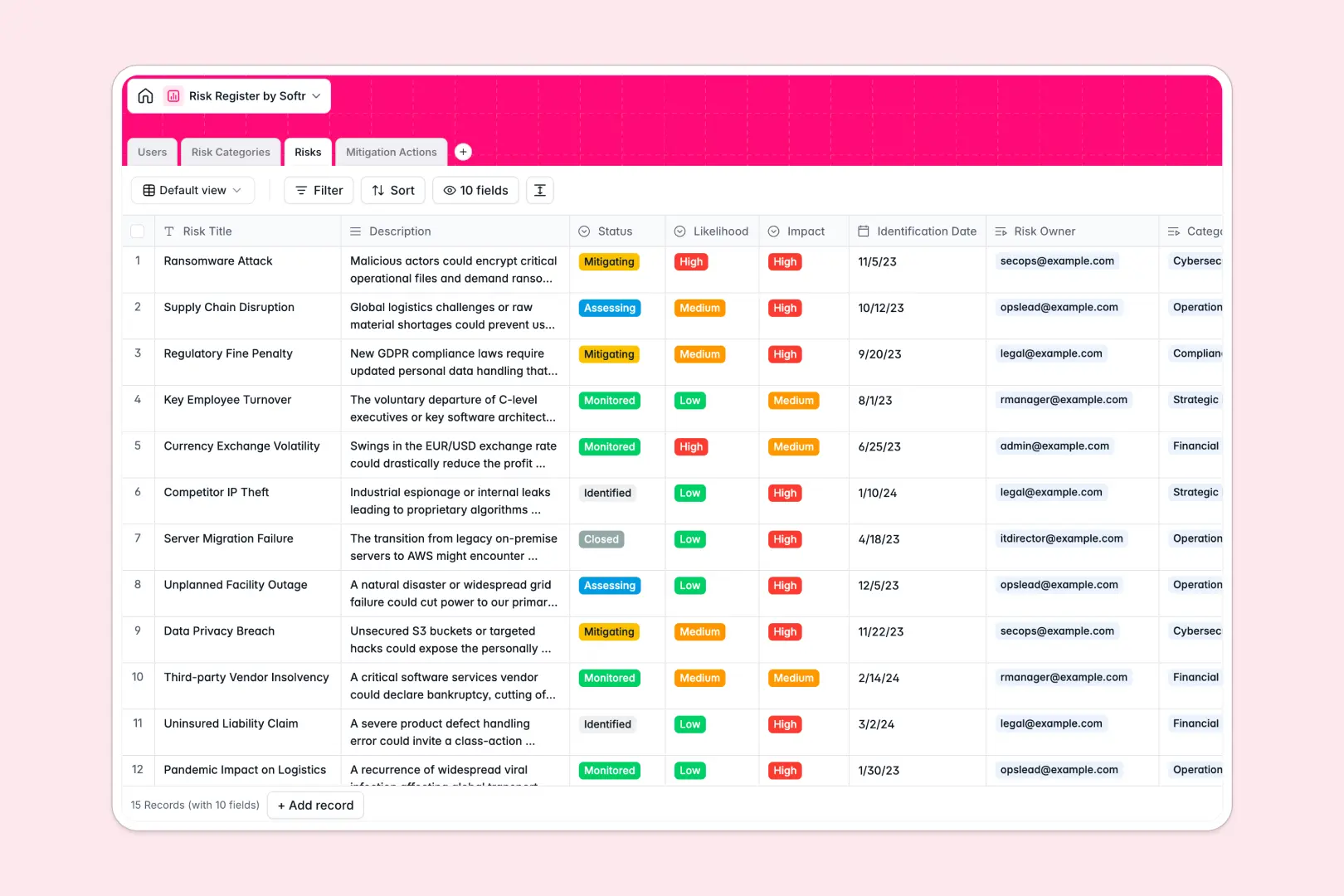
Your Risk Register Database at a glance
This template provides a structured command center to identify, assess, and mitigate business risks. It replaces scattered sheets with a unified system that connects every threat to an actionable plan.
The database organizes data across four connected tables: Users, Risk Categories, Risks, and Mitigation Actions. When you log a new risk, you can immediately tie it to a category, assign an owner, and track its mitigation progress without duplicating entries.
Built-in AI automatically writes executive summaries for complex risks and generates 5-step operational protocols for your mitigation actions. This turns a static tracker into an active assistant that saves hours of manual drafting.
Why tracking risks gets messy in Excel
Spreadsheets quickly become chaotic when multiple team members try to log, assess, and update risks simultaneously. Formulas break, data gets overwritten, and maintaining a clear line of assigned responsibility becomes nearly impossible.
What a structured database changes
In a structured system, columns strictly enforce data rules so impact ratings stay clean and due dates remain actual dates. You can effortlessly link a mitigation action directly to a specific risk owner without relying on fragile VLOOKUPs.
This relational approach ensures that as your operations scale, your risk data remains completely organized and secure. This is exactly what Softr Databases are designed for.
What you can do with this template
Instantly calculate total risk counts per category and monitor real-time mitigation status across your entire portfolio. Every action item is explicitly linked to an assignee and a parent risk, keeping accountability perfectly transparent.
You can also leverage Database AI agents to automatically draft action plans the moment a new mitigation task is assigned. It transforms risk management from a tedious clerical chore into an automated, scalable workflow.
-
Users
Manage personnel profiles, access roles, and specific risk ownership assignments
-
Risk Categories
Organize standard corporate threats into high-level classification groupings
-
Risks
Track identified threats and use AI to generate concise executive summaries
-
Mitigation Actions
Lower threat impact using tasks and AI-driven operational protocol drafts
Who is this Risk Register database for
This system is built for teams that need to turn unpredictable threats into manageable, tracked workflows.
- Project Managers: Keep project threats visible and ensure mitigation steps are executed on time.
- Compliance Officers: Maintain an auditable log of identified risks and the steps taken to neutralize them.
- Operations Leads: Identify operational bottlenecks and assign clear ownership for resolving them.
- Department Heads: Categorize high-level business risks to prioritize resources and strategy efficiently.
How to take it further
Start by modifying the database to fit your exact internal terminology. You can easily adjust the Risk Category names or update the dropdown options for likelihood and impact.
Bring your existing risk logs over without missing a beat. Simply use a CSV import for bulk uploads or connect an API to sync active threats from your other monitoring tools.
When your team is ready, you can transform this foundational data into a fully functional internal application. With a custom interface, you can create intuitive dashboards for stakeholders to submit and review ongoing risks.
You can effortlessly configure specific permissions to ensure contributors only see risks assigned to them, while admins have a global view. Building a tailored operational app is natural when your underlying data is perfectly structured.
-
1
-
2
-
3
-
4
Frequently asked questions
-
What is a risk register database?
-
Why use a no-code database to build a risk register?
-
How can AI help managing data for risk management?
-
Can I build an app with this risk register database?
-
Is this Risk Register database free?
-
How is a risk register database different from Excel?
Start building today. It's free!
Build and launch your first app in under 30 minutes.