


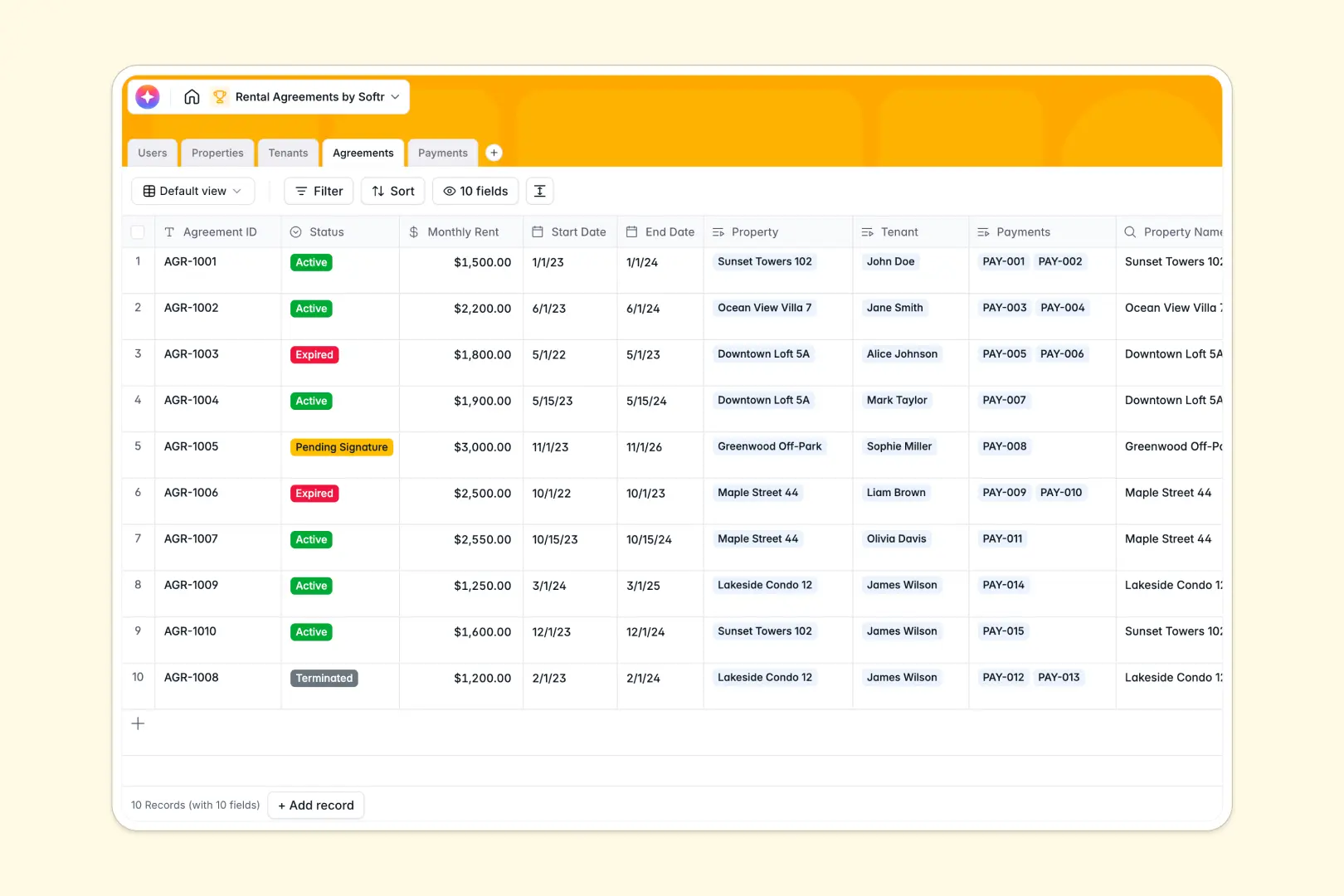
Your Rental Agreements Database at a glance
This template replaces scattered files by centralizing your properties, tenants, contracts, and payment ledgers into a single, reliable system.
Instead of manual data entry, your active leases automatically link to specific tenants and properties. Payments track securely against every current agreement so you confidently know who owes what.
The built-in AI drafts compelling property listing descriptions based on property attributes, and instantly summarizes complex contract terms so you never miss critical lease details.
Why rental agreements get messy in Excel
Trying to manage units, renters, and monthly rent streams across multiple spreadsheet tabs quickly turns into a fragile setup.
What a structured database changes
When you rely on spreadsheets, connecting a specific tenant to a long-term lease and their payment history requires fragile formulas. Tracking varying lease expirations or background checks alongside revenue quickly becomes visually overwhelming.
This is exactly what Softr Databases are designed for. Because every column has a strict data type, your financial inputs stay clean and reliable over time.
You can securely embed file attachments, and native relationships seamlessly tie tenants to their agreements without breaking across rows.
What you can do with this template
You can clearly see which leases are expiring, review pending tenant backgrounds, and track overdue payments directly on your dashboard. Every property profile retains its own history of occupants and cash flow effortlessly.
With embedded Database AI agents, your data works autonomously. The template automatically generates marketing copy for new properties and extracts standard contract terms into simple summaries as records update.
-
Users
Manage property managers and staff with roles, profiles and assigned units
-
Properties
Track rental units and assets while generating AI-powered listing descriptions
-
Tenants
Maintain a registry of applicants and active renters with background status
-
Agreements
Manage contracts with AI-generated summaries of rent terms and status
-
Payments
Record rent ledger payments with receipts and link to active agreements
Who is this Rental Agreements Database for
This ready-to-use template delivers immediate structure for anyone managing real estate assets and tenant operational relationships.
- Property Managers: Track which units are vacant and monitor upcoming lease renewals proactively.
- Landlords: Keep an accurate ledger of monthly rent collections and overdue payments without manual math.
- Real Estate Admins: Store signed contracts, tenant background checks, and payment receipts securely in one view.
How to take it further
You can quickly customize this database to fit your exact operational workflow. Adjust the dropdown fields for specific background check statuses, or refine the AI prompts to adhere perfectly to your regional leasing laws.
If you already manage properties in Excel, you can bulk import your existing tenant registers and payment histories via CSV. Your records will map firmly to the active fields so you gain immediate operational visibility.
When your portfolio grows, you can start building a customized front-end securely. Full-stack functionality seamlessly combines your database with an interface builder to create powerful internal workflows.
Apply native users and permissions to guarantee managers only view their assigned units. A solid database foundation efficiently sets you up to launch full tenant portals without friction.
-
1
-
2
-
3
-
4
Frequently asked questions
-
What is a rental agreements database?
-
Why use a no-code database to build a rental management tool?
-
How can AI help managing data for rental agreements?
-
Can I build an app with this rental agreements database?
-
Is this Rental Agreements Database free?
-
How is a rental agreements database different from Excel?
Start building today. It's free!
Build and launch your first app in under 30 minutes.