


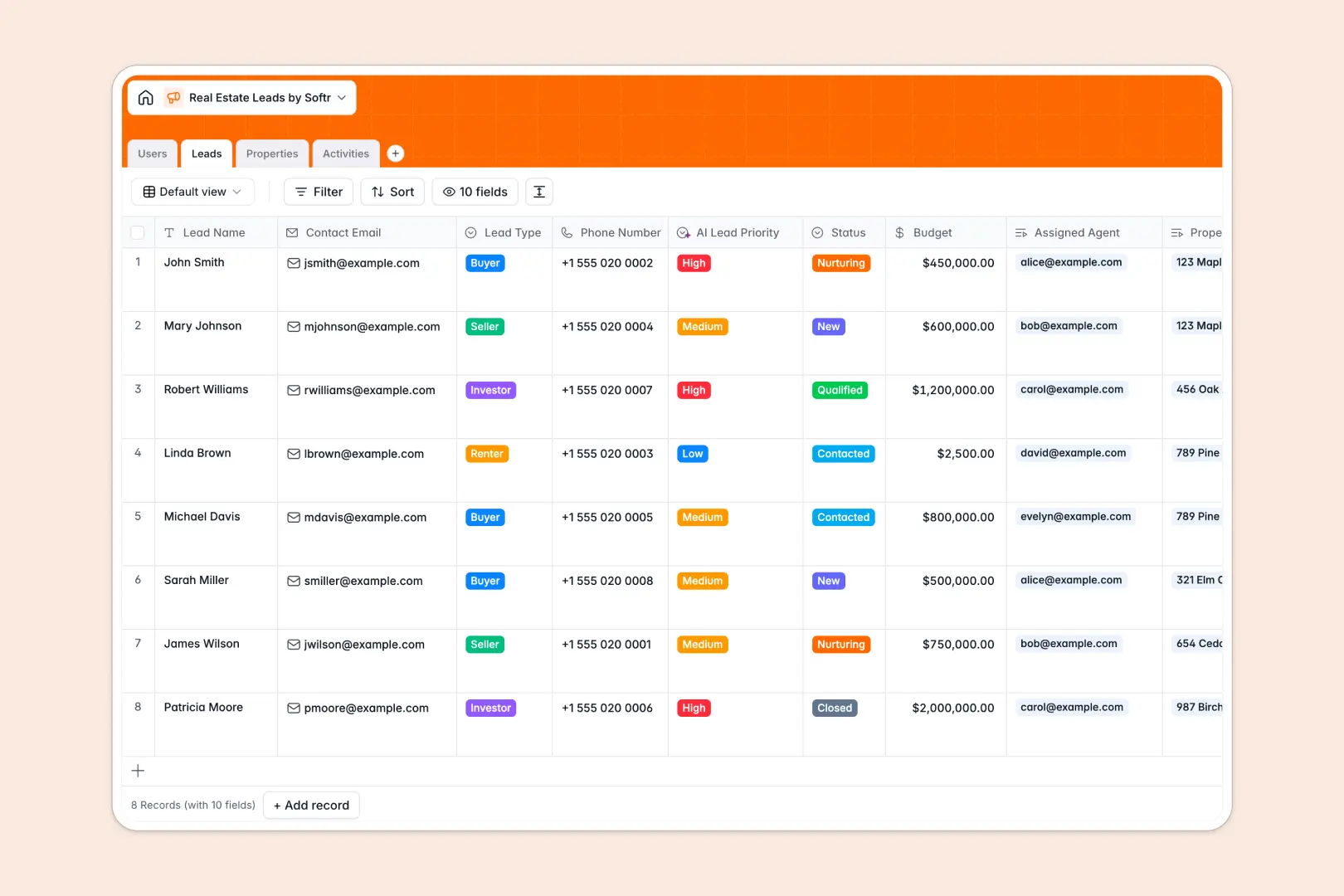
Your Real Estate Leads database at a glance
This template organizes your entire real estate pipeline, connecting buyers and sellers to active listings in one centralized place.
It uses connected tables so you can seamlessly link a lead directly to their assigned agent and favorite properties without duplicate data entry.
Integrated AI agents automatically prioritize leads by budget, instantly research neighborhood profiles for new listings, and extract next steps from your meeting notes.
Why tracking real estate leads in Excel breaks down
Manage a growing list of buyers and sellers in a spreadsheet, and you will quickly face scattered notes, missing contact details, and disorganized follow-ups.
What a structured database changes
In a native database, your records stay pristine because data types are enforced. Phone numbers stay properly formatted, budgets remain as currency, and property photos are attached securely to the record.
You can easily link a buyer's profile to multiple property listings without relying on fragile VLOOKUPs across different tabs.
This is exactly what Softr Databases are designed for—giving you reliable structure that naturally scales as your real estate agency grows.
What you can do with this template
View your entire pipeline instantly, tracking which stage every buyer or seller is in alongside their specific budget and location interests.
Utilize native Database AI agents to automatically categorize high-priority leads the moment they enter your system.
Keep agents updated on their daily tasks by logging every call, email, and property showing in a dedicated internal activities log.
-
Users
Manage real estate agents and brokers with roles and contact details
-
Leads
Organize prospects using AI to prioritize leads by budget and status
-
Properties
List real estate assets with AI-generated neighborhood and local info
-
Activities
Log interactions and use AI to extract action items from meeting notes
Who is this Real Estate Leads database for
This system is built for real estate teams who need a reliable, scalable way to manage operations.
- Real Estate Agencies: Keep all brokers, active listings, and client interactions centralized in one accurate platform.
- Independent Brokers: Track your daily calls, property showings, and prioritized follow-ups without chaotic spreadsheets.
- Sales Managers: Monitor lead statuses and individual agent activity to ensure no warm prospect drops out of the pipeline.
How to take it further
Easily adapt this database to fit your exact local market. Modify the lead stages or add custom property types to match the unique inventory your agency carries.
Bring your existing clients over instantly. Import your historical pipeline securely via CSV so your team does not lose any momentum during the transition.
When your team is ready, you can transform this data into a custom CRM portal for your agents to use on top of the database.
Using advanced users and permissions, you can restrict administrative views while empowering brokers to safely log notes and new listings. Starting with beautifully structured data makes building this fully functional app effortless.
-
1
-
2
-
3
-
4
Frequently asked questions
-
What is a real estate leads database?
-
Why use a no-code database to build a real estate leads tool?
-
How can AI help managing data for real estate leads?
-
Can I build an app with this real estate leads database?
-
Is this Real Estate Leads database free?
-
How is a real estate database different from Excel?
Start building today. It's free!
Build and launch your first app in under 30 minutes.