


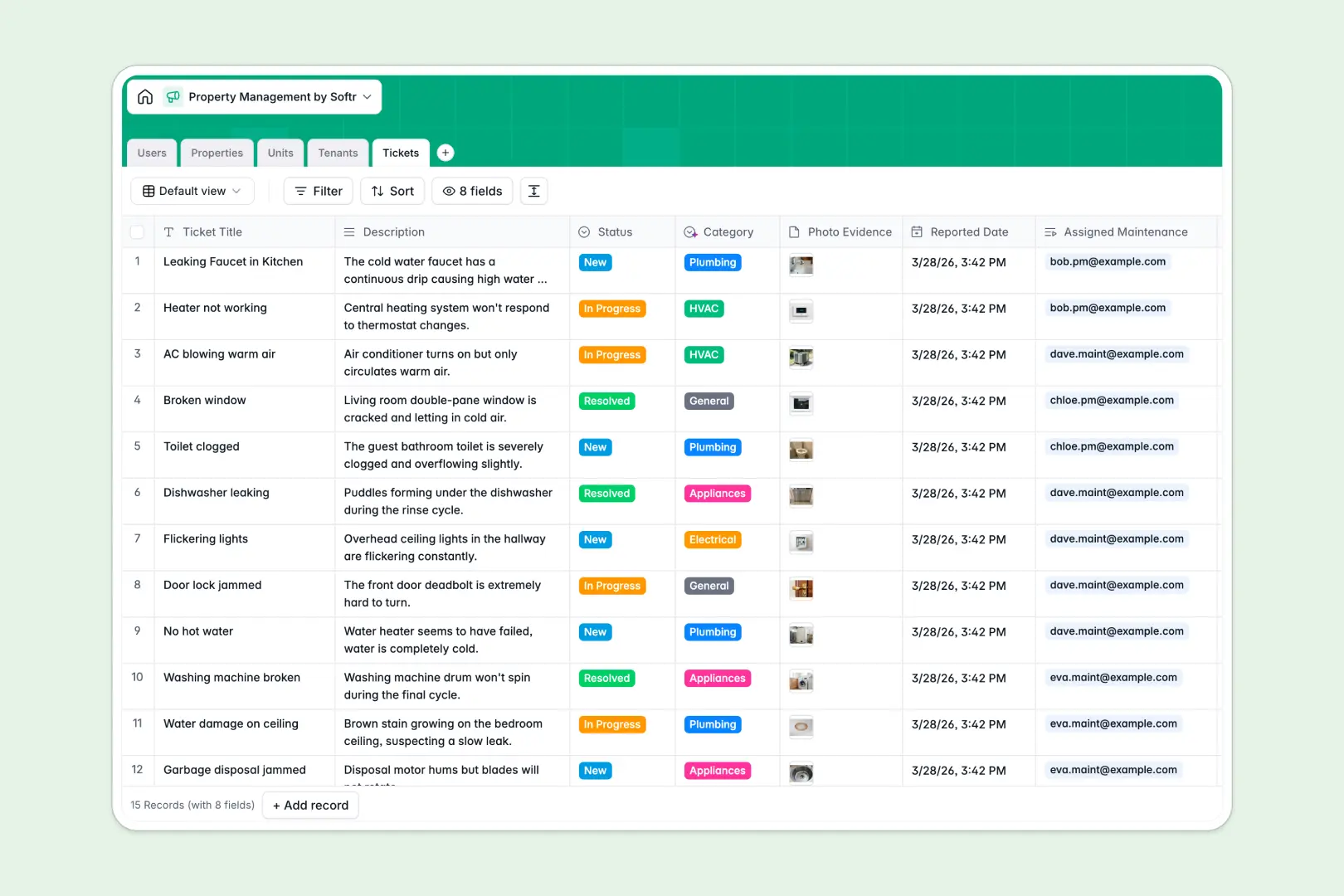
Your Property Management Database at a glance
This ready-to-use template tracks properties, individual units, tenant leases, and maintenance requests in one structured place.
It automatically connects real estate data, allowing you to instantly see which tenants occupy specific units and track assigned repairs.
Built-in AI automatically drafts property listings, categorizes incoming maintenance tickets by trade type, and generates quick tenant profile summaries.
Why property management gets messy in Excel
Managing multiple properties, leases, and scattered repair requests in spreadsheets quickly leads to buried data and broken rows.
What a structured database changes
Instead of typing the exact same property details across multiple tabs, relational tables keep your unit and tenant data natively connected.
Updating a tenant's lease automatically links to their unit without fragile VLOOKUPs. This is exactly what Softr Databases are designed for.
Everything scales cleanly as your portfolio grows, keeping lease files, repair photos, and financial numbers perfectly organized by column type.
What you can do with this template
Track vacant units, monitor active tenant leases, and manage incoming repair tickets from one single, centralized view.
Let Database AI agents do the administrative busywork by reading tenant descriptions to instantly classify incoming tickets as plumbing, HVAC, or electrical issues.
Start managing your true real estate portfolio immediately with a reliable, pre-built structure that prevents accidental data loss.
-
Users
Manage administrative staff and maintenance personnel with assigned roles
-
Properties
Track real estate assets with AI-generated property descriptions for marketing
-
Units
Organize individual rental spaces, vacancy status, and financial rent details
-
Tenants
Store occupant details with AI-powered profile summaries and lease timelines
-
Tickets
Manage repairs using AI to automatically categorize and route maintenance tasks
Who is this Property Management database for
This system is built for teams organizing real estate portfolios, leases, and daily tenant operations.
- Property Managers: Track unit occupancies, lease expirations, and rent amounts securely.
- Maintenance Teams: Review assigned repair tickets with attached photo evidence and location details.
- Real Estate Operators: Maintain a clean, scalable overview of all physical assets and vacant units.
How to take it further
Customizing this database is simple and instantaneous. Modify the ticket status options, adjust unit categories, or tweak the field names to fit your specific real estate needs.
Bring your existing tenant lists to life right away. Import your current spreadsheet logs via CSV to seamlessly migrate your properties and begin operating immediately.
When your team is ready, it is incredibly easy to build an app on top of this structured data. Create a dedicated web portal where tenants can safely log their own maintenance tickets or check lease dates online.
By leveraging advanced users and permissions, you can confidently ensure that maintenance staff or renters only interact with the property data specifically assigned to them.
-
1
-
2
-
3
-
4
Frequently asked questions
-
What is a property management database?
-
Why use a no-code database to build a property management system?
-
How can AI help managing data for property management?
-
Can I build an app with this property management database?
-
Is this Property Management Database free?
-
How is this database different from Excel for property management?
Start building today. It's free!
Build and launch your first app in under 30 minutes.