


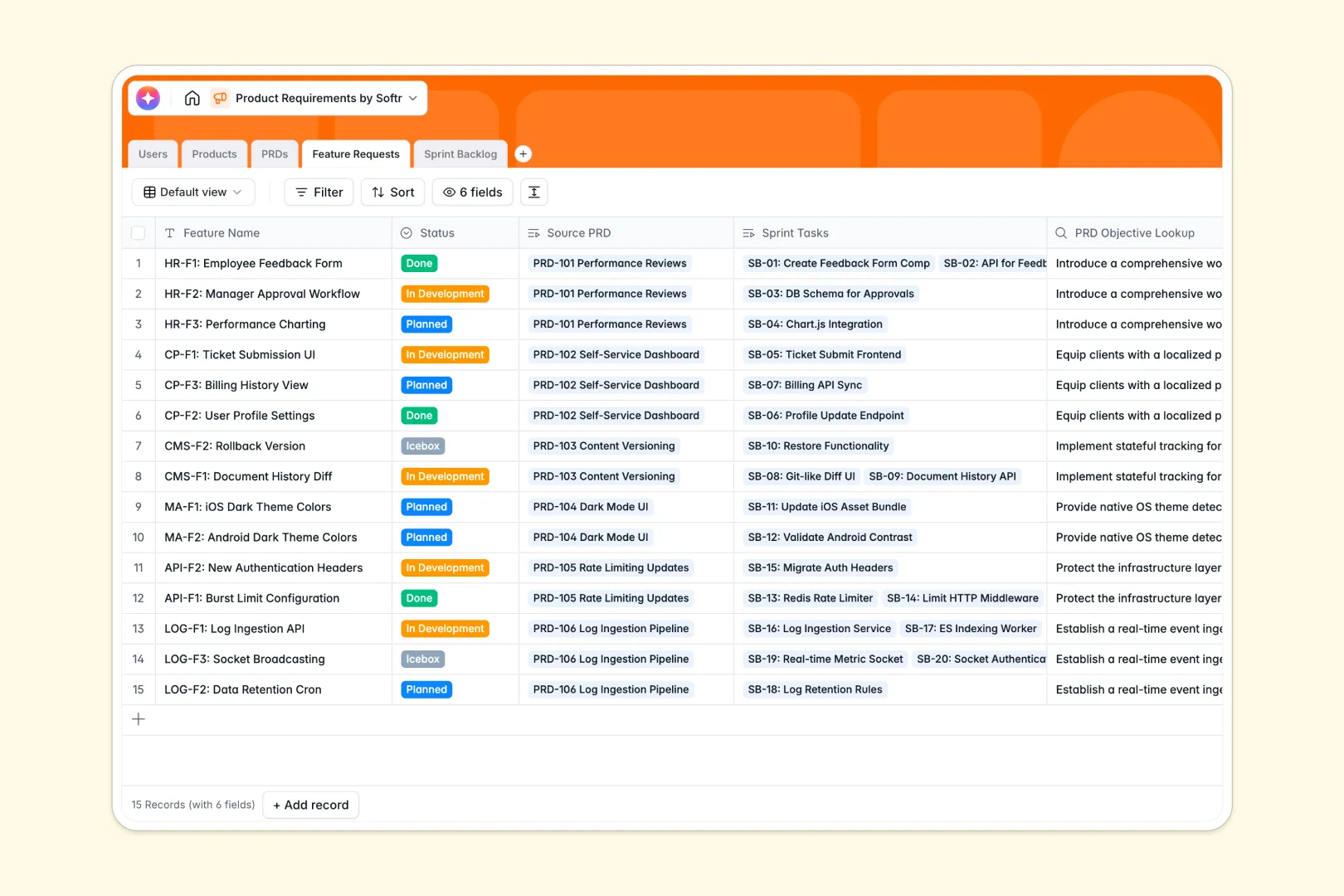
Your Product Requirements database at a glance
This template helps product teams centralize development specs and track feature shipping from a single source of truth. It replaces disconnected documents with a clean, relational structure that ensures everyone is building the right thing.
The structure connects Products to PRDs, breaks downstream requirements into Feature Requests, and maps specific execution details into your Sprint Backlog. Complete with user roles, team members always know who owns what module or task.
Armed with built-in AI fields, the database automatically drafts executive summaries and converts task titles into clear acceptance criteria directly inside your tables.
Why tracking product requirements in Excel gets messy
Product planning naturally evolves, but static spreadsheets struggle to keep up as specs turn into real development tasks. Row-by-row lists quickly turn into a chaotic graveyard of cloned objectives, mismatched versions, and broken lookups.
When product managers edit their PRDs in Excel sheets, engineers and designers often miss the updates entirely. Without a live connection to actual sprint tasks, teams waste endless daily standups recovering lost context and manually aligning data.
What a structured database changes
Unlike a flat grid, a structured database enforces organization by assigning rigid types to your data fields. Dates remain dates, and rich objective logs stay safely separated from development status menus.
Most importantly, your tables link natively. Assigning an owner to multiple features or mapping a PRD to a parent product occurs instantly without write-error risk or fragile calculations.
This is exactly what Softr Databases are designed for. They provide a backend that tracks relationships natively and scales smoothly without cluttered spreadsheets.
What you can do with this template
This template immediately establishes structural links across your product hierarchy, from high-level roadmap specs to task-level details. You can view progress status transparently and update requirements in real time.
By utilizing built-in AI fields, you can automatically draft bulleted requirements, pull key executive summaries, and generate crisp technical criteria instantly.
This ready-to-use template lets your product team transition directly from raw concept drafts into active development loops with absolute clarity.
-
Users
Manage team members, roles, and their ownership of products and PRDs
-
Products
Define high-level product modules and applications with their owners
-
PRDs
Detail product specifications including AI-generated executive summaries
-
Feature Requests
Track deliverables with AI-drafted technical requirements and criteria
-
Sprint Backlog
Manage dev tasks using AI to generate clear acceptance criteria
Who is this Product Requirements database for
This template serves cross-functional product squads that need clear alignment during development:
- Product Managers: Author clean specs, link features to master products, and automate executive updates.
- Engineering Teams: Access precise criteria side-by-side with feature specs directly in the sprint backlog.
- Design Teams: Track design-dependent features and view overall product objectives from one place.
- Agencies & Startups: Scale development cycles fast without losing project history or workflow control.
How to take it further
1. Customize the database
You can tailor every part of this schema to fit your unique methodology. Add customized select fields for priority levels, sprint weeks, or target platforms (iOS, Android, Web) using a simple visual editor.
2. Import your existing data
Migrate your legacy spreadsheets in minutes. The built-in CSV wizard lets you map column names directly to structured database properties so you lose zero active roadmapping progress.
3. Build a full app around it
Once your schema is set, easily convert it into a complete product management portal. Use the drag-and-drop interface builder to design tailored dashboard views for executives, PMs, and engineering leads.
By setting granular user roles and permissions, you decide who can edit the backlog while keeping developers focused only on the active sprint. Building workflows directly into this stack lets you trigger status alerts or Slack notifications instantly.
-
1
-
2
-
3
-
4
Frequently asked questions
-
What is a product requirements database?
-
Why use a no-code database to build a product requirements system?
-
How can AI help managing data for product requirements?
-
Can I build an app with this product requirements database?
-
Is this Product Requirements Database free?
-
How is a product requirements database different from Excel?
Start building today. It's free!
Build and launch your first app in under 30 minutes.