


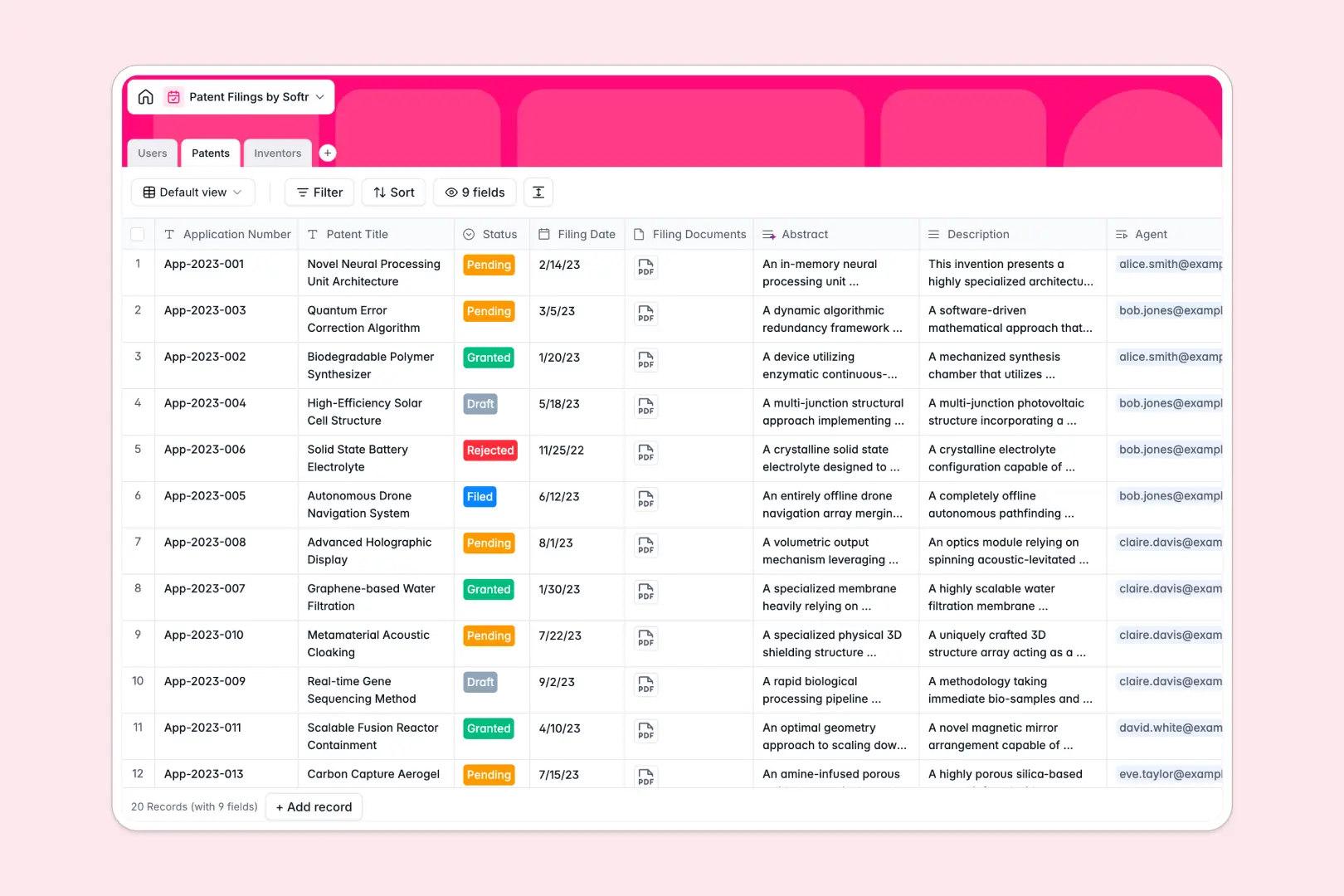
Your Patent Filings Database at a glance
This ready-to-use database gives you a clear, centralized system to track patent applications from draft to granted.
It connects three core tables—Patents, Inventors, and Users—so you can naturally link applications to specific patent agents and external innovators.
It also features built-in AI that automatically reads lengthy technical descriptions and writes a concise abstract for you instantly.
Why tracking patent filings in Excel breaks down
Managing intellectual property in Excel quickly becomes a messy liability. Spreadsheets force you to track individual inventors, legal agents, and complex statuses using fragile workarounds that inevitably break.
What a structured database changes
In a true database system, every filing follows strict formatting rules. Application dates remain reliable, PDF documents attach directly to the exact record, and statuses are locked to approved choices.
Instead of copying and pasting an inventor's details across dozens of rows, tables link together natively. This is exactly what Softr Databases are designed for.
What you can do with this template
You instantly gain real-time visibility over every single patent application assigned to your firm's agents. It also naturally calculates total filings per inventor without writing a single VLOOKUP formula.
AI features act as your legal assistant to speed up documentation. Native AI automatically summarizes complex technical descriptions into clean, single-paragraph abstracts as soon as a record is created.
-
Users
Manage internal patent agents and reviewers with roles and application access
-
Patents
Log patent applications with statuses and AI-generated invention abstracts
-
Inventors
Maintain profiles of original inventors and their total filing history
Who is this Patent Filings database for
This system is built for legal teams and R&D operators who need reliable oversight over their intellectual property pipeline.
- Law Firms & Patent Agents: Keep track of client filings, deadlines, and current statuses across multiple legal reviewers instantly.
- R&D Departments: Manage internal innovators, tie inventors directly to specific patents, and track total intellectual property submissions easily.
- Legal Ops Managers: Move away from scattered spreadsheets and unify all filing documents and approvals in one secure hub.
How to take it further
Native Softr Databases are completely flexible and easily adapt to how you work. You can effortlessly add new columns to track jurisdictions, update the dropdown options for statuses, or attach grant certificates.
Say goodbye to managing multiple outdated tracking sheets. You can easily map your existing CSV spreadsheets directly into these tables to populate your historical filings in seconds.
When your team needs more control, you can launch a custom portal on top of this structured data. Connecting your table to a full-stack interface is seamlessly handled within Softr.
This allows you to invite clients to log in and securely check their own application statuses. Thanks to robust users and permissions, they can upload necessary forms without ever seeing your internal operational tracking.
-
1
-
2
-
3
-
4
Frequently asked questions
-
What is a patent filings database?
-
Why use a no-code database to build a patent tracking system?
-
How can AI help managing data for patent filings?
-
Can I build an app with this patent filings database?
-
Is this Patent Filings template free?
-
Why is tracking patent applications in Excel a bad idea?
Start building today. It's free!
Build and launch your first app in under 30 minutes.