


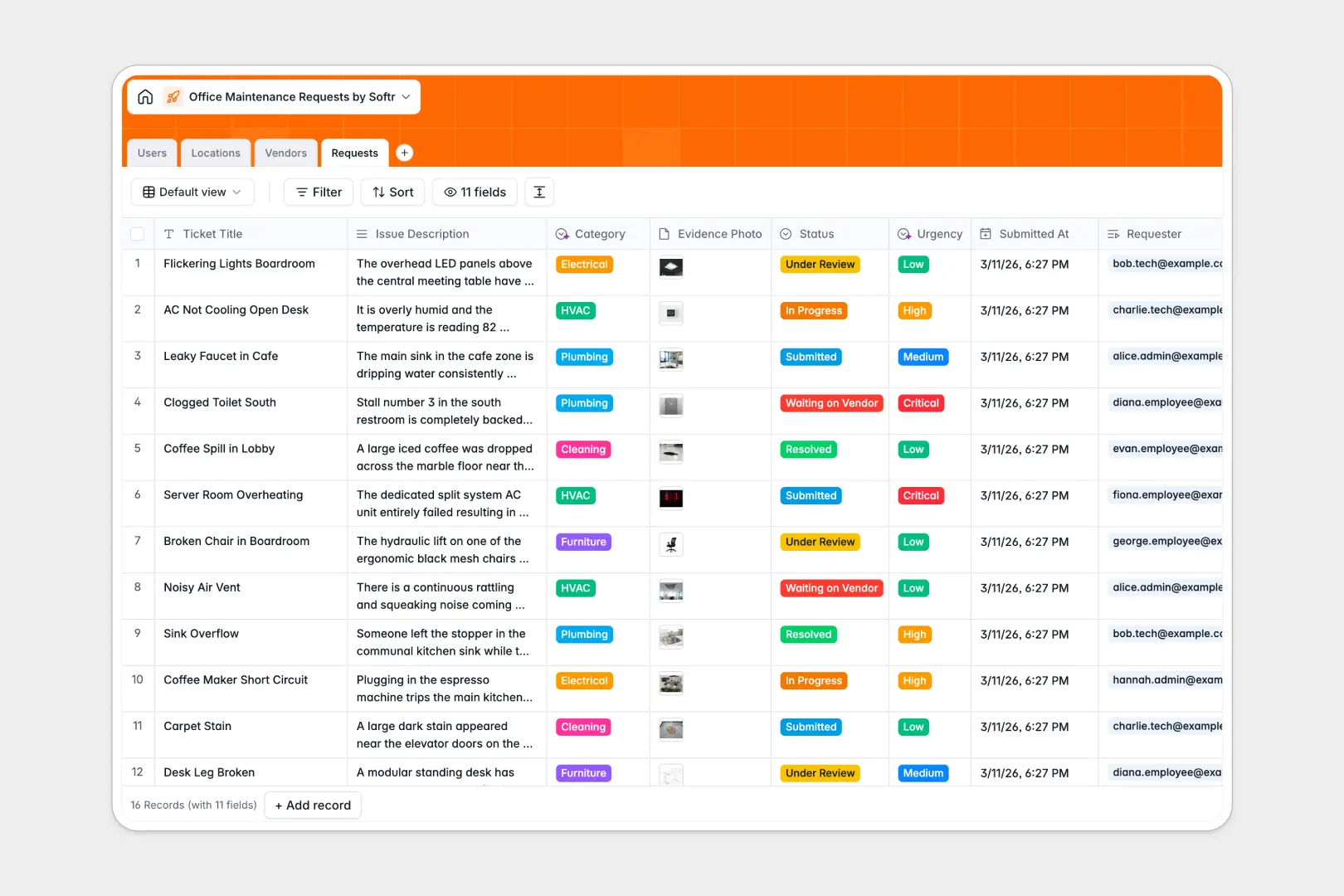
Your Office Maintenance Requests database at a glance
This template provides a central hub to log, assign, and track facility issues in real time. It ensures staff requests are routed to the right technicians without delays.
The system connects `Requests` directly to specific `Locations`, `Users`, and `Vendors`. This means every broken AC or lighting issue is mapped to an exact room and assigned repair contact.
Built-in AI automatically reads issue descriptions to instantly set the `Category` and `Urgency`. It even searches the web to build complete profiles of your external `Vendors`.
Why office maintenance gets messy in Excel
Managing facility tickets in spreadsheets usually means lost requests, buried status updates, and endless email chains. When emergency repairs hit, you don't have time to dig through endless rows to find out who reported the issue.
What a structured database changes
A proper database enforces structure so dates stay as dates and status dropdowns remain consistent. You can link a plumbing ticket directly to a specific breakroom and contractor without relying on fragile formulas.
This is exactly what Softr Databases are designed for. Everything stays clean, connected, and easy to navigate no matter how many tickets your team submits.
What you can do with this template
Instantly capture photos of damage and track the exact status from submitted to resolved. You can finally give your facility team a single source of truth for all pending jobs.
Native Database AI agents act as your dispatcher, instantly categorizing new tickets like "HVAC" or "IT/Hardware" and labeling them as critical or low priority. This keeps your queue organized automatically.
-
Users
Manage office staff and technicians including contact details and roles
-
Locations
Organize office zones and rooms to track reported maintenance trends
-
Vendors
Directory of specialists using AI to summarize service and reputation
-
Requests
Central ticket log using AI to categorize issues and assess urgency
Who is this Office Maintenance Requests database for
This system is built for teams that need to keep their physical workspaces safe, functional, and fully operational.
- Facilities Managers: Centralize all building repairs, track technician workloads, and monitor vendor performance in one place.
- Office Administrators: Give employees a reliable way to report broken equipment without cluttering your inbox.
- IT Departments: Separate hardware and networking tickets from general building repairs to ensure specialized routing.
- Operations Leads: Analyze issue trends across different floors and zones to proactively schedule maintenance.
How to take it further
Start by customizing the database to match your physical workspace. You can easily add your own floors to the `Locations` table or tweak the `Vendors` list to include your specific contractors.
Import your existing tickets and contractor lists in seconds. Just upload a CSV or use an API to bring your historical maintenance data directly into the new structure.
When you are ready, you can build an app to give staff a self-serve portal to submit tickets. With native users and permissions, employees only see their own requests while technicians see their assigned queue.
A clean database foundation makes spinning up these custom facility portals effortless.
-
1
-
2
-
3
-
4
Frequently asked questions
-
What is an office maintenance requests database?
-
Why use a no-code database to build an office maintenance tool?
-
How can AI help managing data for office maintenance?
-
Can I build an app with an office maintenance requests database?
-
Is this Office Maintenance Requests template free?
-
How is an office maintenance requests database different from Excel?
Start building today. It's free!
Build and launch your first app in under 30 minutes.