


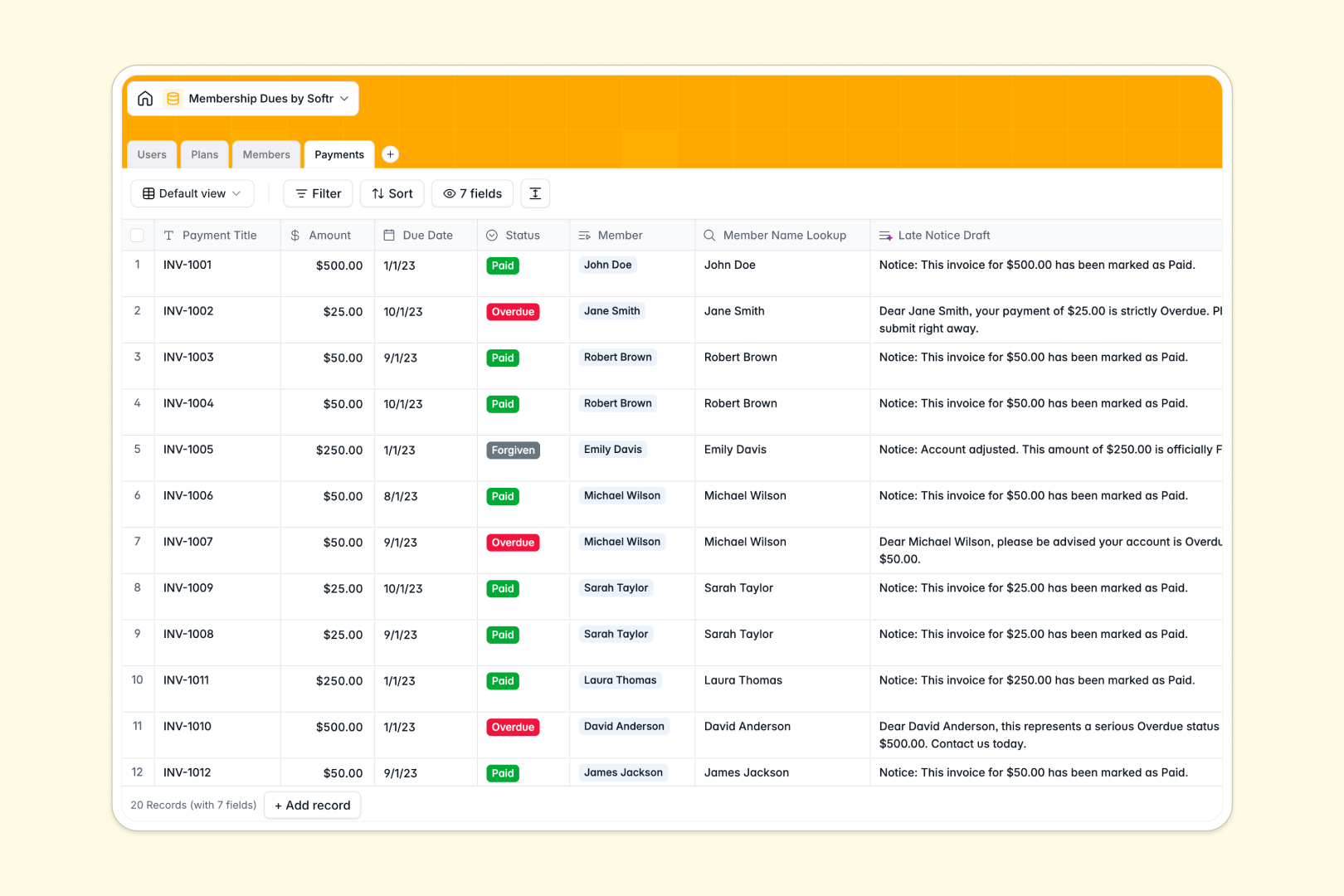
Your Membership Dues Database at a glance
This Membership Dues Database replaces chaotic spreadsheets with a structured, reliable system. It organizes members, tier plans, and payment logs so you always know exactly who owes what.
Instead of scattering data across tabs, native relational tables link everything seamlessly. Every payment connects directly to its member profile and specific plan, ensuring you never have to double-enter data.
Built-in AI features do the heavy admin lifting for you. As payment statuses change to overdue, the database automatically drafts personalized late notices and summarizes member profiles instantly.
Why tracking membership dues gets messy in Excel
When your membership base grows, managing billing cycles and payment statuses in Excel quickly turns into a nightmare of broken rows and outdated files.
What a structured database changes
In a spreadsheet, an accidental keystroke can overwrite a payment status or miscalculate an annual total. A structured system locks everything into proper field types—currencies stay currencies, and status changes are restricted to fixed dropdowns.
You also eliminate fragile VLOOKUPs by linking a member directly to their billing plan, keeping their payment history naturally clustered under their profile. This reliability is exactly what Softr Databases are designed for.
What you can do with this template
Instantly log and categorize payments by status, whether they are pending, paid, overdue, or forgiven. You can clearly see exactly how much revenue each membership plan generates as new members enroll.
You can also use built-in AI to automate your hardest communication workflows. The system instantly generates professional email drafts for overdue payments and summarizes member accounts without you writing a single word.
-
Users
Manage internal staff profiles, access levels, and member assignments
-
Plans
Define membership tiers with pricing and AI-generated benefit pitches
-
Members
Track client details and status with AI-powered profile summaries
-
Payments
Log dues and status while using AI to draft automated late notices
Who is this Membership Dues database for
This template is built for teams and organizations that need a reliable, error-free way to manage recurring revenue.
- Non-profits: Track donor memberships and ensure timely renewals without administrative bloat.
- Associations: Manage professional member tiers and maintain clear lists of active versus suspended members.
- Fitness Clubs & Gyms: Keep billing cycles organized and auto-generate notices when client accounts fall past due.
- Community Managers: Group members by subscription plans and instantly spot overdue accounts at a glance.
How to take it further
Customize the database to fit your exact billing structure instantly. You can easily modify the dropdown choices for membership tiers or add new fields to track offline payment methods.
Import your existing member list seamlessly to get started in minutes. Simply upload a CSV file of your current spreadsheet to populate the tables and instantly see who is active or past due.
When your organization is ready, you can transform this database into a fully functional client portal using Softr's interface builder. Members can log in securely to view their payment history, update their contact information, and check their active plans.
By configuring users and permissions, you guarantee that members only see their own dues, while staff get a complete overview of the organization's revenue. A well-structured database makes this app-building process completely effortless.
-
1
-
2
-
3
-
4
Frequently asked questions
-
What is a membership dues database?
-
Why use a no-code database to build a dues management system?
-
How can AI help managing data for membership dues?
-
Can I build an app with this membership database?
-
Is this Membership Dues Database free?
-
How is this template different from managing membership dues in Excel?
Start building today. It's free!
Build and launch your first app in under 30 minutes.