


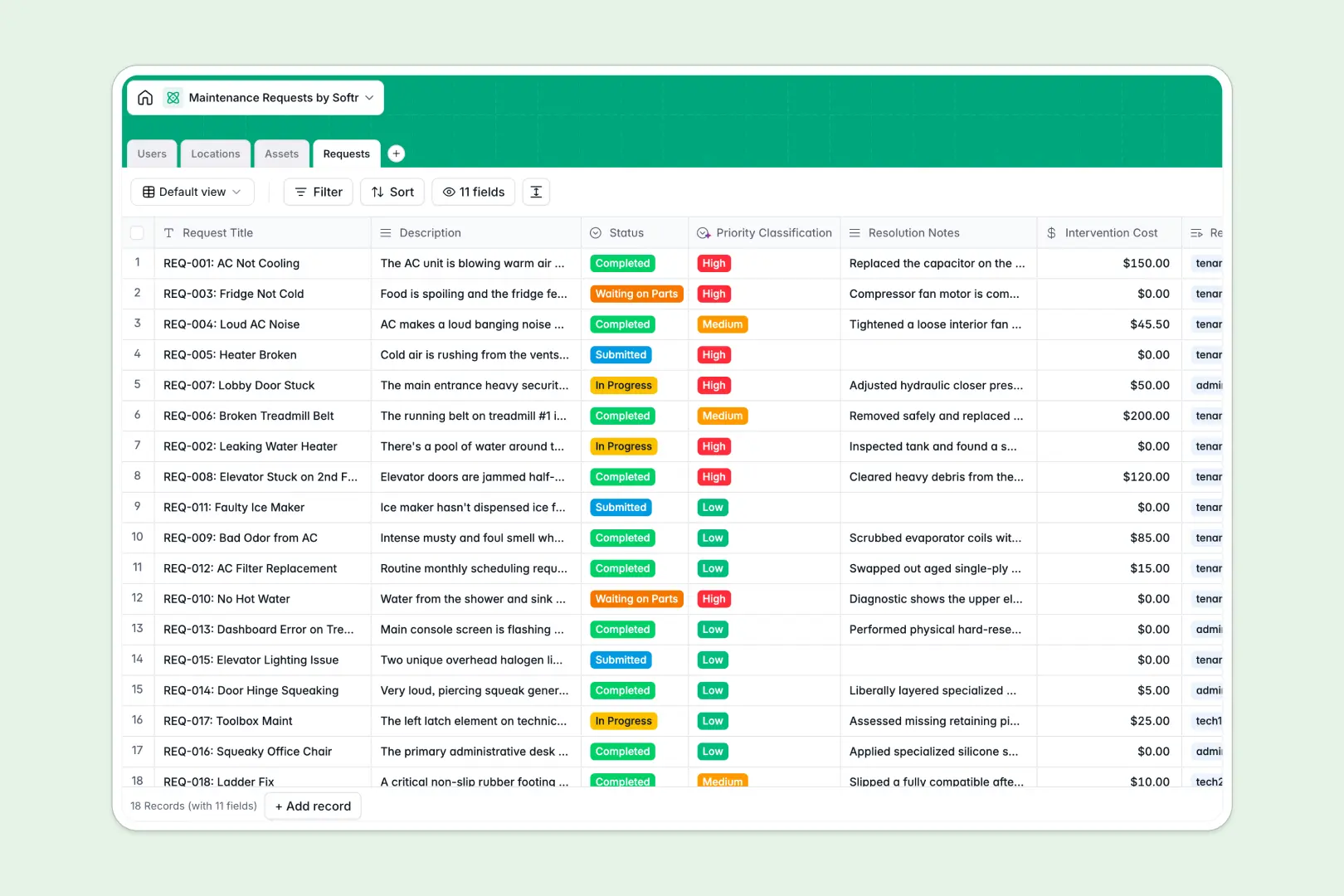
Your Maintenance Requests database at a glance
This template replaces messy spreadsheets by giving you a clear, centralized system to track work orders from submission to completion. You'll always know which technician is assigned, the status of the repair, and what asset is involved.
It connects everything naturally without fragile formulas. A single maintenance request is automatically linked to the tenant who submitted it, the exact building location, and the specific piece of equipment needing repair.
It also features built-in AI fields that act instantly on incoming data. The system automatically classifies the priority of requests and generates concise summaries of completed work based on technician notes.
Why tracking maintenance requests in Excel breaks down
Managing work orders in Excel quickly becomes a nightmare of mixed data types and lost information. When multiple people edit the same file, rows get deleted, attachments like photos of a leak get lost, and tracing an asset's repair history is nearly impossible.
What a structured database changes
A proper database ensures every column has a strict rule, so repair costs stay as currency and statuses remain consistent. Instead of relying on fragile VLOOKUPs, tables intuitively link together, making it simple to tie a repair history directly to a tenant or location.
This means your data remains clean no matter how many requests pile up. This is exactly what Softr Databases are designed for, giving you a reliable foundation that scales flawlessly.
What you can do with this template
You can ditch manual triage entirely. Using Database AI agents, incoming descriptions are instantly prioritized as low, medium, or high, telling your technicians exactly what to tackle first.
You'll also gain immediate visibility into repair costs and location bottlenecks. Live rollups automatically calculate your total cost of repairs per asset and the number of open requests per building altogether.
-
Users
Manage tenants and staff members with roles, emails, and phone numbers
-
Locations
Organize units and areas with tracking for open maintenance requests
-
Assets
Inventory equipment and appliances with purchase history and repair costs
-
Requests
Manage work orders using AI to classify priority and summarize tasks
Who is this Maintenance Requests database for
This template is perfect for teams looking to replace chaotic spreadsheets with a structured tracking system.
- Property Managers: Track open requests across all locations and monitor tenant submissions effortlessly.
- Maintenance Technicians: See assigned tasks, asset histories, and auto-generated work summaries in one clear view.
- Facilities Admins: Monitor repair costs through automated rollups to decide whether to repair or replace equipment.
How to take it further
This template is a native setup, meaning you can easily mold it to your exact processes. You can add new status options, create custom fields for specific equipment models, or adjust the AI prompt to read differently.
Bringing your existing work orders over is completely seamless. You can bulk upload your current CSVs or Excel sheets, instantly turning rows of raw text into heavily structured, linked records.
When your team is ready, you can easily turn this database into a proper operational portal using Softr's interface builder. Building an app on top of this structure allows you to give tenants a secure place to log tickets and technicians a mobile-friendly view.
Because your data is perfectly structured, setting up users and permissions takes just a few clicks. Tenants will only see the requests they’ve submitted, while admins get a global overview of every property.
-
1
-
2
-
3
-
4
Frequently asked questions
-
What is a maintenance requests database?
-
Why use a no-code database to build a maintenance tracking system?
-
How can AI help managing data for maintenance requests?
-
Can I build an app with this maintenance request database?
-
Is this maintenance requests template free?
-
Why do maintenance requests get messy in Excel?
Start building today. It's free!
Build and launch your first app in under 30 minutes.