


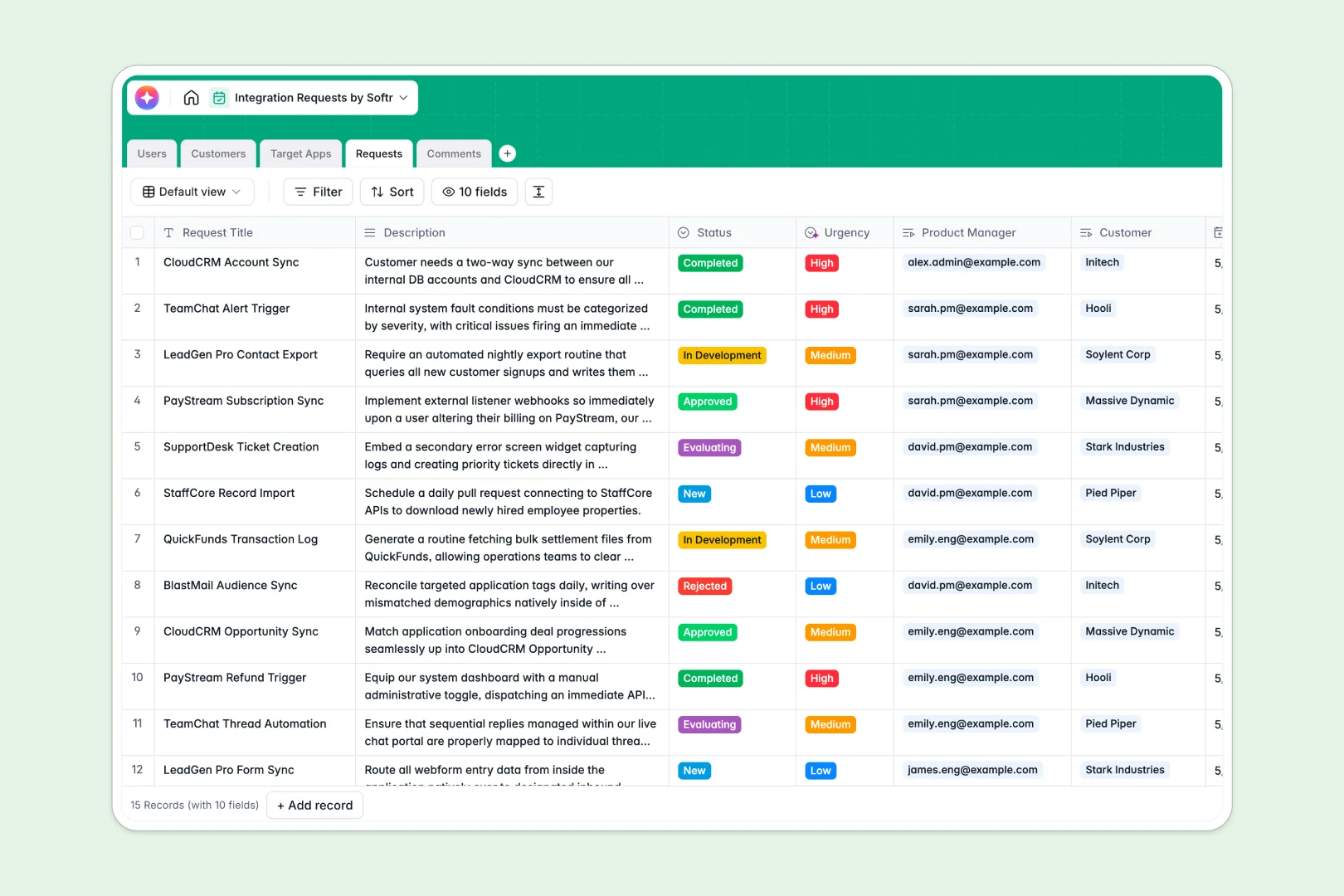
Your Integration Requests database at a glance
This template gives product and engineering teams a clear, centralized system to log, evaluate, and track customer integration requests. It eliminates scattered feedback and ensures every third-party app request is tied directly to the customer asking for it.
The template uses connected tables to map out your pipeline natively. You can link specific `Customers` to the `Target Apps` they want, assign a `Product Manager`, and keep all internal `Comments` in one organized place.
Built-in AI agents make triage effortless by automatically categorizing request urgency and summarizing long descriptions. It will even browse the web to draft accurate descriptions for newly requested apps based on their website URL.
Why tracking integration requests gets messy in Excel
Logging new feature or integration requests in Excel quickly turns into a chaotic list of isolated text strings. Without proper structure, you end up copy-pasting customer details across rows, losing track of identical requests, and missing critical context.
What a structured database changes
Instead of fragile formulas and endless scrolling, a true database uses relationships. You can link a dozen requests to one target CRM tool without duplicating data, ensuring your roadmap stays organized as it scales.
This is exactly what Softr Databases are designed for. Every column has a strict type—status dropdowns stay consistent, and customer emails stay formatted correctly.
What you can do with this template
Instantly start tracking the integration pipeline from "New" to "In Development," dynamically rolling up total requests per customer. Use Database AI agents to automatically research third-party app websites so your engineers instantly understand what the tool does.
Keep the team aligned by logging timestamped internal comments directly under each request. Everything is ready to use immediately, keeping your roadmap data clean and actionable.
-
Users
Manage internal team members with role assignments and access levels
-
Customers
Track client companies and their total volume of integration requests
-
Target Apps
Catalog third-party software with AI-powered web-sourced descriptions
-
Requests
Track development status with AI-powered summaries and urgency detection
-
Comments
Centralize team communication and internal updates on specific requests
Who is this Integration Requests database for
This database is built for product and engineering teams who need to prioritize their integration roadmaps based on real customer demand.
- Product Managers: Clearly see exactly which customers are requesting unbuilt integrations to guide roadmap priority.
- Engineering Leads: Access auto-generated technical summaries of requested apps before scoping the integration effort.
- Customer Success: Submit new requests on behalf of clients and easily check pipeline statuses without bothering developers.
How to take it further
Customizing this structure is incredibly simple. You can quickly edit the `Status` choices to match your specific agile workflow or add new categories to the `Target Apps` table.
Move out of Excel securely by bulk uploading your old integration wishlists via CSV import. The template will automatically organize the imported records into your clean, typed columns.
When you are ready to expand, you can use the interface builder to turn this specific database into a fully functional product portal. Create a secure login flow where customers can submit requests themselves and track their own tickets.
By setting up strict users and permissions, you guarantee clients only see their own company's requests while your internal team sees the complete pipeline. Leveraging a clean database from day one makes launching this app completely effortless.
-
1
-
2
-
3
-
4
Frequently asked questions
-
What is an integration requests database?
-
Why use a no-code database to track integration requests?
-
How can AI help manage integration requests?
-
Can I build an external request portal with this database?
-
Is this Integration Requests template free?
-
Why is this database better than tracking requests in Excel?
Start building today. It's free!
Build and launch your first app in under 30 minutes.