


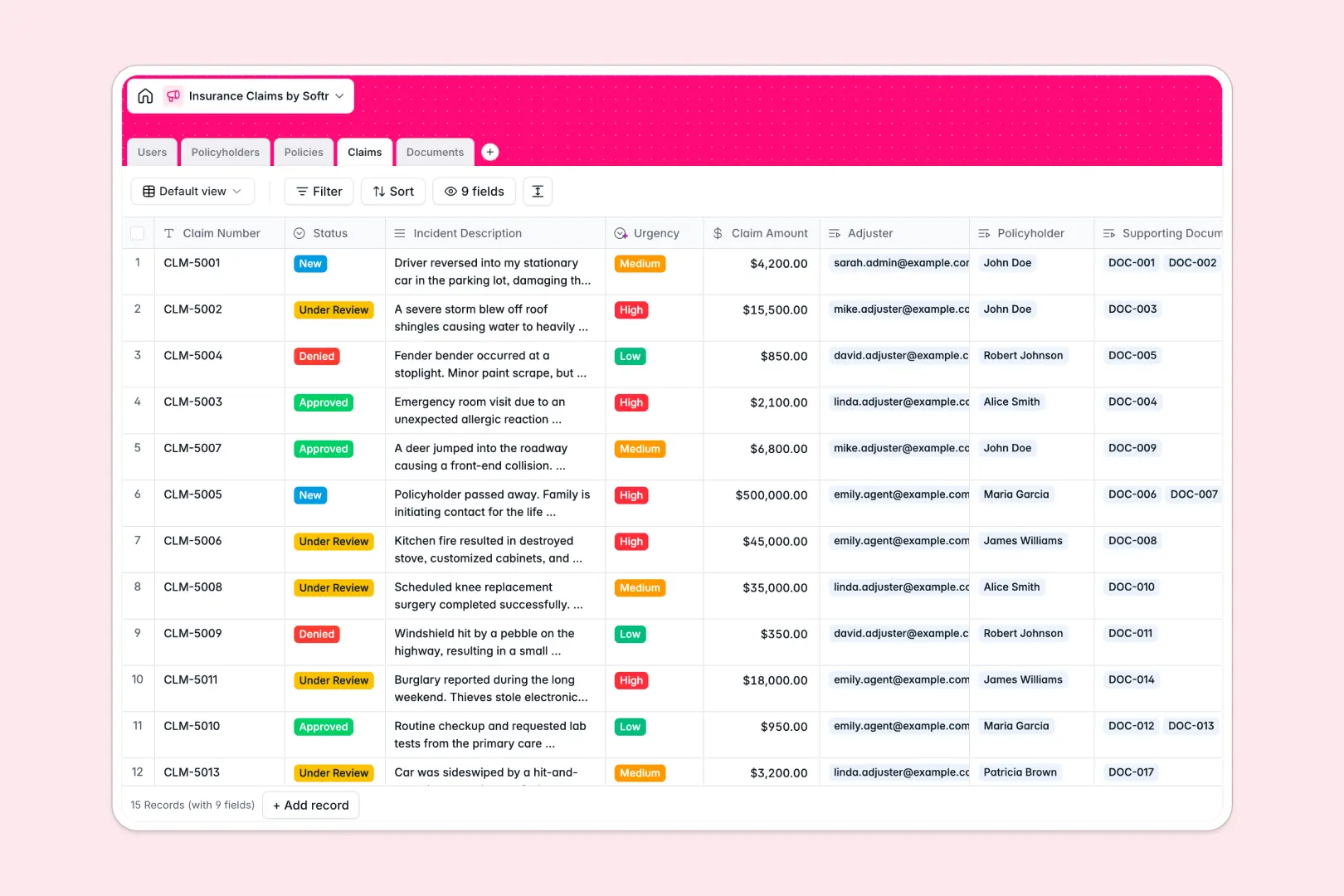
Your Insurance Claims database at a glance
The Insurance Claims database helps you track every incident from initial filing to final resolution in one secure place. It completely eliminates scattered emails and unorganized external folders.
The system connects policyholders directly to their active policies and filed claims. Adjusters can easily review incident descriptions, check coverage limits, and access uploaded evidence across perfectly linked tables.
As new claims arrive, built-in AI automatically assesses the incident description to set the urgency to Low, Medium, or High. It also generates clean, three-bullet summaries of uploaded documents to speed up the review process.
Why tracking insurance claims gets messy in Excel
Managing complex life, auto, or home insurance claims in spreadsheets quickly becomes a nightmare of broken formulas and lost files. Spreadsheets simply aren't built to handle multiple photos, police reports, and status updates across a single row.
What a structured database changes
Actively tracking claims requires giving every piece of information a strict format. Claim amounts stay as currency, statuses update cleanly without typos, and document uploads attach directly to the corresponding case.
Instead of running fragile VLOOKUPs to match a customer to their policy, you simply link tables naturally. If you want to tie an evidence photo to a specific claim, it takes one click without duplicating data.
This is exactly what Softr Databases are designed for. They keep your sensitive information connected, secure, and perfectly structured as your claim volume grows.
What you can do with this template
Instantly view a policyholder's entire history, including their active life or auto policies and total claim count. Centralize all related photos, medical records, and repair estimates directly alongside the adjuster's notes.
Your most tedious tasks are handled automatically without writing any code. The system reads incident reports to classify urgency instantly and summarizes lengthy document notes so adjusters can act faster.
-
Users
Manage claims adjusters and staff with roles, contact info, and avatars
-
Policyholders
Centralize customer contact details, addresses, and linked insurance files
-
Policies
Track active coverage details, financial limits, and effective dates
-
Claims
Handle incident reports using AI to classify urgency levels and status
-
Documents
Store evidence files with automated AI summaries for claim verification
Who is this Insurance Claims database for
This structured system is built for teams that need to process incidents quickly and accurately.
- Claims Adjusters: Review related evidence, policy limits, and AI-summarized notes from a single interconnected view.
- Insurance Agents: Keep track of policyholder profiles and quickly see how many claims a customer has filed historically.
- Operations Admins: Monitor the overall status of active cases, expired policies, and adjuster workloads without touching a spreadsheet.
How to take it further
Customize the database
It is incredibly easy to adapt this template to your specific insurance niche. You can instantly add new coverage types to the policies table or modify the claim status dropdown to match your team's exact workflow.
Import your existing data
Don't start from scratch if you already have files elsewhere. Easily map your existing policyholders and CSV claim logs directly into the system to get up to speed in minutes.
Build a full app around it
When your team is ready, you can transform this database into a fully functional client portal using Softr's interface builder. This allows policyholders to securely log in and upload their own damage photos or police reports directly.
By setting up clear users and permissions, you ensure that customers only see their personal policies and claim statuses. A well-structured database makes launching this kind of secure application completely seamless.
-
1
-
2
-
3
-
4
Frequently asked questions
-
What is an insurance claims database?
-
Why use a no-code database to build a claims management tool?
-
How can AI help managing data for insurance claims?
-
Can I build an app with this insurance claims database?
-
Is this Insurance Claims database free?
-
How is a claims database different from Excel?
Start building today. It's free!
Build and launch your first app in under 30 minutes.