


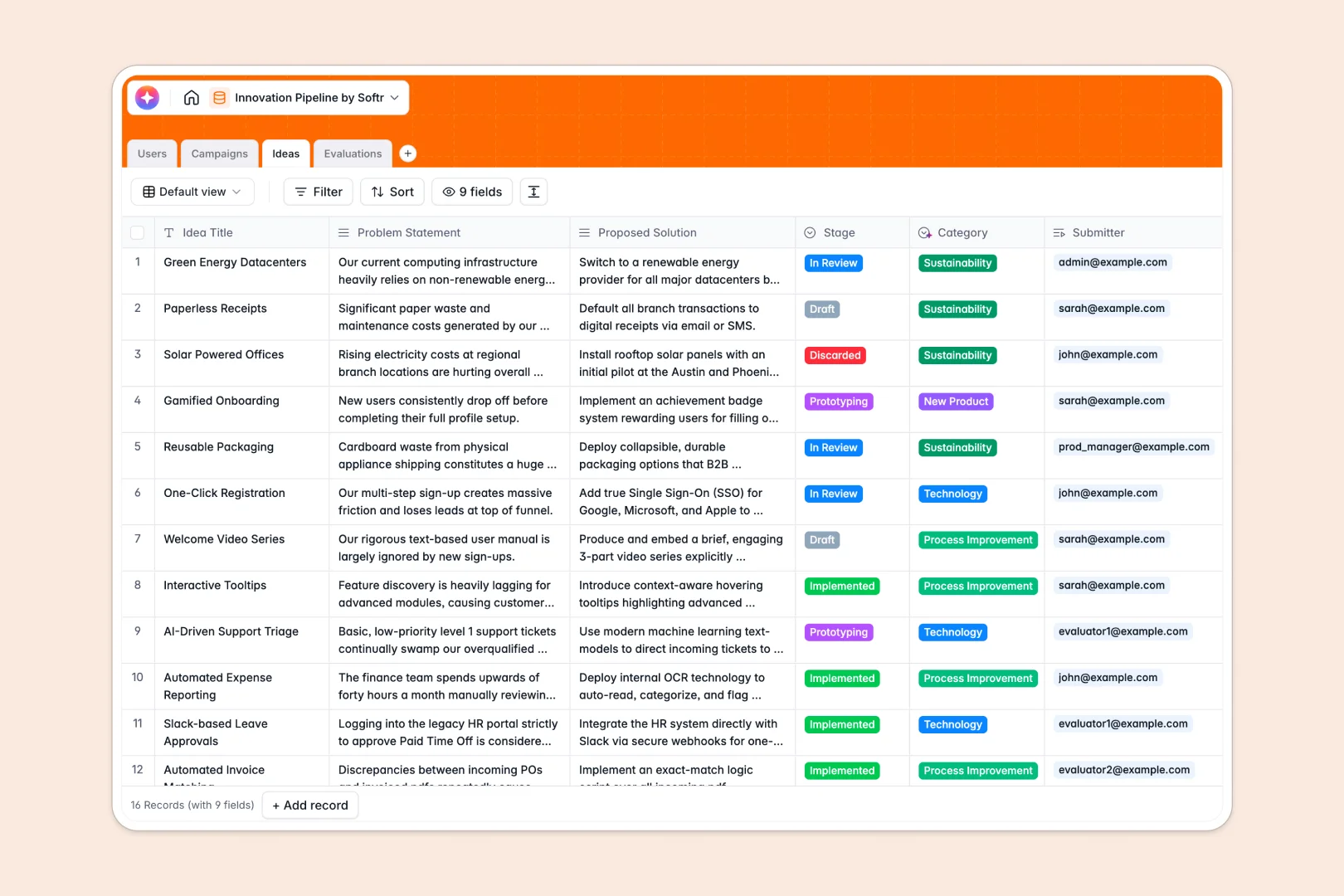
Your Innovation Pipeline database at a glance
This template streamlines your innovation pipeline from initial concept to final evaluation. It eliminates the chaos of lost submissions by giving every idea, campaign, and evaluation a proper, structured home.
The system is built on connected tables that naturally link your team's Ideas to specific Campaigns and Users. Simply capture a problem statement, assign it to a contributor, and let reviewers add structured Evaluations without messy data entry.
Built-in AI automatically drafts an executive pitch from the problem solving statement and categorizes proposals instantly. This means you spend less time formatting and more time driving actual innovation.
Why scaling an innovation pipeline gets messy in Excel
Managing an innovation pipeline in Excel quickly turns into a nightmare of scattered tabs and mixed text formats. Broken links across different campaigns make it impossible to track progress clearly.
What a structured database changes
A structured database keeps your data strictly organized and reliable. Instead of typing the same campaign details across fifty rows, you connect an idea directly to a campaign with a clean, unbreakable link.
This is exactly what Softr Databases are designed for. They enforce structure so ratings stay as numbers, dates stay as dates, and your data never breaks as submission volumes grow.
What you can do with this template
You can instantly launch thematic campaigns, collect formatted ideas, and assign structured text and numeric evaluations in one unified workspace. Everything stays connected perfectly without running a single fragile formula.
With native AI fields, the template automatically generates high-impact pitches and categorizes ideas based on the proposed solution. You get a ready-to-use, intelligent pipeline that removes the friction of manual data cleanup.
-
Users
Manage platform members including administrators, contributors, and evaluators
-
Campaigns
Organize thematic innovation challenges and track submission progress and deadlines
-
Ideas
Store innovation proposals with AI-generated pitches and automated classification
-
Evaluations
Record feasibility and impact scores with feedback from specialized evaluators
Who is this Innovation Pipeline database for
This system is ideal for teams wanting to source, evaluate, and implement internal ideas efficiently.
- Product Teams: Source feature ideas and track conceptualization stages without losing valuable feedback.
- Operations Leads: Manage process improvement campaigns and gather structured evaluations from multiple departments.
- Innovation Managers: Run thematic challenges, oversee idea progress, and quantify impact scores easily.
How to take it further
It takes seconds to customize this database to your exact workflow. Modify the select field values in the Ideas table to match your organization's specific innovation stages.
Bring your past innovation concepts right into the system using a simple CSV import. You can instantly map your existing data to the structured fields and pick up where you left off.
When you're ready to scale, you can build an internal portal using Softr's interface builder. This connects directly to your database, allowing staff to submit ideas and reviewers to score them through custom frontend forms.
By configuring users and permissions, you can ensure that evaluators only see the ideas assigned to them while admins monitor all campaigns. A well-structured database makes this entire app-building process effortless.
-
1
-
2
-
3
-
4
Frequently asked questions
-
What is an innovation pipeline database?
-
Why use a no-code database to build an innovation pipeline?
-
How can AI help managing data for an innovation pipeline?
-
Can I build an app with an innovation pipeline database?
-
Is this Innovation Pipeline template free?
-
How does an innovation pipeline database beat Excel?
Start building today. It's free!
Build and launch your first app in under 30 minutes.