


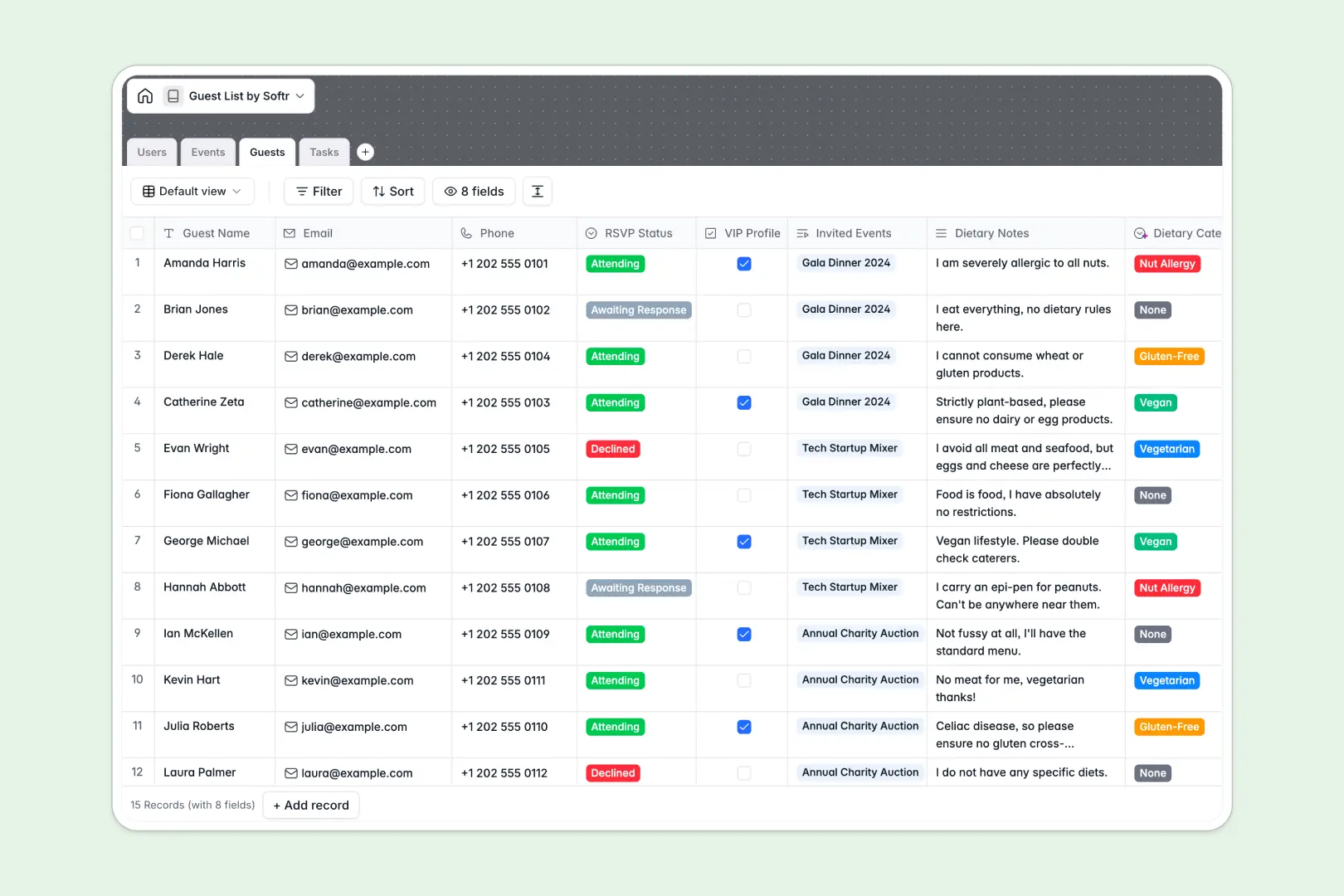
Your Guest List Database at a glance
This template replaces scattered spreadsheets with a single truth for your events, attendees, and checklists. It ensures you always know exactly who is coming, what they need, and what tasks are left to complete.
The system perfectly connects your data behind the scenes. An Events table links directly to your Guests and Tasks, allowing you to see every RSVP, dietary restriction, and pending to-do item tied to a specific party.
Best of all, built-in AI handles the tedious work automatically. It instantly categorizes rough dietary notes into specific labels, writes engaging event descriptions, and extracts step-by-step checklists for your team.
Why managing guest lists in Excel breaks down
Trying to track fluctuating RSVPs, multiple event dates, and dynamic dietary preferences across rigid spreadsheet rows quickly becomes a chaotic mess of copy-pasting.
What a structured database changes
In a spreadsheet, attaching a single guest to multiple events usually means duplicating rows or relying on fragile formulas. Columns meant for confirmed RSVPs easily get cluttered with random text, leaving you with unreliable data on the day of the event.
A relational system fixes this by enforcing clear structure and connecting data seamlessly. Guests, events, and tasks each have their own space, but link together effortlessly without breaking.
This is exactly what Softr Databases are designed for. You get absolute data integrity, meaning a VIP guest's dietary restrictions stay perfectly attached to their profile across every event they attend.
What you can do with this template
You can instantly assign event prep tasks to organizers, track RSVP statuses, and calculate expected attendance numbers through automated rollups. Everything works smoothly right out of the box.
Using Database AI agents, this template also acts as a smart event coordinator. Drop in messy dietary notes from an email, and the AI automatically tags them as Gluten-Free or Vegan so your catering team is ready.
Start organizing immediately with a reliable system. It gives you the perfect foundation to scale alongside your most ambitious events.
-
Users
Manage administrative personnel, contact info, roles, and event assignments
-
Events
Schedule events using AI to generate engaging rich-text marketing summaries
-
Guests
Track invitees and RSVP status using AI to categorize dietary requirements
-
Tasks
Organize event logistics with AI-extracted action steps and status tracking
Who is this Guest List Database for
This ready-to-use template is designed for teams and professionals who need an organized, automated approach to event management.
- Event Organizers: Track tasks, deadlines, and RSVP responses in real time without digging through email threads.
- Catering Managers: Get instant, AI-categorized summaries of dietary restrictions like vegan or nut allergies well before the event surfaces.
- VIP Coordinators: Maintain detailed profiles on high-profile attendees to guarantee a flawless guest arrival and experience.
- Administrative Assistants: Streamline routine event prep by connecting guests, scheduled timing, and daily checklists into one clear view.
How to take it further
Editing this template is incredibly simple since it relies on native columns and intuitive settings. You can easily add new RSVP statuses, modify the AI dietary classification categories, or add new checklist steps for your organizers.
Bring your historical event data over instantly to hit the ground running. You can easily drag and drop CSV files to populate your existing guests and users, ensuring no historical contact is left behind.
When your team is ready, you can seamlessly transition this internal database into an interactive portal. You can build an app that allows invitees to log in securely, view their specific invitations, and update their own RSVPs directly.
By fully configuring users and permissions, you can ensure external guests only see their own tickets while your admin team retains full visibility. Starting with a cleanly structured database makes launching a powerful external app effortless.
-
1
-
2
-
3
-
4
Frequently asked questions
-
What is a guest list database?
-
Why use a no-code database to build an event management tool?
-
How can AI help manage data for events and guest lists?
-
Can I build an app with this guest list database?
-
Is this Guest List Database template free?
-
Why is an event database better than Excel or Google Sheets?
Start building today. It's free!
Build and launch your first app in under 30 minutes.