


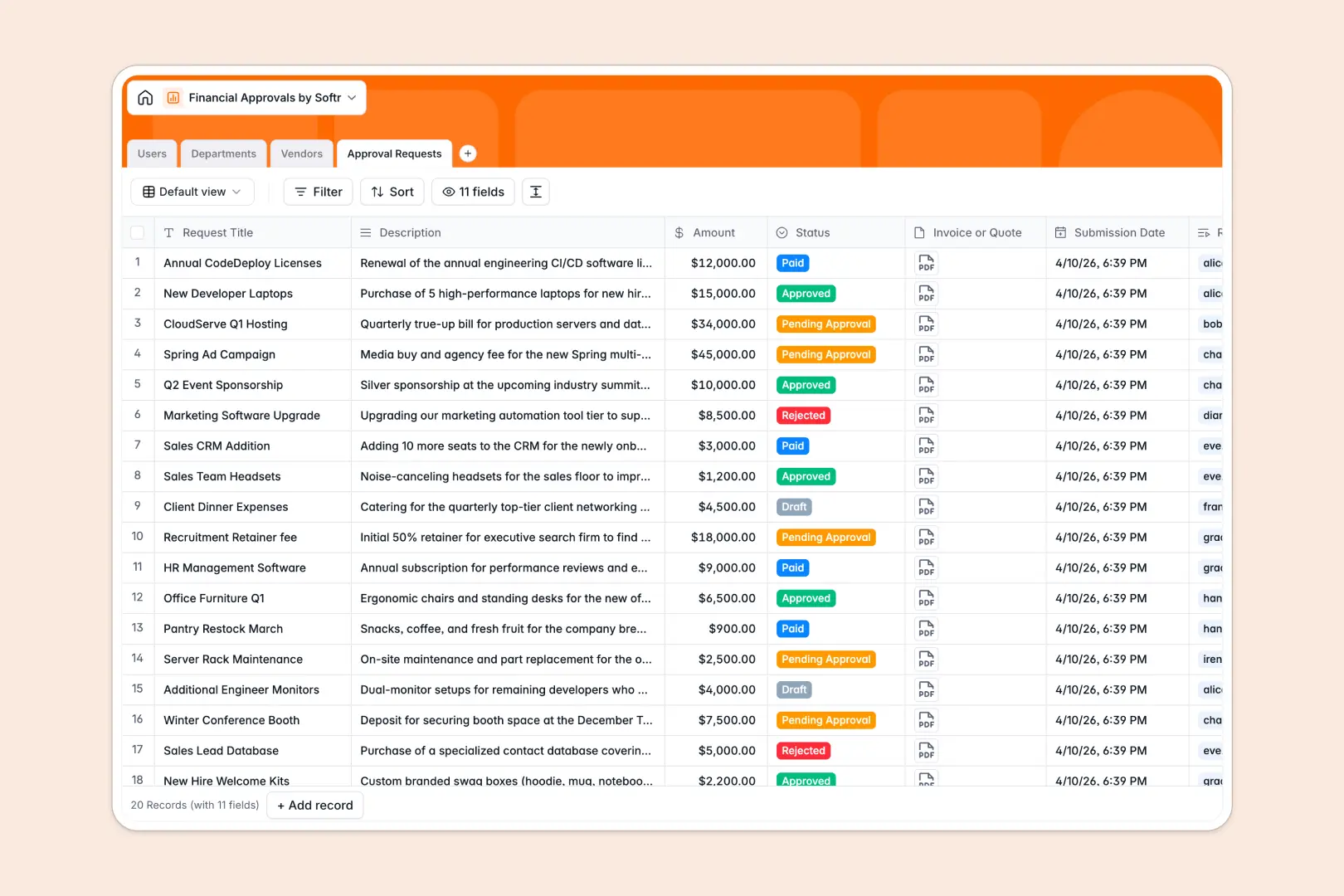
Your Financial Approvals database at a glance
This template replaces scattered email threads and rigid spreadsheets with a centralized system for tracking company spend. Requesters, managers, and finance teams can log, review, and finalize requests in complete clarity.
Users are linked directly to their Departments, which maintain real-time budget limits, while Vendors are logged alongside categorized transactions. Each Approval Request cleanly houses the description, requested amount, current status, and attached invoices, naturally connecting every piece of the puzzle.
Integrated AI steps in to accelerate the review process by instantly generating bulleted executive summaries for quick decision-making. It also automatically searches the web to build up-to-date vendor profiles saving your operations team hours of manual research.
Why financial approvals get messy in Excel
When you manage company spend in Excel, the entire process quickly becomes fragile. Columns mix text with dates, crucial invoices can't be properly attached, and formulas used to track overall department budgets inevitably break.
What a structured database changes
A true database ensures every piece of data is reliable and tightly connected. Instead of retyping department names or hoping a VLOOKUP holds up, your requests link directly to unified department records to accurately roll up total approved spending.
Attachments like quotes and invoices stay safely bound to the specific request, and columns enforce correct formatting. This reliable foundation is exactly what Softr Databases are designed for.
What you can do with this template
You can immediately begin logging secure requests, attaching official quotes, and monitoring request statuses across the pipeline. Department managers can see budget caps right next to total spending in real time.
With native Database AI agents, you completely eliminate manual data gathering for new contractors. The system proactively curates context for unknown vendors and condenses lengthy request descriptions into clear summaries for faster managerial sign-offs.
-
Users
Manage system users with roles, contact info and financial access levels
-
Departments
Monitor organizational units with budget caps and total spending tracking
-
Vendors
Organize suppliers using AI to research and generate company descriptions
-
Approval Requests
Log financial requests with AI-generated summaries for faster approvals
Who is this Financial Approvals database for
This system is built for teams that need to process daily spend securely and efficiently.
- Finance Teams: Centralize incoming requests, ensure all invoices are attached, and maintain complete audit trails.
- Department Managers: Track team expenses against approved budget limits in real time without waiting for monthly reports.
- Operations Leads: Keep your vendor directory organized, centralized, and automatically enriched with accurate context.
How to take it further
Customize the database
You can easily tailor this template to fit your exact procurement rules. Add new options to the Status select field, adjust your vendor categories, or create specific fields to track tax information.
Import your existing data
Ready to transition out of your old spreadsheets? Use bulk CSV imports or API endpoints to instantly migrate your employee directory, historical vendor data, and past requests into the live system.
Build a full app around it
When your team is ready to scale, you don't need to keep everyone working directly inside the backend tables. You can use an interface builder to turn this exact database into a user-friendly internal procurement portal.
By layering robust users and permissions, you ensure requesters only ever see their own personal submissions while department managers get a broader view of their team's budget. Starting with a perfectly connected, structured database makes this entire app-building process effortless.
-
1
-
2
-
3
-
4
Frequently asked questions
-
What is a financial approvals database?
-
Why use a no-code database to build a financial approval tool?
-
How can AI help managing data for financial approvals?
-
Can I build an app with this financial approvals database?
-
Is this Financial Approvals template free?
-
Why is this database a better alternative to Excel for approvals?
Start building today. It's free!
Build and launch your first app in under 30 minutes.