


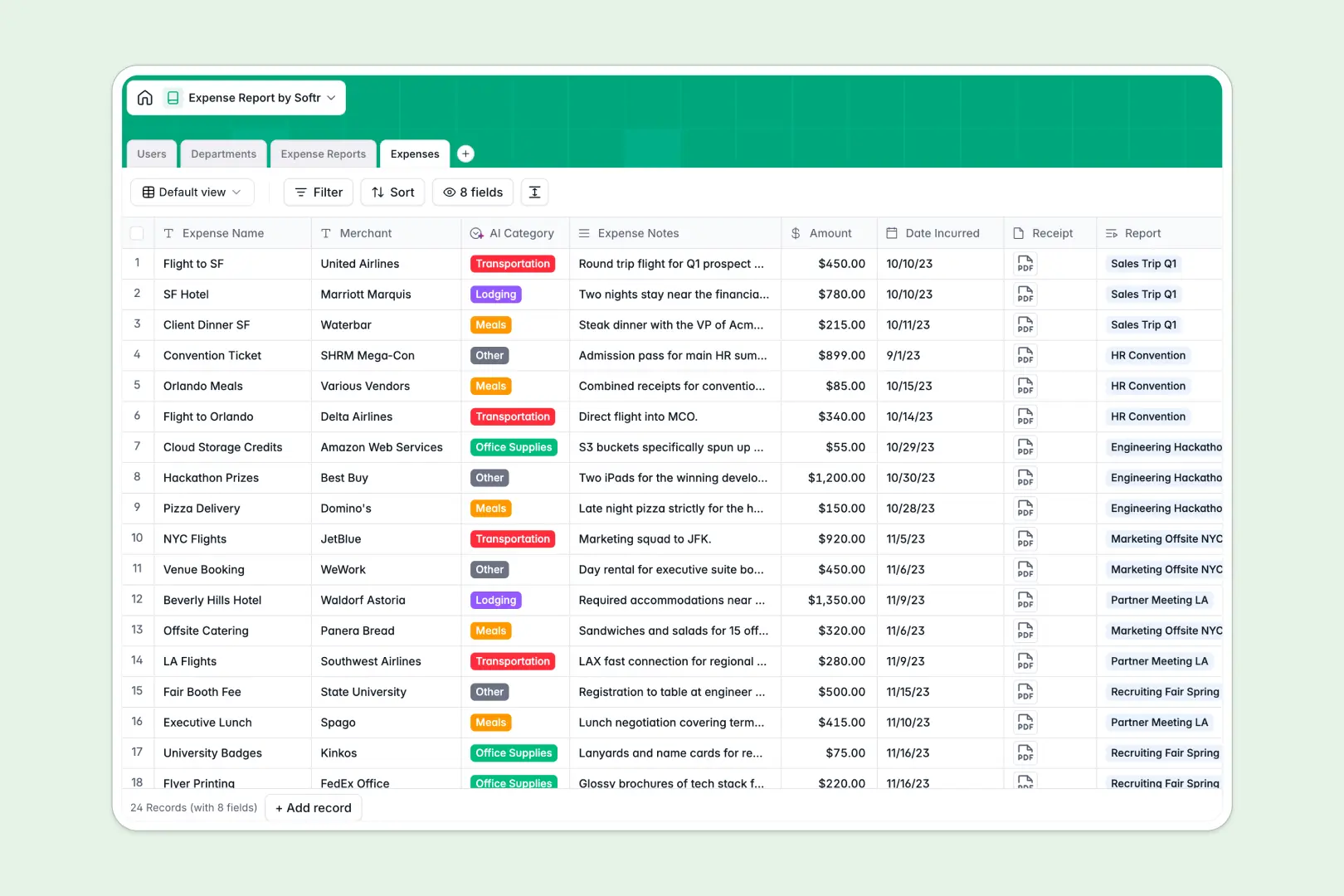
Your Expense Report database at a glance
This template gives your team a centralized system to submit, categorize, and approve employee spending. It replaces scattered receipts and manual data entry with a streamlined, error-free workflow.
The structure relies on distinct, connected tables for Users, Departments, Expense Reports, and individual Expenses. This means every line-item automatically rolls up into its master report and ties directly back to the submitting employee.
Built-in AI takes the heavy lifting out of compliance and data entry. When a new expense is logged, AI automatically assigns the correct category based on the notes, while an AI audit generates a compliance summary for approvers.
Why managing expenses gets messy in Excel
When you track company spending in Excel, you inevitably end up with mixed data formats, mislaid receipt attachments, and a chaotic approval chain that relies on emails.
What a structured database changes
In a spreadsheet, connecting an employee’s line-item expense to their department’s annual budget requires fragile VLOOKUPs that break when someone deletes a row. A true database enforces structure: currencies stay currencies, attachments stay securely linked, and relational connections keep data intact automatically.
This is exactly what Softr Databases are designed for. Instead of copying and pasting data across tabs, you connect records natively so your organizational spending is always accurate and easy to navigate.
What you can do with this template
You can capture individual expense receipts, group them into submission batches, and route them to department heads for approval in one seamless flow. Submissions calculate totals automatically through rollups, eliminating math errors.
The template also comes pre-configured with native database AI agents that act as your automated financial assistants. They instantly categorize incoming expenses as Travel, Meals, or Lodging, and summarize expense notes to flag potential compliance issues before an approver even opens the report.
-
Users
Manage employee profiles, departmental roles, and approval permissions
-
Departments
Organize business units and track their specific annual budget limits
-
Expense Reports
Batch expenses for review with an AI summary of overall compliance
-
Expenses
Track individual receipts using AI to automate line-item categorization
Who is this Expense Report database for
This system is built for growing teams that need a reliable and scalable way to track company spending.
- Finance Teams: Maintain complete visibility into departmental budgets and ensure all spending is documented.
- Department Heads: Review and approve aggregated expense reports from team members seamlessly.
- Operations Managers: Standardize the reimbursement process across the entire company.
- Employees: Submit individual expenses on the go and track the status of reimbursements.
How to take it further
Customize the database
You can easily adapt this template to fit your company's specific financial policies. Rename the default expense categories, adjust the approval status labels, or add custom fields to track internal project codes.
Import your existing data
If you currently track spending in Excel, you can upload your existing data via CSV in seconds. This allows you to migrate historical budgets and past reports without skipping a beat.
Build a full app around it
Once your data is structured, you can create a custom internal portal for your team to use on mobile or desktop. You naturally won't want every employee seeing the whole company's sensitive spending data.
By setting up users and permissions, you can restrict access so employees only see their own submissions while managers see requests from their direct reports. A well-structured database makes building these secure, tailored apps incredibly simple.
-
1
-
2
-
3
-
4
Frequently asked questions
-
What is an expense report database?
-
Why use a no-code database to build an expense tracking tool?
-
How can AI help managing data for expense reports?
-
Can I build an app with an expense report database?
-
Is this Expense Report database free?
-
How is an expense report database different from Excel?
Start building today. It's free!
Build and launch your first app in under 30 minutes.