


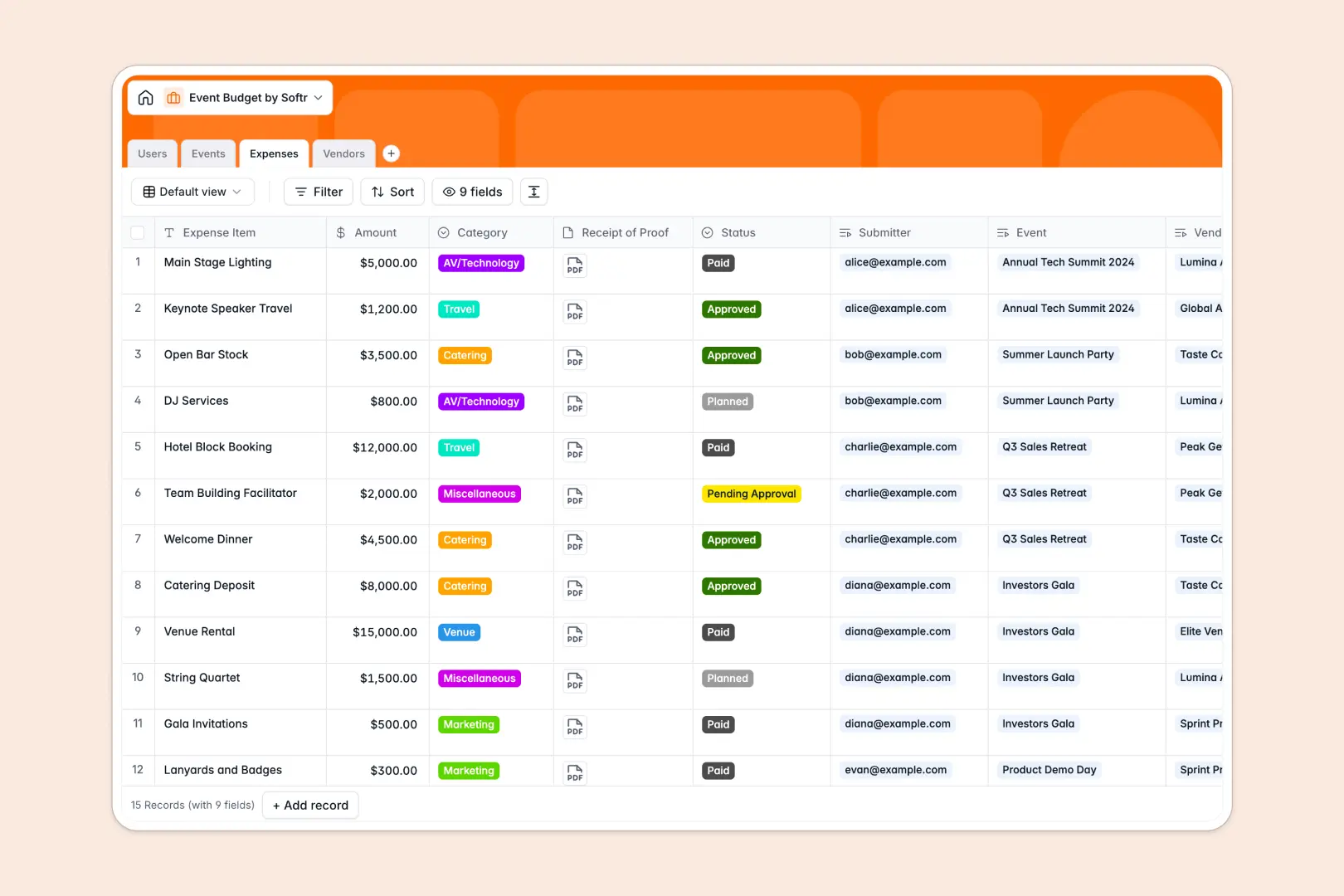
Your Event Budget database at a glance
This template tracks total allocations, individual expenses, and vendor payments so you never overspend on an event.
It links your Events directly to individual Expenses and Vendors, using automated formulas to calculate your remaining budget instantly.
Built-in AI automatically drafts project briefs, writes expense justifications, and searches the web to build services profiles for your newly added vendors.
Why event budgets get messy in Excel
Tracking a multi-part event in spreadsheets quickly turns into a maze of broken formulas, hidden costs, and untraceable receipts.
What a structured database changes
Instead of copy-pasting vendor details across multiple sheets, a relational setup keeps everything connected logically. You can link a categorized expense directly to a specific event and vendor in one click.
Every column has a strict purpose—currencies stay currencies, and receipts are attached natively to the expense row. This is exactly what Softr Databases are designed for.
What you can do with this template
Log costs like catering and venue rentals, assign them to team members, and track the exact remaining budget in real time.
You can also leverage Database AI agents to automatically research a vendor's website and summarize their services before you even sign a contract.
-
Users
Manage internal team members, their roles, and track their expenses
-
Events
Track event budgets and use AI to generate internal project briefs
-
Expenses
Log costs and use AI to generate professional budget justifications
-
Vendors
Manage service providers and use AI to research their business profiles
Who is this Event Budget database for
This ready-to-use template is built for teams managing complex events and tight margins:
- Event Managers: Track total budget allocations versus actual spending in real time.
- Finance Teams: Review categorized expenses and attached receipts pending approval.
- Vendor Coordinators: Maintain a central directory of service providers and total amounts paid.
How to take it further
Start by adjusting the expense status options or adding new expense categories like "Swag" to fit your specific needs. Because it's a native Softr database, customizing fields takes seconds.
If you have historical event costs or a master vendor list mapped out, you can import it instantly via CSV to populate your tables.
When your team needs an easier way to submit expenses, you can use the interface builder to create an internal portal connected directly to this data.
By configuring users and permissions, you can ensure event managers only see and approve budgets for the events they directly oversee. A well-structured database makes launching custom tools incredibly simple.
-
1
-
2
-
3
-
4
Frequently asked questions
-
What is an event budget database?
-
Why use a no-code database to build an event budget tracker?
-
How can AI help managing data for event budget planning?
-
Can I build an app with this Event Budget database?
-
Is this Event Budget database free?
-
How is an event budget database different from Excel?
Start building today. It's free!
Build and launch your first app in under 30 minutes.