


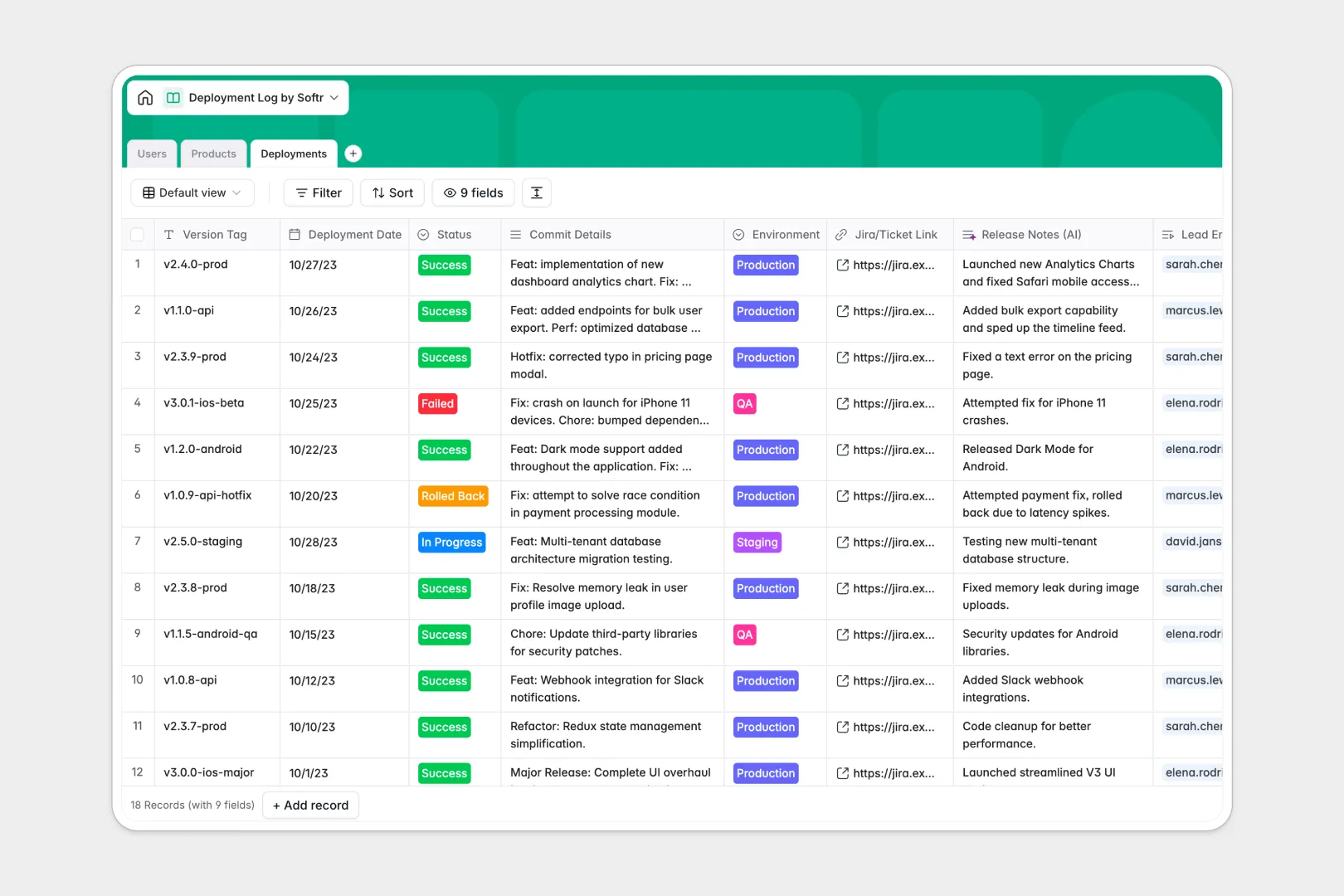
Your Deployment Log database at a glance
This template gives your engineering team a central hub to track code pushes, monitor environments, and catalog version histories. You instantly see which products received updates, who led the deployment, and whether the push succeeded.
By natively connecting your Products, Users, and Deployments tables, every commit is tied directly to the responsible DevOps engineer. You eliminate scattered records and keep all environment statuses perfectly aligned.
Because this template includes native AI fields, you can instantly summarize raw technical commit logs into clean release notes. The AI also researches repository URLs to maintain an up-to-date tech stack overview automatically.
Why logging deployments gets messy in Excel
Using Excel to track fast-moving deployments quickly breaks down when multiple engineers overwrite rows or misformat crucial dates. Without strict structure, tracking rollback histories or safely tying specific Jira tickets to production environments becomes impossible.
What a structured database changes
A structured system forces standardized choices, meaning deployment statuses and environments always remain uniform. You can seamlessly link a specific version tag directly to the lead engineer without relying on fragile VLOOKUPs.
This is exactly what Softr Databases are designed for. They replace messy spreadsheet lists with a clean, heavily structured foundation that scales safely as your team ships more code.
What you can do with this template
You can easily log every deployment date, attach repository URLs, and monitor total push counts across all active products. Everything is stored in one strictly-typed view, keeping your engineering data secure and error-free.
Instead of manually typing updates, you can leverage native Database AI agents to automatically translate dense commit data into stakeholder-ready release notes. Your non-technical team members get the insights they need without slowing down developers.
-
Users
Manage team members with roles and statuses who lead deployment cycles
-
Products
Catalog digital products and services with AI-powered tech stack analysis
-
Deployments
Log code pushes with status tracking and AI-generated release notes
Who is this Deployment Log database for
This ready-to-use template helps fast-paced engineering teams standardize their release tracking and cross-department communication.
- DevOps Engineers: Standardize deployment records and track rollback history across all staging and production environments accurately.
- Product Managers: Read automatically-generated release notes and stay informed on what shipped without pinging developers.
- Engineering Leads: Oversee output and instantly review which team member successfully led specific digital product deployments.
How to take it further
Customizing this database only takes a few clicks. You can easily modify the environment types, add new deployment statuses, or tweak the AI prompts to format release notes specifically for your organization.
To get started fast, upload your historical deployment logs via CSV in bulk. You can also use the API to automatically sync live push events directly from your continuous integration pipelines.
When your team is ready, you can transform this database into a complete internal developer portal. Building an interface on top of your structured data lets you create custom dashboards for different departments with minimal effort.
By using built-in users and permissions, you effectively control who sees what. DevOps engineers can get full editing rights to log production changes, while stakeholders only receive view access to the latest product release notes.
-
1
-
2
-
3
-
4
Frequently asked questions
-
What is a deployment log database?
-
Why use a no-code database to build a deployment tracker?
-
How can AI help managing data for deployments?
-
Can I build an app with this deployment log database?
-
Is this Deployment Log Database free?
-
Why is a deployment log database better than Excel?
Start building today. It's free!
Build and launch your first app in under 30 minutes.