


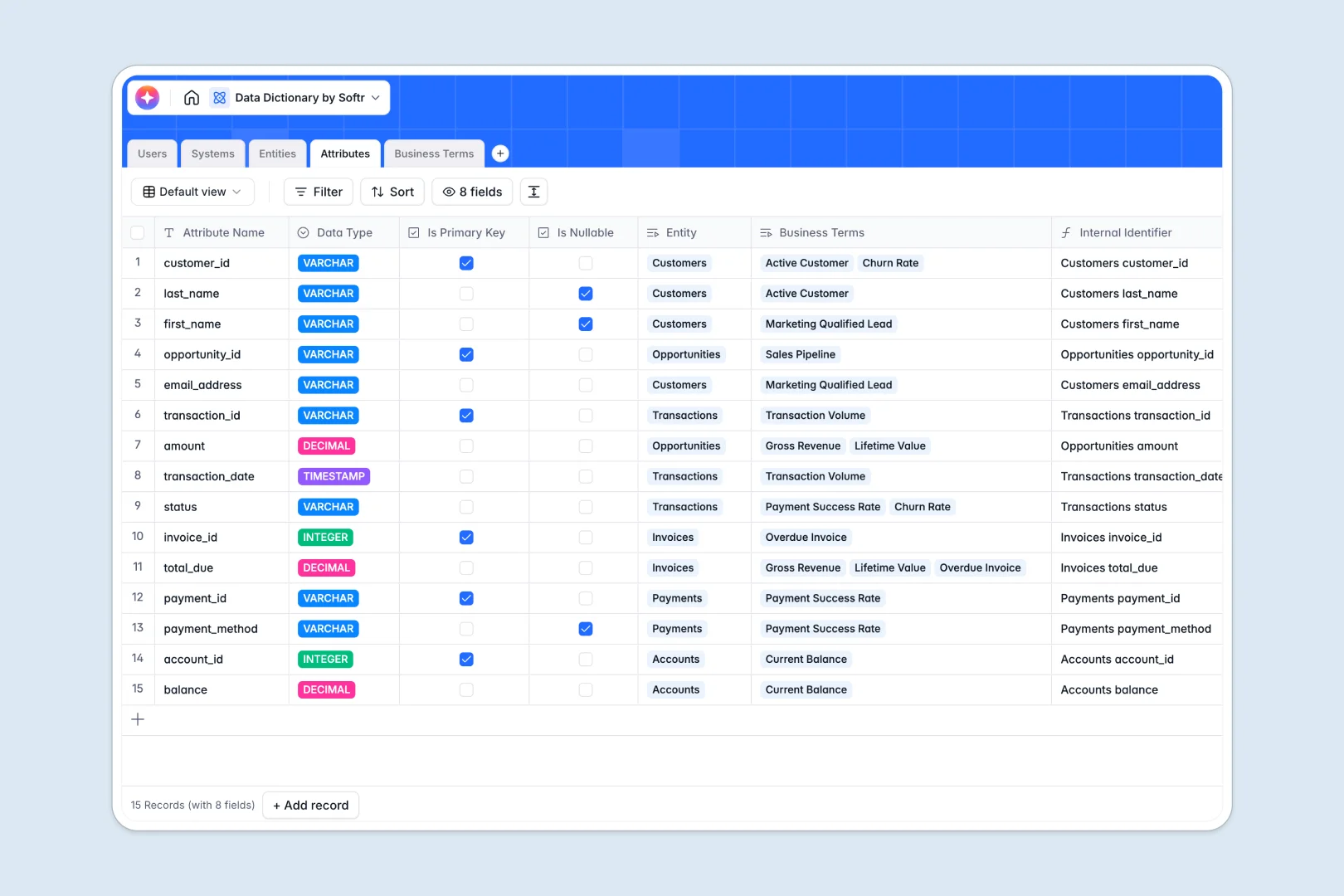
Your Data Dictionary database at a glance
This template centralizes your technical architecture and business definitions into a single, structured source of truth. It helps data stewards, engineers, and product teams document assets clearly and eliminate ambiguity across systems.
Five dedicated tables structure your catalog: Users, Systems, Entities, Attributes, and Business Terms. Real relationships connect technical fields directly to high-level business definitions and their designated owners without copy-pasting.
Built-in AI fields automatically draft entity overviews, summarize complex business definitions, and pull industry benchmark context directly into your records.
Why technical metadata breaks inside flat sheets
Data dictionaries quickly outgrow disconnected tables when schema changes, ownership shifts, and terms get linked to dozens of separate fields.
What a structured database changes
A flat sheet cannot maintain multi-tiered technical relationships. When an attribute belongs to a table, that table belongs to a system, and both map to a shared glossary term, manual lookups break immediately.
In a structured database, every column has an enforced type and records link natively. If a data steward updates a business term definition, every connected technical attribute reflects the change across your entire catalog.
This clarity is exactly what Softr Databases provide out of the box, giving your team dependable data governance.
What you can do with this template
Assign clear ownership for every system, dataset, and glossary term so team members know exactly whom to contact for questions or schema reviews.
Use native Database AI agents to generate documentation guidelines for technical fields and pull live web definitions for standard industry terms automatically.
Group and filter attributes by data type, nullable status, or update frequency in seconds to audit your infrastructure with zero friction.
-
Users
Manage data stewards and admins with contact info and ownership mapping
-
Systems
Catalog core data sources, warehouse platforms, and owner assignments
-
Entities
Track datasets and tables with update schedules and AI-generated summaries
-
Attributes
Define data schema columns with primary keys and AI usage documentation
-
Business Terms
Maintain a business glossary with AI web benchmarks and quick summaries
Who is this Data Dictionary database for
- Data Stewards: Maintain governance, approve official definitions, and track data ownership across all business units.
- Analytics Engineers: Document warehouse schemas, define primary keys, and map ETL dependencies without maintaining static wikis.
- Product Managers: Understand available system attributes and business logic when planning new feature integrations.
- Compliance Officers: Audit sensitive fields, data storage types, and update frequencies to ensure regulatory compliance.
How to take it further
Tailor the database to your exact infrastructure in minutes. Add custom select options for your cloud providers, create tags for regulatory scopes like GDPR, or add custom formulas for table naming conventions.
Bring in your existing schema metadata instantly. Use bulk CSV imports to upload database column exports or connect external data pipelines via API to keep your catalog synchronized.
Turn this database into a complete internal data portal. With Softr, you can easily build an app by describing your desired interface to the AI Co-Builder, creating searchable documentation portals for your entire engineering and business team.
Set granular users and permissions so viewers can search terms and attributes freely, while only data stewards and admins can approve definitions or edit system architecture.
-
1
-
2
-
3
-
4
Frequently asked questions
-
What is a data dictionary database?
-
Why use a no-code database to build a data dictionary system?
-
How can AI help managing data for a data dictionary?
-
Can I build an app with this data dictionary database?
-
Is this Data Dictionary template free?
-
How do I import existing schema data into this template?
Start building today. It's free!
Build and launch your first app in under 30 minutes.