


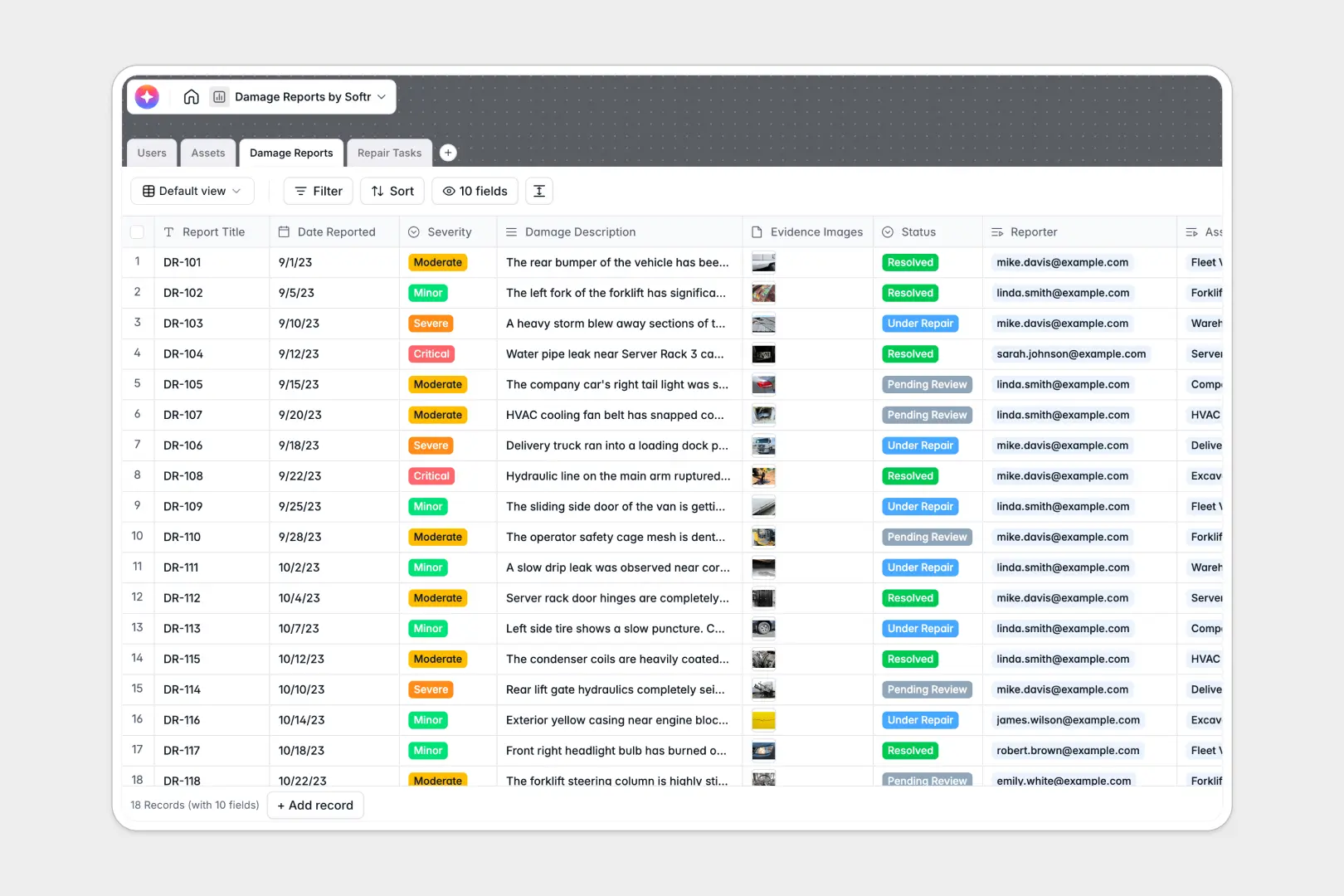
Your Damage Reports database at a glance
This template replaces fragile spreadsheets with a structurally sound incident management system. It seamlessly connects new damage logs directly to equipment records and repair personnel.
Reporters log damage instantly alongside photos and severity levels inside the `Damage Reports` table. These records automatically link to distinct `Assets` and trigger actionable `Repair Tasks` for assigned technicians.
Built-in AI automatically drafts formal executive summaries for newly logged incidents. It also practically suggests step-by-step repair methodologies right inside your tables to accelerate task completion.
Why tracking damage reports in Excel gets messy
Managing broken equipment or facility damage in spreadsheets quickly becomes chaotic. When incident images are mixed with broken formulas and misaligned columns, tracking the repair lifecycle feels impossible.
What a structured database changes
In a proper database, column types stay strictly structured and reliable. Critical evidence images remain securely attached directly to the specific incident records, while dates never break format.
Instead of trusting fragile VLOOKUPs, independent database tables connect cleanly. You can tie a specific vehicle from your `Assets` straight to a newly created `Repair Task` effortlessly.
This is exactly what Softr Databases are specifically designed for. As your logged damage incidents scale up, your critical operational data remains perfectly clean and natively formatted.
What you can do with this template
Log detailed damage incidents with categorized severity levels, clearly attached photos, and pinpoint reporter details. You can watch the total incident counts immediately roll up dynamically per asset.
Generate actionable repair work orders while tracking statuses, assigned technician availability, and actual repair costs.
Leverage intelligent Database AI agents to automatically evaluate severe damage descriptions. You can instantly produce executive summaries and actionable repair methodology plans for your technicians without lifting a finger.
-
Users
Manage system roles including damage inspectors and repair technicians
-
Assets
Catalog company properties and equipment with location and valuation data
-
Damage Reports
Log incidents and generate AI executive summaries for rapid assessment
-
Repair Tasks
Manage work orders and utilize AI for step-by-step repair methodology
Who is this Damage Reports database for
This connected system instantly adapts to any operational team struggling with messy incident logging.
- Facility Managers: Track building maintenance accurately without losing severe damage details inside sprawling spreadsheets.
- Fleet Operators: Consolidate vehicle damage logs, assign repairs consistently, and monitor the total lifetime incidents per vehicle.
- Maintenance Operations: Assign structured, actionable tasks to your technicians while maintaining strict visibility on overall repair costs.
- IT Departments: Monitor broken machinery or vital IT equipment logs and schedule systemic repair methodologies effectively.
How to take it further
Customize this database immediately to fit your unique operational workflows. You can swiftly modify the dropdown options for damage severity, task statuses, or distinct asset types.
Bring your existing asset catalog over efficiently. Use simple CSV data uploads to instantly populate your fleet or building lists and completely abandon your legacy spreadsheets.
When you are ready to share this system securely across your workforce, you can build an app directly on top of this structured foundation. It requires no code and natively integrates your existing tables.
By leveraging users and permissions, you securely ensure technicians only ever see or modify their specially assigned work orders. A clean, deliberately structured database makes launching these operational portals truly effortless.
-
1
-
2
-
3
-
4
Frequently asked questions
-
What is a damage reports database?
-
Why use a no-code database over Excel to track damages?
-
How can AI help managing data for damage reports?
-
Can I build an app with this damage reports database?
-
Is this damage reports template free?
-
Why does Excel struggle with asset tracking and ongoing repairs?
Start building today. It's free!
Build and launch your first app in under 30 minutes.