


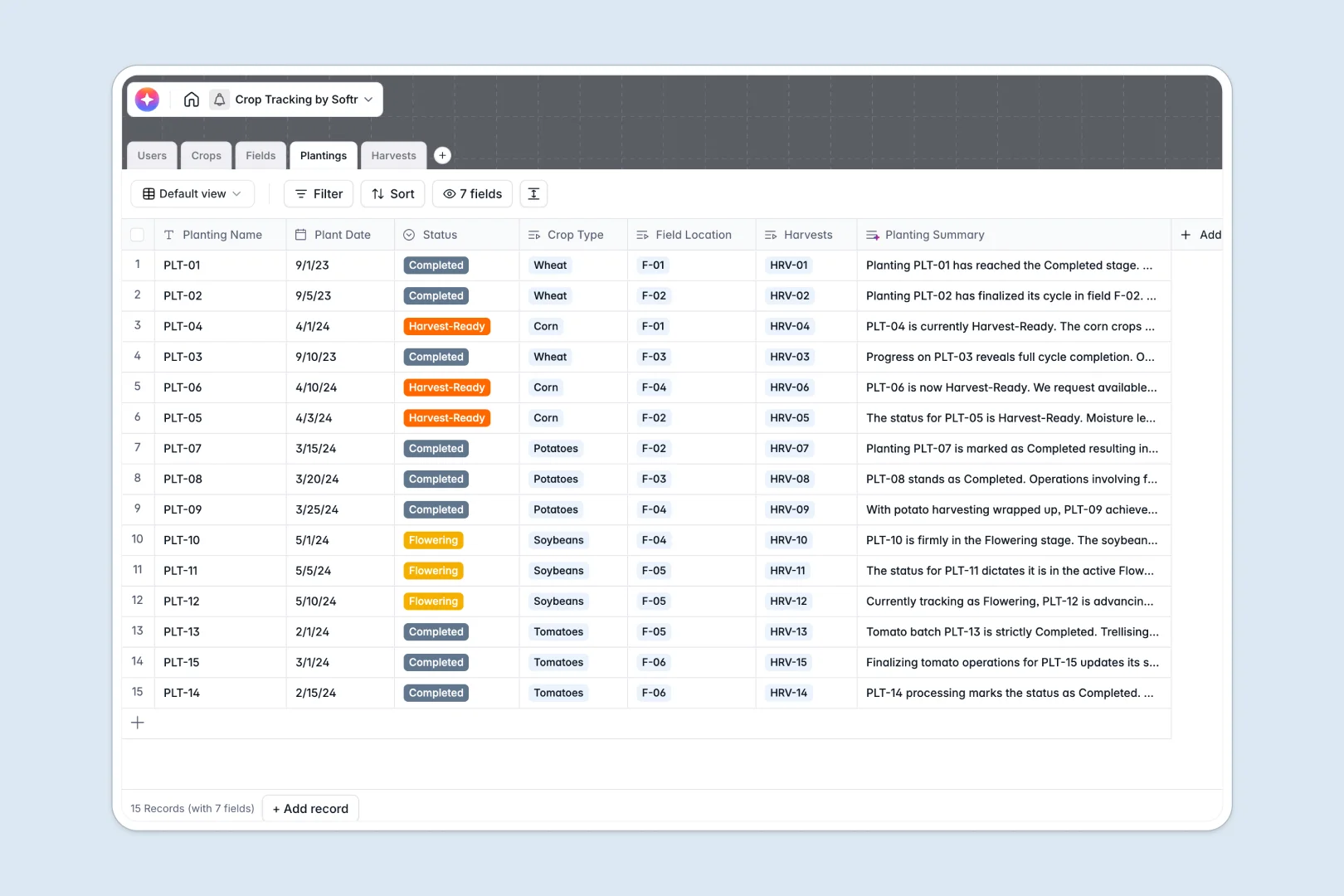
Your Crop Tracking Database at a glance
This template provides a clear, structured system to track every stage of your agricultural cycle. It perfectly captures seed-to-harvest data, ensuring you never lose sight of yields, field assignments, or crop varieties.
Behind the scenes, it links five distinct tables together: Users, Crops, Fields, Plantings, and Harvests. When a farmhand logs a harvest, it automatically connects to the exact planting batch and physical field without any raw data entry errors.
This template also features native AI capabilities. It can automatically pull cultivation best practices from the web for new crops, summarize planting cycles, and instantly extract yield quality notes from manual logs.
Why farm management gets messy in Excel
Excel works fine for a few isolated plots, but it quickly breaks down as seasons overlap and operations expand. Tracking varied yields across dozens of fields often leads to accidental row deletions, broken formulas, and missing historical data.
What a structured database changes
In a structured system, every column has a strict rule. Dates stay as dates, numeric yields stay numbers, and crop types are tightly controlled, meaning your data stays clean over time.
Instead of relying on fragile VLOOKUPs, tables connect directly to one another natively. You can effortlessly link a harvest log strictly to its specific field and planting batch without duplicating rows or copy-pasting.
This exact reliability is what Softr Databases are built to deliver. They provide a scalable, error-free foundation as your agricultural operations grow season over season.
What you can do with this template
Instantly log harvests against specific planting batches, tracking exact yield quantities and quality metrics. You can also utilize Database AI agents to automatically research crop best practices and summarize field conditions in real time.
Monitor field assignments cleanly so every agronomist and farmer knows exactly which plots they are responsible for. It is fully structured and ready to use from day one.
-
Users
Directory of farm staff and experts with field and harvest logs
-
Crops
Catalog of crop varieties with AI-generated cultivation guides
-
Fields
Physical zones for agricultural use with soil data and ownership
-
Plantings
Active crop batches with AI-powered progress and status overviews
-
Harvests
Log of crop yields featuring AI-powered quality and yield analysis
Who is this Crop Tracking database for
This system is designed specifically for agricultural teams needing high visibility over their operations.
- Farm Managers: Track overall yields, assign staff to specific fields, and oversee harvesting seasons smoothly.
- Agronomists: Monitor crop health, analyze soil types, and automate cultivation best practices seamlessly.
- Field Staff: Easily log harvest dates, record yield quantities, and submit quality notes directly from the farm.
How to take it further
Customize the database
It is incredibly simple to modify this database to fit your local environment. You can easily add new drop-down options for soil types or adjust the crop family taxonomy to match your specific farm's reality in seconds.
Import your existing data
You can effortlessly upload your historical Excel records via CSV directly into the tables. This allows your team to continue tracking this season's plantings right away without having to start over.
Build a full app around it
When you are ready to share this data with seasonal workers, you can quickly build an app straight on top of this structure. It provides a secure way to distribute information across your team without risking data integrity.
Using users and permissions, you can ensure farmhands only see the fields they are assigned to, keeping administrative data secure. Starting with a perfectly structured database makes building a robust farm management portal entirely effortless.
-
1
-
2
-
3
-
4
Frequently asked questions
-
What is a crop tracking database?
-
Why use a no-code database to build a farm management tool?
-
How can AI help managing data for crop tracking?
-
Can I build an app with this crop tracking database?
-
Is this crop tracking template free?
-
How is a crop tracking database different from Excel?
Start building today. It's free!
Build and launch your first app in under 30 minutes.