


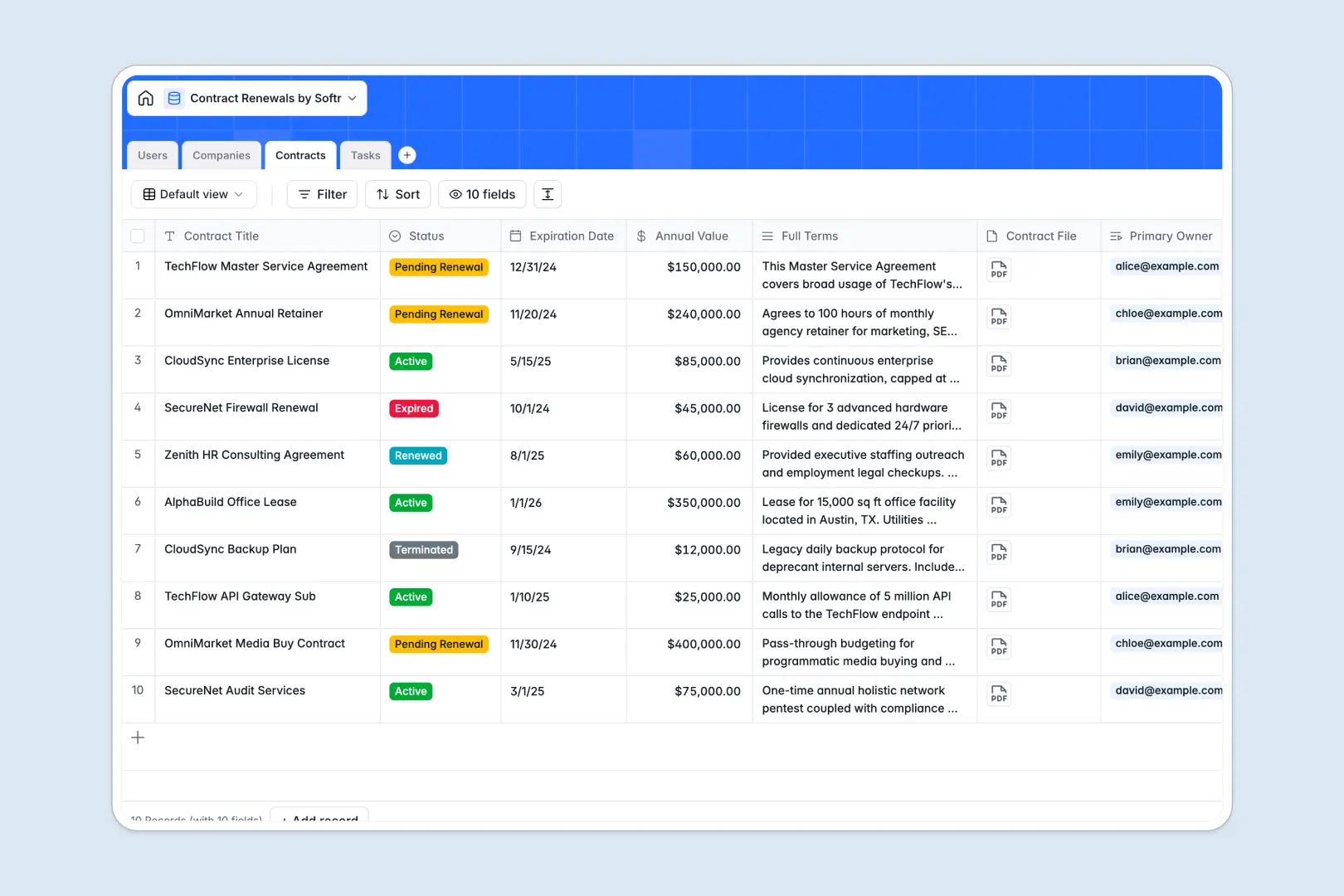
Your Contract Renewals Database at a glance
This ready-to-use template helps you monitor active agreements, track upcoming expirations, and assign renewal tasks in one centralized system. It keeps your team aligned on deadlines without manual follow-ups.
The database connects your clients (Companies), their active agreements (Contracts), and action items (Tasks) together natively. When you assign a primary owner to a contract, all related tasks and deadlines automatically link directly to their profile.
Built-in AI fields do the heavy lifting by pulling company profiles right from vendor websites. They also instantly summarize complex, multi-page contract terms into three clear, actionable bullet points.
Why tracking contract renewals in Excel breaks down
Managing expirations in spreadsheets usually leads to scattered files, missed dates, and broken formulas as your vendor list grows.
What a structured database changes
In a true database, data types are strictly enforced. Your expiration dates remain searchable dates, and attached contract files live directly alongside the terms—no more pasting local folder paths into spreadsheet cells.
Instead of relying on fragile VLOOKUPs to match vendors with agreements, tables connect securely. You can instantly see every active contract rolling up under a single company profile without duplicating rows.
This is exactly what Softr Databases are designed for. They provide the relational structure you need to scale without rows getting accidentally deleted or overwritten.
What you can do with this template
Instantly see which agreements are pending renewal, track the annual value at stake, and assign specific follow-up tasks to your team members.
You can also leverage Database AI agents to automatically suggest immediate next steps for blocked tasks. Let the system summarize lengthy legal terms the moment a new contract is logged, saving hours of manual review.
-
Users
Manage internal team members with roles, contact info, and task assignments
-
Companies
Organize client data using AI to research and summarize company profiles
-
Contracts
Store agreement records with AI-generated summaries of key terms and dates
-
Tasks
Track renewal actions using AI to suggest next steps based on status
Who is this Contract Renewals database for
This template provides immediate structure for any team managing ongoing vendor relationships, client subscriptions, or partner agreements.
- Operations Managers: Track annual values, consolidate vendor documents, and standardize team tasks before deadlines hit.
- Sales Teams: Monitor client subscription statuses, easily view summarized terms, and orchestrate smooth account handoffs.
- Procurement Leads: Keep supplier profiles updated automatically and track the total volume of active contracts per vendor.
- Legal Departments: Centralize all active and expired files securely while ensuring action items are assigned strictly to the right stakeholders.
How to take it further
Customizing this database is incredibly intuitive as your processes evolve. You can easily add new fields, modify the status dropdowns to match your specific workflow, or tweak the AI prompts to extract different contract clauses.
Getting started takes just minutes to provide immediate value. You can bulk upload your existing agreements and vendor details via CSV, instantly populating your new structured system.
When you are ready to scale, you can easily build an app on top of this foundation. Create a custom dashboard where team members only see the contracts they are specifically responsible for managing.
By leveraging users and permissions, you can ensure external vendors or junior staff only access the data they are permitted to see. Starting with a cleanly structured database makes assembling these powerful interfaces completely frictionless.
-
1
-
2
-
3
-
4
Frequently asked questions
-
What is a contract renewals database?
-
Why use a no-code database to build a contract management tool?
-
How can AI help managing data for contract renewals?
-
Can I build an app with this contract renewals database?
-
Is this Contract Renewals Database free?
-
How is a contract renewals database different from Excel?
Start building today. It's free!
Build and launch your first app in under 30 minutes.