


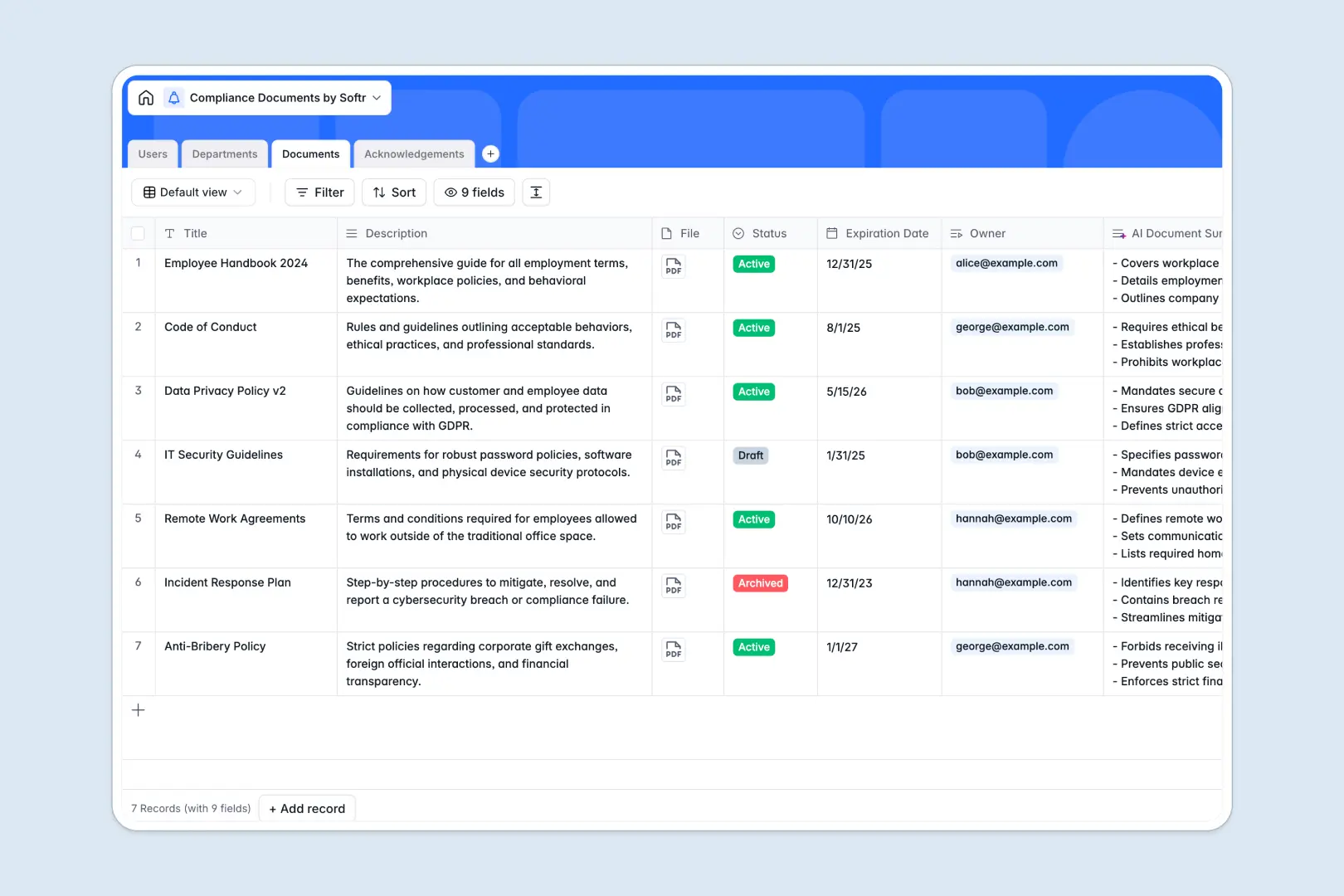
Your Compliance Documents Database at a glance
This template centralizes your company policies, guidelines, and terms so you can track precisely who has read and consented to them. It keeps your organization audit-ready without manual follow-ups.
The database connects specific departments securely to their required documents. When an employee signs a policy, the Acknowledgements table instantly updates their status from pending to signed.
An integrated AI agent automatically reads your long document descriptions and generates a concise, three-bullet summary, helping employees understand requirements instantly.
Why managing compliance out of Excel breaks down
Tracking company policies and employee signatures in a spreadsheet quickly becomes a liability. Rows get accidentally deleted, tracking expirations is a manual nightmare, and attaching actual policy files directly in cells creates a bloated, unreadable mess.
What a structured database changes
A proper database gives every piece of information a strict format. Expiration dates stay dates, file attachments are securely stored, and document statuses are standardized.
Instead of running fragile VLOOKUPs to see if an employee signed a policy, tables link to each other natively. You can connect a specific user to their necessary departmental documents seamlessly.
This level of secure, structured connection is exactly what Softr Databases are designed for. It keeps your compliance records clean and scalable as your team grows.
What you can do with this template
You can assign specific policies to entire departments at once and track real-time acknowledgment statuses for every employee.
You can also use Database AI agents to automatically summarize complex legal or compliance jargon into digestible bullet points as soon as a new document is added. Everything is ready to use immediately.
-
Users
Manage employee and compliance officer profiles with roles and departments
-
Departments
Organize business units to manage group-wide compliance requirements and staff
-
Documents
Archive policies and utilize AI to generate concise summaries of key guidelines
-
Acknowledgements
Track legal signatures and consent status for regulatory document compliance
Who is this Compliance Documents database for
This database is built for teams that need to maintain strict oversight of internal policies and employee training without relying on messy spreadsheets.
- HR Managers: Track onboarding document signatures and ensure new hires read core company policies.
- Compliance Officers: Maintain a central, audit-ready repository of every active, drafted, and archived regulation.
- Department Heads: Assign specific safety guidelines or operational terms directly to their team members.
How to take it further
You can customize this database in seconds to match your exact procedures. Add new document status types, modify user roles, or adjust the AI prompt to extract different information from your policy guidelines.
If you already have a list of employees or a backlog of policies, easily bulk upload your existing records via CSV. Your data will instantly populate the linked tables so you see immediate value.
When you are ready to distribute these documents, you can use Softr's interface builder to create a secure employee portal.
By configuring users and permissions, you can ensure employees only see the documents assigned to their specific department, while managers get a full dashboard of pending signatures. A well-structured backend makes building these secure apps completely frictionless.
-
1
-
2
-
3
-
4
Frequently asked questions
-
What is a compliance documents database?
-
Why use a no-code database to build a compliance tracking system?
-
How can AI help managing data for compliance documents?
-
Can I build an app with this compliance documents database?
-
Is this Compliance Documents template free?
-
Why is this template better than managing compliance in Excel?
Start building today. It's free!
Build and launch your first app in under 30 minutes.