


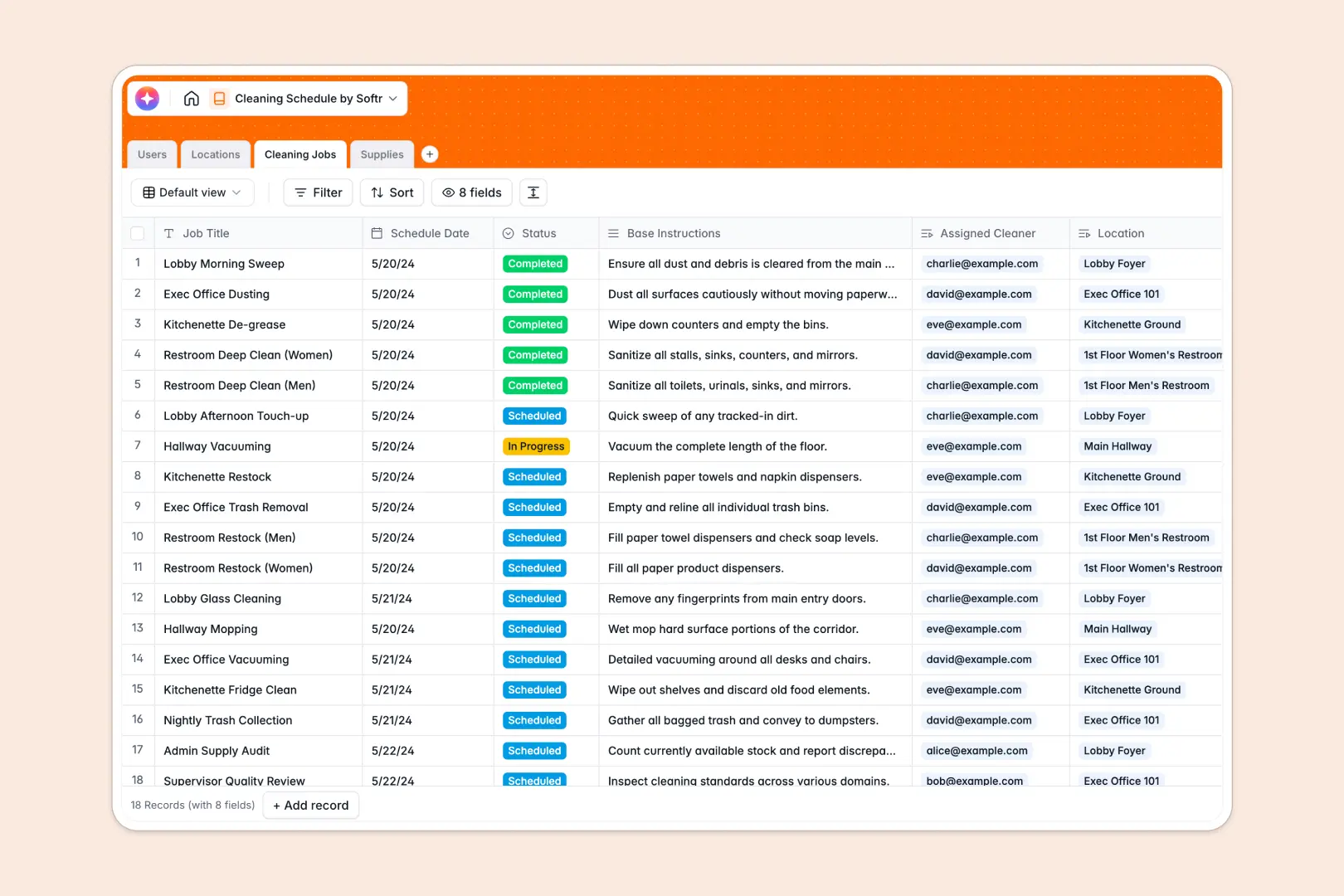
Your Cleaning Schedule database at a glance
Manage staff workloads, zone assignments, and daily tasks reliably with a structured system. This foundation helps facility operational managers track status changes in real time.
Connect Users directly to specific Locations and scheduled Cleaning Jobs automatically. Instead of searching through endless tracking tabs, you get a clean view of everything, including live Supplies stock levels.
Built-in AI automatically breaks down base job instructions into clear, step-by-step checklists for your cleaners. It also actively monitors your supply counts and drafts restock emails immediately when inventory runs low.
Why cleaning schedules get messy in Excel
Tracking daily cleaning tasks across multiple floors, rooms, and staff members quickly turns a simple Excel sheet into a chaotic mess. Formulas break when rows are shifted, and keeping everyone synced on a static file is nearly impossible.
What a structured database changes
Say goodbye to mixed data types and accidental row deletions. In a structured system, columns enforce strict rules, ensuring status updates like "Completed" or "In Progress" stay perfectly consistent.
You can seamlessly link a cleaner to a location and a supply closet instantly, eliminating the need for fragile VLOOKUPs or manual duplicate entries.
This is exactly what Softr Databases are designed for—giving you scale and organization without the spreadsheet chaos.
What you can do with this template
Track the exact status of scheduled tasks categorized by specific zones, such as the Ground Floor or Office Space. Assign jobs to precise dates and staff members effortlessly.
Monitor your cleaning tools natively and let smart Database AI agents automatically write restock emails to your distributor the moment stock levels drop to "Low Stock."
Instantly generate detailed, bulleted workflows for your team from a simple task title, ensuring standards are always met.
-
Users
Manage cleaning staff, supervisors, and admins with roles and contact details
-
Locations
Organize physical zones and rooms requiring maintenance with area classification
-
Cleaning Jobs
Schedule tasks with AI-generated checklists for optimized cleaning workflows
-
Supplies
Track inventory and use AI to automate restock communication for low stock
Who is this Cleaning Schedule database for
A reliable schedule foundation designed for teams who manage physical spaces and operational staff daily.
- Facility Managers: Keep cross-floor assignments organized and monitor supply levels in real time.
- Cleaning Supervisors: Assign daily tasks with auto-generated checklists and track completion effortlessly.
- Administrative Teams: Maintain vendor details and instantly generate restocking emails for chemical inventories.
How to take it further
Customize the database
Quickly update the preset room types to match your exact floor layouts. Modify job status options directly in the choice field to perfectly align with your team's workflow.
Import your existing data
Bring in your current staff directory, location lists, and base chemical inventory instantly via a CSV upload. Start organizing your shifts without missing a beat.
Build a full app around it
When your team is ready, you can use the drag-and-drop interface builder to turn this foundation into a mobile-friendly app. Cleaners can check off tasks on the go without accessing the backend.
By leveraging custom users and permissions, you can ensure cleaners only see their assigned rooms. Meanwhile, supervisors retain a high-level view of all ongoing work and supply levels.
-
1
-
2
-
3
-
4
Frequently asked questions
-
What is a cleaning schedule database?
-
Why use a no-code database to build a cleaning management system?
-
How can AI help managing data for cleaning schedules?
-
Can I build an app with this cleaning schedule database?
-
Is this Cleaning Schedule free?
-
Why are spreadsheets inadequate for tracking daily cleaning jobs?
Start building today. It's free!
Build and launch your first app in under 30 minutes.