


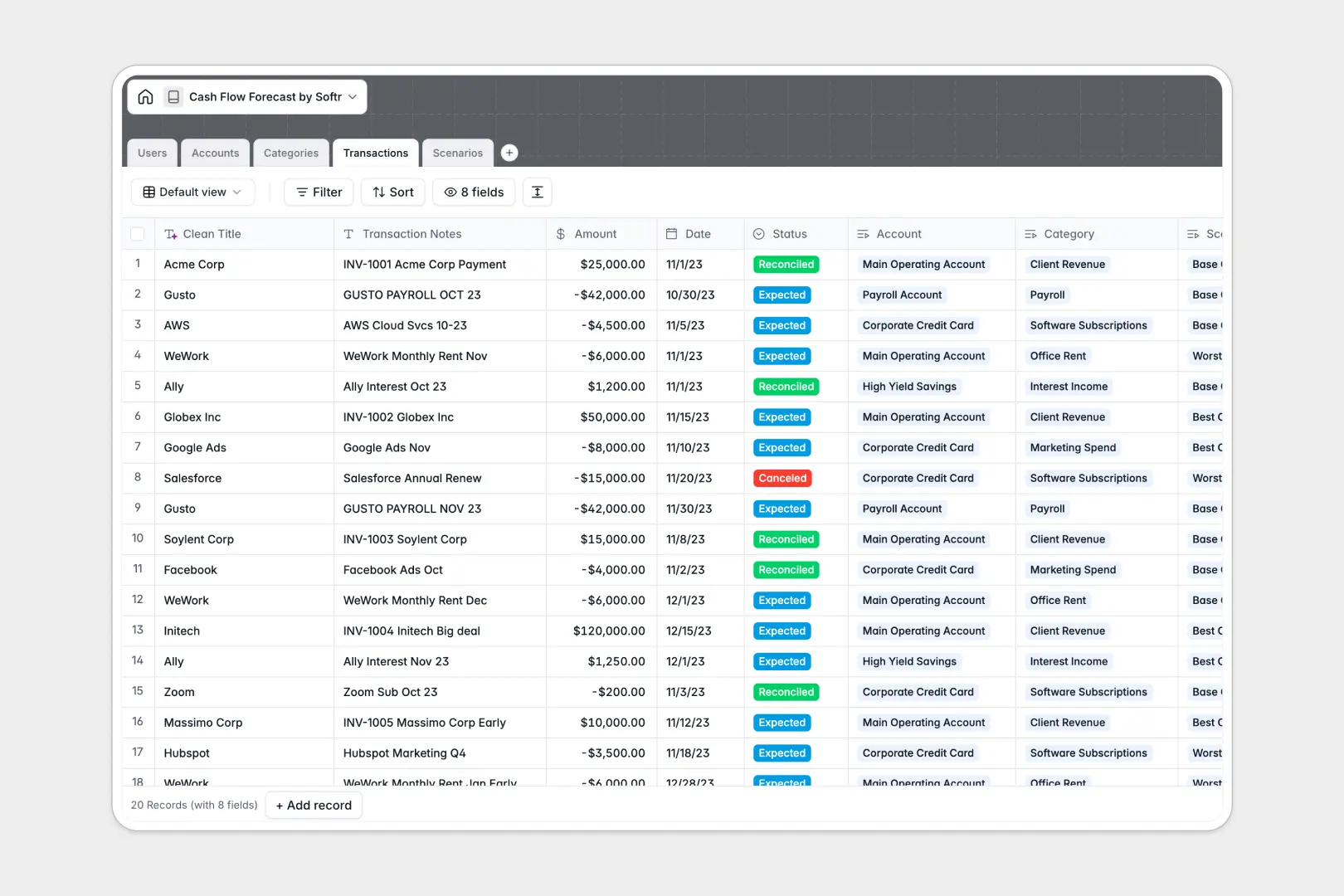
Your Cash Flow Forecast Database at a glance
This template gives you a clear, centralized view of your expected cash inflows and outflows. It helps you monitor real-time balances and predict structural runway without wrestling with disconnected spreadsheets.
Information is cleanly separated into linked tables for Accounts, Categories, Transactions, and Scenarios. When you log a new expected transaction, it automatically links to the correct account and forecast scenario to keep your numbers perfectly accurate.
Built-in AI automatically extracts clean vendor names from messy bank notes and generates executive summaries for different financial models. This eliminates manual data entry and provides instant context for decision-making.
Why forecasting cash flow gets messy in Excel
Tracking cash flow in a spreadsheet usually starts simple but quickly turns chaotic. As transaction volume grows, formulas break, data gets pasted over incorrectly, and maintaining different financial scenarios becomes a nightmare.
What a structured database changes
In a database, every column enforces a specific data type, meaning dates stay as dates and currency stays strictly as currency. You can link expected transactions directly to specific accounts and scenarios without relying on fragile VLOOKUPs.
This native structure prevents human error and keeps data perfectly pristine as your business scales. This is exactly what Softr Databases are designed for.
Instead of duplicating rows to model a "worst-case" scenario, you simply link transactions to the correct scenario record. This keeps all your underlying financial data unified and intact.
What you can do with this template
You can instantly categorize cash inflows and outflows while tracking real-time balances across multiple bank accounts. Everything updates dynamically based on the expected transactions you log against different scenarios.
Using native AI features, the template automatically cleans up messy transaction strings so you always know exactly which vendor was paid. It also writes instant executive summaries comparing your best, worst, and baseline financial outcomes.
-
Users
System users handling financial data, forecasting, and account management
-
Accounts
Manage bank accounts and credit lines to track balances and cash flow
-
Categories
Classify income and expenses with AI-generated accounting definitions
-
Transactions
Log cash movements and use AI to extract clean vendor names from notes
-
Scenarios
Compare forecast models and generate AI-powered executive summaries
Who is this Cash Flow Forecast database for
This system is designed for teams that need reliable financial visibility without technical complexity.
- Founders and CEOs: View executive summaries and reliable runway predictions instantly.
- Finance Managers: Track expected vs. actual balances across different bank accounts securely.
- Operations Teams: Log expected invoices and vendor payments into the correct categorical buckets.
- Department Heads: Model distinct financial scenarios to plan alternative budget constraints safely.
How to take it further
Customizing this database is as simple as renaming a column or adding a new field. You can securely adjust user roles or add new status tags like "Pending Approval" to your transactions without breaking any formulas.
You don't have to start from scratch to see value from this system. Use the built-in CSV import to upload your past bank statements, or connect your existing financial tools via API to sync real-time balances immediately.
When your team is ready, you can transform this database into a secure financial application. Spreadsheets are notoriously hard to share efficiently, but a database allows you to implement robust users and permissions to control exactly who sees what data.
By connecting your data to an intuitive interface, you can give department heads a clean dashboard to submit expected expenses while hiding the company's master account balances. A well-structured database is the perfect foundation for these powerful internal workflows.
-
1
-
2
-
3
-
4
Frequently asked questions
-
What is a cash flow forecast database?
-
Why use a no-code database to build a cash flow forecast system?
-
How can AI help managing data for cash flow forecasting?
-
Can I build an app with this cash flow forecast database?
-
Is this Cash Flow Forecast Database free?
-
How is a cash flow forecast database different from Excel?
Start building today. It's free!
Build and launch your first app in under 30 minutes.