


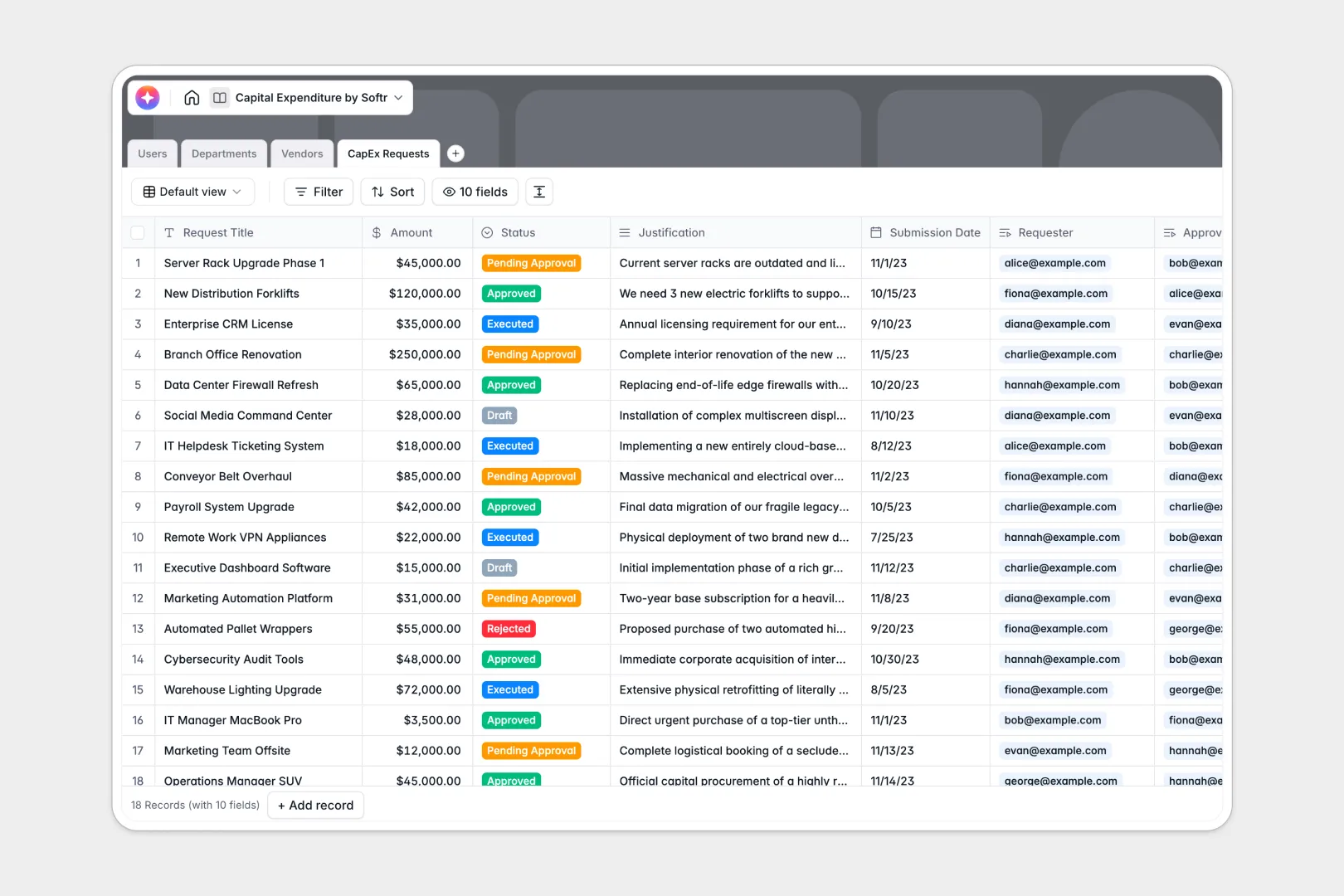
Your Capital Expenditure Database at a glance
This template lets you centralize Capex proposals, track submissions, and monitor department budget spent versus budget remaining. It ensures all software, hardware, or property requests are evaluated with full transparency.
The template connects four pre-defined tables: CapEx Requests, Departments, Vendors, and Users. Dynamic fields link requesters to finance approvers, guaranteeing that every purchase automatically deducts from its respective budget allocation.
Built-in AI fields instantly generate an Executive Summary from long request justifications and fetch live vendor details to create profiles on the fly.
Why capital expenditure tracking gets messy in Excel
Managing capital proposals in shared Excel spreadsheets quickly turns into a nightmare of overwritten cells, broken formulas, and missing transaction history. When team leads manually enter numbers, you lose visibility over actual budget limits and suffer approval delays.
What a structured database changes
Excel relies on fragile, scale-limiting lookup formulas to link requests to department budgets, which break easily when rows are sorted or edited. A structured database enforces strict column rules, ensuring currency calculations, dates, and related lookups stay perfectly organized.
Instead of manual typing, you link requests directly to departments and vendors without duplicate records. This scale-ready architecture is why Softr Databases make managing capital workflows infinitely safer than traditional workbooks.
What you can do with this template
You can automate budget tracking by calculating spent and remaining funds instantly when an approver marks a request as Approved. There is no manual math required to protect your department cost centers.
Use integrated AI agents to automate data entry and speed up reviews. The system can parse complex business justifications into succinct text bullets or run real-time web searches to gather company details for new vendor profiles.
-
Users
Manage system users, contact info, and their specific departmental roles
-
Departments
Track organizational cost centers, team structures, and budget allocations
-
Vendors
Store supplier profiles with AI-generated business overviews and spending logs
-
CapEx Requests
Log expenditure proposals featuring AI-powered summaries and approval workflows
Who is this Capital Expenditure database for
This template is designed for teams that need to organize investments without administrative delays.
- Finance Directors: Easily monitor budget allocations, track total committed spend across multiple vendors, and prevent cost overruns.
- Department Managers: Submit justified CapEx requests, check remaining department budgets instantly, and track approval status in real time.
- Operations Teams: Automatically index approved vendor lists, associate purchase requests, and maintain audit-ready investment histories.
How to take it further
Customize the database
Make the schema your own by modifying status options, adding custom departments, or adapting role definitions with the native editor inside Softr. You can easily drag and drop new fields like invoice attachments or deprecation periods without writing code.
Import your existing data
Bring over your historical spreadsheet records instantly using the built-in CSV upload tool. You can also run a direct API sync to connect external payment software and update transaction balances automatically.
Build a full app around it
Once your database structure is ready, you can scale it into a complete secure portal. Use our drag-and-drop tools to turn raw data into an intuitive capital request portal for your team.
By configuring advanced users and permissions, requesters will only see their own submissions while department managers and finance directors can view approval queues. This separation keeps sensitive budget details safe while letting workers submit claims autonomously.
-
1
-
2
-
3
-
4
Frequently asked questions
-
What is a capital expenditure database?
-
Why use a no-code database to build a capital expenditure system?
-
How can AI help managing data for capital expenditure requests?
-
Can I build an app with my capital expenditure database?
-
Is this Capital Expenditure database free?
-
How is a capital expenditure database different from a capital expenditure Excel sheet?
Start building today. It's free!
Build and launch your first app in under 30 minutes.