


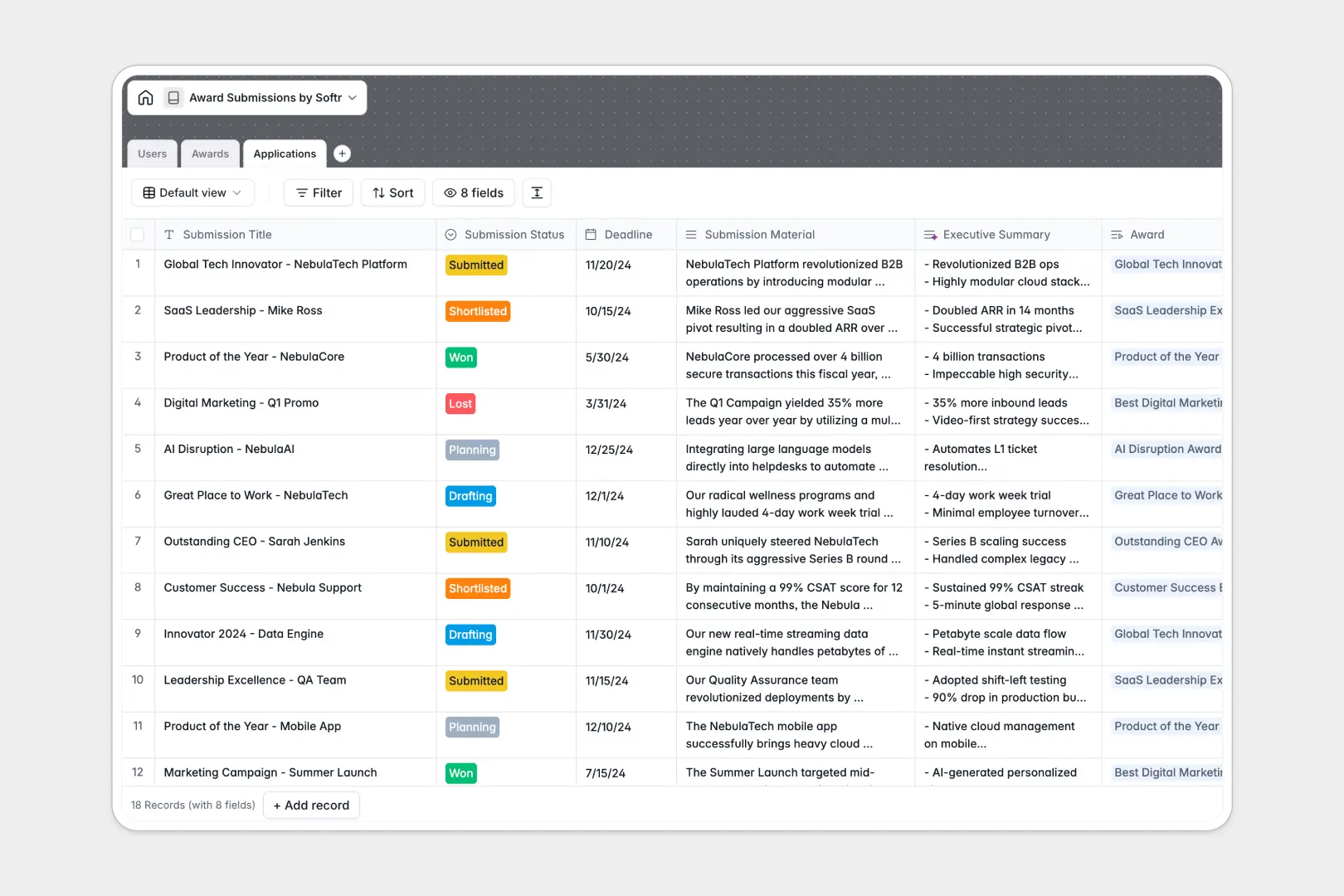
Your Award Submissions database at a glance
This template gets your team's award applications out of chaotic spreadsheets and into a structured system. Track every detail from the initial planning stages to final announcements without losing context.
It natively links your applicants, award directories, and submission drafts across connected tables. You can monitor deadlines and statuses effortlessly while keeping all supporting documents firmly attached to the right records.
Built-in AI automatically researches award criteria from the web and formats the data for you. It also generates rapid, three-bullet executive summaries of long submission materials for fast managerial review.
Why award submissions get messy in Excel
Managing lengthy submission texts, multiple file attachments, and shifting deadlines across endless Excel rows almost always leads to costly mistakes.
What a structured database changes
In a database, attachments stay securely linked to records and long-form text doesn't break your grid view. Every column enforces a strict data type, so dates stay formatted as dates and select values remain standardized.
You can seamlessly connect team members to specific industry recognitions without relying on fragile VLOOKUPs. This foundation is exactly what Softr Databases are specifically engineered to provide.
What you can do with this template
Build a clean, searchable directory of industry awards and easily link multiple distinct applications to a single organizational body. Track individual team member progress as their drafts move from the planning stage to won or lost.
Managers can leverage automated AI summaries to quickly review drafts without reading pages of text. Your award pipeline becomes immediately visual and highly actionable.
-
Users
Manage team members preparing submissions with roles and contact details
-
Awards
List industry awards using AI to summarize criteria and organizer info
-
Applications
Track submission status and deadlines with AI-generated exec summaries
Who is this Award Submissions database for
This template is designed for teams managing multiple industry recognitions and complex submission pipelines at once.
- Marketing Teams: Centralize upcoming industry awards and map out which product features to submit.
- PR Managers: Keep a clear directory of organizing bodies while monitoring crucial submission deadlines.
- Executive Leaders: Review automatically generated summaries of applications before giving final sign-off.
How to take it further
Customize the exact data points you want to track by directly modifying select field values like statuses or categories. Because you are working in a native database, renaming columns or adding new relational links requires zero technical setup.
Bring in your historical award wins and past submissions via a simple CSV import. Moving your existing records into this system instantly creates a powerful, searchable archive.
When your team outgrows a standalone database, you can easily wrap a custom app directly around this data. You could build a dedicated portal where external partners or internal writers can submit drafts visually.
By configuring users and permissions, you can ensure applicants only see their own drafts while administrators view the global pipeline. A well-structured database makes launching these robust internal tools incredibly fast.
-
1
-
2
-
3
-
4
Frequently asked questions
-
What is an award submissions database?
-
Why use a no-code database to build an award submission tool?
-
How can AI help managing data for award submissions?
-
Can I build an app with an award submissions database?
-
Is this award submissions template free?
-
How is an award submissions database different from Excel?
Start building today. It's free!
Build and launch your first app in under 30 minutes.