


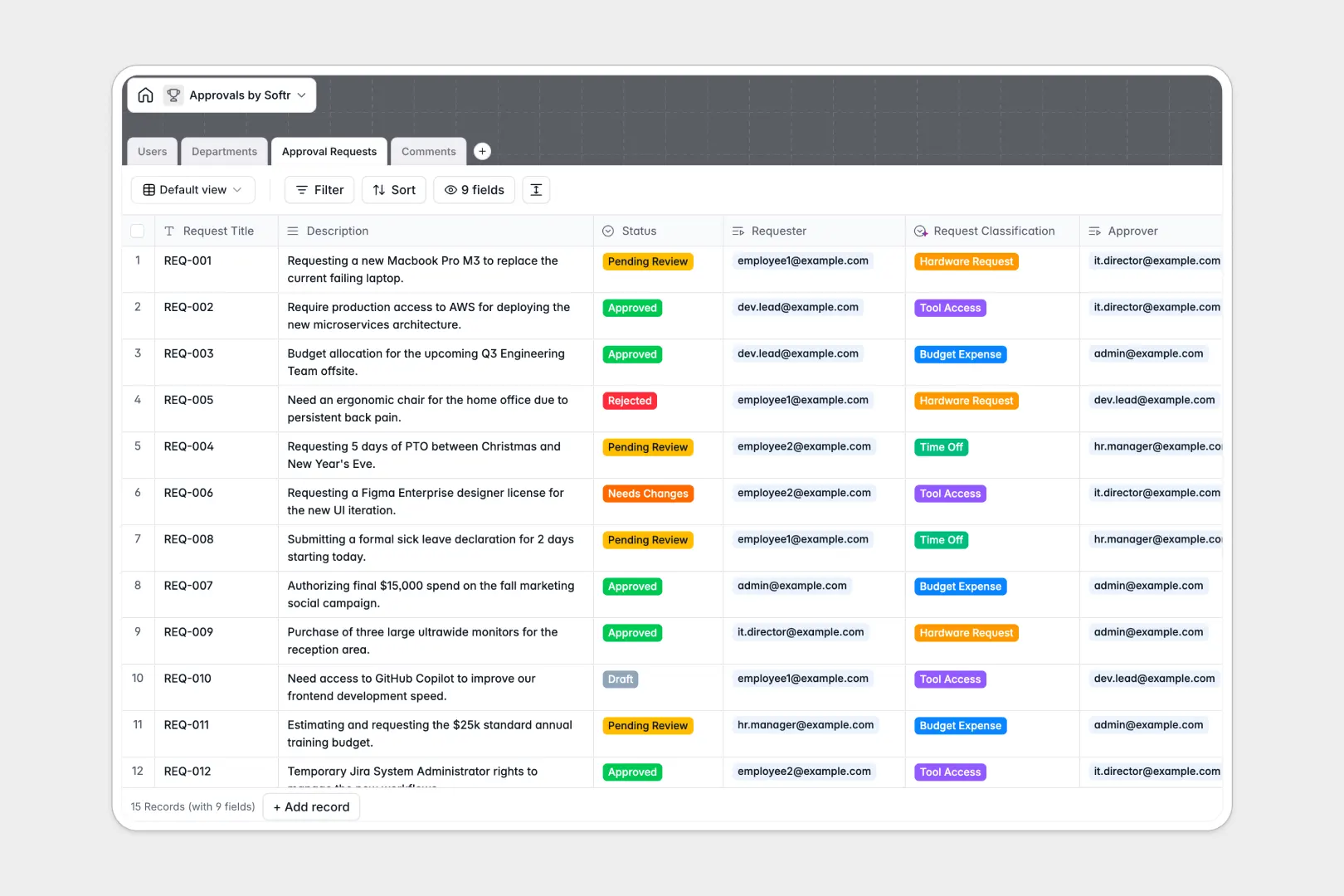
Your Approvals Database at a glance
This template centralizes every request, discussion, and decision in one reliable system. Teams can easily submit requests and track their status in real time without hunting through endless email threads.
Everything is connected natively so your operations run smoothly. Approval Requests link directly to Departments and specific Users, while a dedicated Comments table tracks all feedback tied to each exact submission.
Built-in AI features automatically classify incoming requests—such as flagging a Budget Expense or Tool Access—saving hours of manual sorting. The AI also evaluates the sentiment of every reviewer comment instantly.
Why tracking approvals gets messy in Excel
Managing approvals in spreadsheets quickly creates chaos as your team scales. Rows get accidentally overwritten, files can't be attached to cells, and threaded conversations get lost without a clear timeline.
What a structured database changes
In a proper database, strict structure is enforced automatically so data stays clean. Status labels are locked to specific options, dates remain dates, and related records connect directly without fragile formulas.
This ensures that linking an employee to an expense request never breaks, even as your list grows. This is exactly what Softr Databases are designed for.
What you can do with this template
You can instantly route new requests to the right department heads and track real-time resolution statuses. The built-in request counter shows exactly how many items each department is actively managing.
Reviewers can also leave detailed feedback securely logged against specific approvals. This keeps the entire audit trail clean, searchable, and completely accessible in one place.
-
Users
Manage user profiles, organizational roles, and their approval history
-
Departments
Organize approval workflows and metrics categorized by business units
-
Approval Requests
Track requests using AI to classify types based on item descriptions
-
Comments
Log communications and use AI to monitor sentiment within discussions
Who is this Approvals Database for
This template provides a reliable foundation for any business operator needing to process requests efficiently:
- HR Teams: Process time-off requests and manage employee benefits seamlessly.
- IT Leads: Track hardware deliveries and authorize software access for new hires.
- Finance Managers: Review budget expenses securely with clear, unalterable audit trails.
- Operations Teams: Keep complex cross-department workflows moving without manual followup.
How to take it further
Customize the database
You can easily rename status labels or modify the custom request classifications to match your exact internal terminology. Simply tweak the dropdown options to fit the unique way your distinct departments work.
Import your existing data
Quickly bring in historical approval logs by uploading a CSV file. You can instantly map past requests, comments, and specific team members into your newly structured tables.
Build a full app around it
When your team is ready, building an internal app around this database is effortless. Employees get a clean interface to submit their items, while managers get dedicated dashboards tailored for approving requests.
By connecting users and permissions, you guarantee that team members only see their personal requests while leadership oversees whole departments. A well-organized database is the perfect starting point for fully connected internal tools.
-
1
-
2
-
3
-
4
Frequently asked questions
-
What is an approvals database?
-
Why use a no-code database to build an approval workflow?
-
How can AI help managing data for approvals?
-
Can I build an app with an approvals database?
-
Is this Approvals Database free?
-
How is an approvals database different from Excel?
Start building today. It's free!
Build and launch your first app in under 30 minutes.